Thursday, March 12, 2015
An Example of a Self Organizing Team
But before you judge that person, let me tell you a story. In this true story youll have the opportunity to judge me for having the same thoughts before trying a different approach. This is the story of my self organizing daughter.
My kids go to a great school - the kind of school that fosters engaged teachers who go the extra mile to create engaged students. Throughout the school year the teachers run numerous clubs before school, at lunch, or after school including run club, football club, circus club (complete with unicycles!), reading club, wrestling club, girls club, gymnastics club, etc. My kids love attending these clubs and my oldest (aged 10 during this story) was determined to be in every one of those clubs.
This is great, except there were a few problems. Many of the clubs started before the school day so she had to be ready and out the door pretty early. Since most of the clubs had a strict attendance policy (if you miss two days, you are out of the club), being on time was important. Further, because of our cold winter weather, she received a ride on many of the mornings with one of her friends. If she was late getting out the door, her friend also risked being late and missing out on the clubs.
So, being the responsible parents that we are, we nagged her out the door each the morning. "Time to get out of bed", "Have you brushed your teeth yet?" "Go comb your hair", "Its time to make your lunch now!" "Hurray up, youre going to be late!" It made for some pretty frustrating mornings for all of us. We treated her exactly as the statement above: "some people are just lazy and need to be told exactly what to do and when." She would do the task we asked her to do and then wait to be told what to do next. Looking at it now, she was disengaged and dis-empowered. I cringe at the memory.
While this was happening, I was reading the 7 Habits of Highly Effective People by the late Dr. Stephen R. Covey. I had my "Oh crap" moment when he said this:
"You cannot hold people responsible for results if you supervise their methods. You then become responsible for results and rules replace human judgement, creativity, responsibility... Effective leaders set up the conditions of empowerment and then... get out of people’s way, clear their path and become a source of help as requested.“
After talking it over with my wife, we approached our daughter and apologized. We then discussed a new plan with her. Since she clearly was capable of getting out the door on time on her own, she would take over that responsibility. We would make ourselves available to be a source of help if requested but otherwise stay out of it. She jumped at the chance to take ownership of her morning routine. On the first day of this new arrangement she was ready fifteen minutes early and there hasnt been a day since then that she wasnt ready on time. Not so lazy after all I guess - just the victim of well intentioned managers.
After getting over my embarrassment, I pondered how this is a great parallel to self organized teams:
1. Status is known daily. We had daily status of her progress - if she was late she would miss her ride or be kicked out of a club. Our agile teams have daily standups, visual boards, frequent deliveries and demos so that everyone understands that status of the project at all times.
2. Agreed upon goals. She understood the goal (get out the door on time so that she can keep going to clubs) and desired to reach it. Self organized teams need to understand the goals of the project, not just the tasks to complete the project.
3. Freedom over methods. She started out being assigned tasks and moved to taking ownership of her own methods. Self organizing teams are given freedom to achieve the project goals and pull their own tasks rather than being assigned tasks.
4. Ask for help. She wasnt abandoned if she ran into trouble (oh no! I cant find the shirt that matches these pants!) - we stepped into help when asked. An effective scrum master, agile project manager, IT director, etc helps the team in a similar manner.
5. Empowerment brings results. This change turned a painful morning routine into a simple one because she was given the trust and responsibility to achieve the goal. When a team is given the trust and empowerment to accomplish the goal using their own methods, great things occur.
(Note :You can ready a similar story about Dr. Covey and his son entitled "Green and Clean")

Announcing Version 1 8 of the NET library for Google Data APIs
- Google Apps Audit API
- Google Content API for Shopping
- Google Calendar Resource API
In order to improve security and stability, SSL is now turned on by default for all APIs that support it and, since the previous major release (1.7.0.1), more than 30 issues have been Fixed.
For all details, please check the Release Notes:
Want to weigh in on this topic? Discuss on Buzz
Monday, March 9, 2015
Deprecating SWF exports of presentations in the Google Documents List API
We are announcing the deprecation of SWF export functionality for presentations from the Google Documents List API. We are taking this action due to the limited demand for this feature, and in order to focus engineering efforts on other aspects of the API.
Clients currently making the following request to the API are affected by this change.
https://docs.google.com/feeds/download/presentations/Export?docID=1234&exportFormat=swf
We recommend clients currently using SWF exports switch to PDF exports, using the appropriate exportFormat value.
https://docs.google.com/feeds/download/presentations/Export?docID=1234&exportFormat=pdf
We are disabling SWF exports in the coming weeks. Clients attempting to export presentations as SWF after the exports are disabled will receive an HTTP 400 response.
For more information on exporting presentations, see the Google Documents List API documentation. If you have any questions, feel free to reach out in the forums.
 | Vic Fryzel profile | twitter | blog Vic is a Google engineer and open source software developer in the United States. His interests are generally in the artificial intelligence domain, specifically regarding neural networks and machine learning. Hes an amateur robotics and embedded systems engineer, and also maintains a significant interest in the security of software systems and engineering processes behind large software projects. |
Introducing a New Version of the Email Migration API
This API is now part of our Admin SDK, which is useful for managing applications for Google Apps users through the Google APIs Console. Additionally, the Email Migration API v2 now includes support for:
- Delegated administrators
- OAuth 2.0
- Media uploads
engineering/backend-support can be migrated with the label engineering-backend-support to retain the previous organization structure. For more information about the API, visit the the Getting Started guide or explore the API Reference.
 | Greg Knoke Google+ Greg Knoke is a technical writer in the Google Drive Developer Relations Team. Prior to joining Google, he worked as a scientist developing image and signal processing algorithms. His current interests include new technologies, content management, information architecture, cooking, music, and photography. |
Monday, March 2, 2015
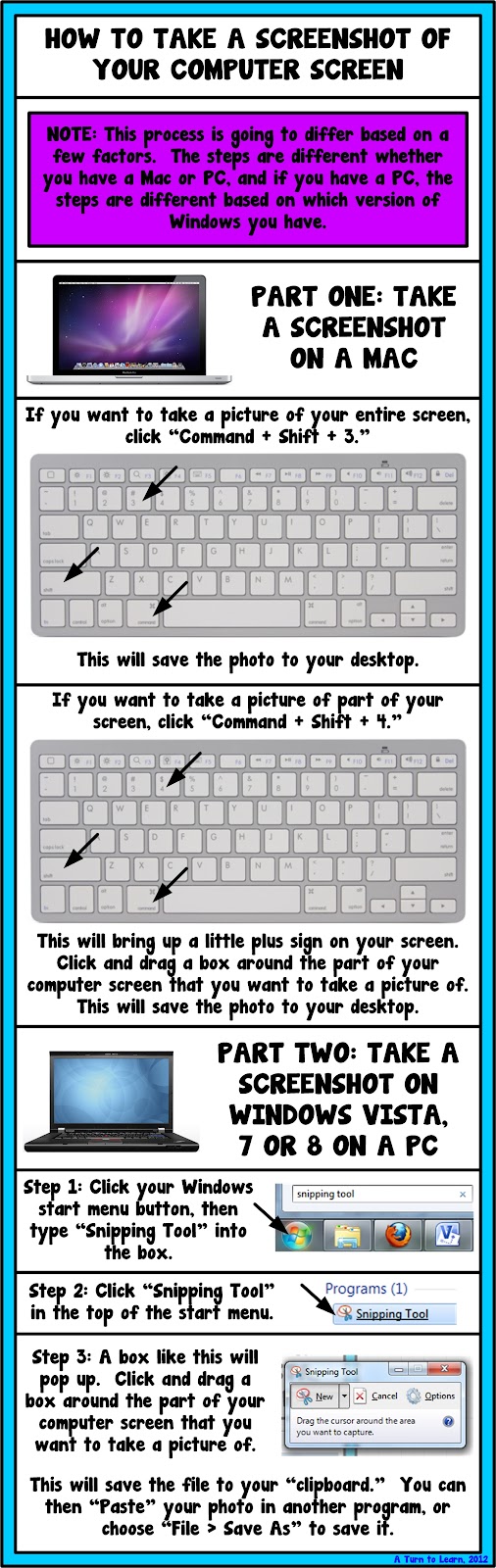
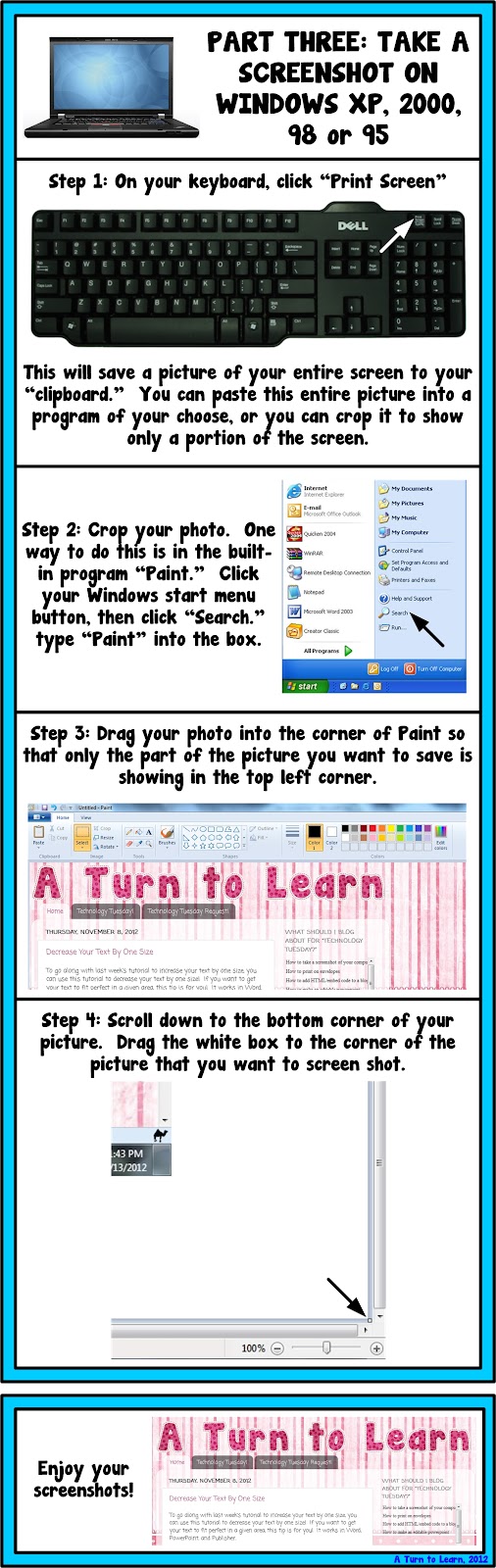
How to Take a Screenshot of Your Computer Screen!


As for next weeks poll, Im going to add a how to embed videos in smart notebook. I havent done any Smart Notebook tutorials yet and I would really love to... so Im curious to see how this one fairs in the poll!
Addition Subtraction Key Word Posters June Problem of the Day


On another note, how is it June already? I know Im a bit late on this one... but here is the Problem of the Day for June/July! If you want to read about the routine, head on over here. Otherwise, the routine and everything you need to start it is included in the free TPT item! Click either picture to download!


Thanks for stopping by! I hope you enjoy the new items! Im linking up with Manic Monday again... be sure to head there for other great free items!

Saturday, February 28, 2015
The Quality and Extent of Online Education in the United States
Link to site & full report (PDF, 27 pages, 695K)
"The online enrollment projections have been realized, and there is no evidence that enrollments have reached a plateau. Online enrollments continue to grow at rates faster than for the overall student body, and schools expect the rate of growth to further increase:
- Over 1.9 million students were studying online in the fall of 2003.
- Schools expect the number of online students to grow to over 2.6 million by the fall of 2004.
- Schools expect online enrollment growth to accelerate ? the expected average growth rate for online students for 2004 is 24.8%, up from 19.8% in 2003.
Are students as satisfied with online courses as they are with face-to-face instruction?
- 40.7% of schools offering online courses agree that students are at least as satisfied? with their online courses, 56.2% are neutral and only 3.1% disagree.
- Medium and large schools strongly agree (with less than 3% disagreeing).
- The smallest schools (under 1,500 enrollments) are the least positive, but even they have only 5.4% disagreeing compared to 32.9% agreeing.
- Doctoral/Research, Masters, and Associates schools are very positive, Specialized and Baccalaureate schools only slightly less so."
Read the summary (at least) or the full report . This report is excellent (27 pages), and gives us insight to the e-learning or online education state and progress in U.S. higher education.
Maps of War History of Religion in 90 animated seconds
- Link to Maps-of-War
- Link to History-of-Religion
 MAPS-OF-WAR?
Maps-of-War is a multimedia site dedicated to producing diverse, creative visuals that enhance our understanding of war and its history.
HISTORY-OF-RELIGION?
How has the geography of religion evolved over the centuries, and where has it sparked wars? This animated map gives you a brief history of the worlds most well-known religions: Christianity, Islam, Hinduism, Buddhism, and Judaism. Selected periods of inter-religious bloodshed are also highlighted. Here is 5,000 years of religion in 90 animated seconds:
 OTHER MAPS?
- Leadership-and-War
Which Presidents have led the United States into its deadliest wars? - Imperial-History
Who has controlled the Middle East over the course of history? - Iraqi-Pressure-Vault
From a geographic standpoint, Iraq is caught between a rock and a hard place... - Signs-of-Occupation
Before / after satellite photos of Saddams palace in Baghdad, Iraq... - Shiite-vs-Sunni
The pieces of the puzzle are slowly aligning themselves as Iraqs sectarian divide widens... - CIA-Secret-Prisons
Anatomy of a secret prison... - Recapture - of - Fallujah
In November of 2004, American forces launched Operation Phantom Fury to recapture Fallujah...
In addition, I would not be surprised if more animated maps will be added in the near future.
DOWNLOAD?
Every Maps-of-War animation is available for download so that you can play it on your own computer, even without an internet connection. Maps are provided in Flash SWF Format (.swf).
These Maps-of-War animations are also excellent tools to engage (or motivate) students into thinking and kick-start discussions in your face-to-face or online sessions (as long as they are related in one way or the other to the subject or topic you are teaching/facilitating). Finally, these visual maps should also facilitate great discussions on whether they are really accurate or not :)
Friday, February 27, 2015
The Myths of Open Source By Malcom Wheatly
Click here to view full article
- MYTH 1: THE ATTRACTION IS THE PRICE TAG
- MYTH 2: THE SAVINGS ARENT REAL
- MYTH 3: THERES NO SUPPORT
- MYTH 4: ITS A LEGAL MINEFIELD
- MYTH 5: OPEN SOURCE ISNT FOR MISSION-CRITICAL APPLICATIONS
- MYTH 6: OPEN SOURCE ISNT READY FOR THE DESKTOP
" (Conclusion)...Is open source right for every organization? In the end, argues Andy Mulholland, chief technology officer for Cap Gemini Ernst & Young, its a question of attitude. "The arguments for and against open-source software often get very trivialized," he says. "Its not a technology issue; its a business issue to do with externalization." Companies with an external focus, he says, which are used to working collaboratively with other organizations, and perhaps are already using collaborative technologies, stand to gain much more from open source than companies with an internal focus, which see the technology in terms of cost savings... "
Wednesday, February 25, 2015
Change the Capitalization of Your Text with Ease!

World Digital Library Free of Charge!
- Link to World Digital Library
- Video - Experience the Vision (WDL)
 WHAT?
WHAT?
The World Digital Library (WDL) will make available on the Internet, free of charge and in multilingual format, significant primary materials from cultures around the world, including manuscripts, maps, rare books, musical scores, recordings, films, prints, photographs, architectural drawings, and other significant cultural materials.
VISION?
Experience the technologies that will put visitors in touch with cultural heritage collections from around the world (Click the video link and you will be inspired!)
OBJECTIVES?
- Promote international and inter-cultural understanding and awareness;
- Provide resources to educators;
- Expand non-English and non-Western content on the Internet; and
- Contribute to scholarly research.
Librarian of Congress James H. Billington proposed the establishment of a World Digital Library (WDL) in a speech to the U.S. National Commission for UNESCO in June 2005. The Library of Congress is currently engaged in a planning process to determine how this vision can be realized. Participants in the planning process include national libraries and other libraries and cultural institutions from around the world that have expressed interest in joining the project, as well as UNESCO and IFLA. The planning process is being underwritten by a gift from Google, Inc.
- UNESCO
- Bibliotheca Alexandrina
- International Federation of Library Associations and Institutions (IFLA)
- The Library of Congress
- National Library of Brazil
- National Library and Archives of Egypt
- National Library of Russia
- Russian State Library
Since they are inviting other libraries, archives, museums, etc. around the world to participate, I suppose we will be seeing many more juicy partners joining in the near future.
Although, we only have the visionary video to enjoy for now, I certainly hope and believe this will be a successful project. Having Google onboard the team certainly increases the possibility of success, though it would also be great to see MSN and Yahoo getting involved. Yes, it would be great to see these three Search Giants (or Three Musketeers) working together on such a massive and noble project :)
Wednesday, February 18, 2015
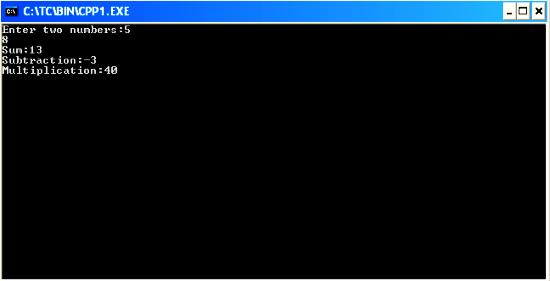
C Program to do Addition subtraction and multiplication of two numbers using function
#include<iostream.h>
#include<conio.h>
int res;
void main()
{
clrscr();
int sum(int,int);
int sub(int,int);
int mul(int,int);
int a,b,m,su,s;
cout<<"Enter two numbers:";
cin>>a>>b;
s=sum(a,b);
su=sub(a,b);
m=mul(a,b);
cout<<"Sum:"<<s<<"
Subtraction:"<<su<<"
Multiplication:"<<m;
getch();
}
sum(int a,int b)
{
res=a+b;
return(res);
}
sub(int a,int b)
{
res=a-b;
return(res);
}
mul(int a,int b)
{
res=a*b;
return(res);
}
Terrain Correction of SAR Images Part 3
Here is how to do it:
First you create the processing chain with the graph builder as described in part 2 and save it as an XML file. Especially in the beginning, you may want to keep it to simpler processing chains not containing all tasks at once. In our case, lets take only the SARSIM Terrain Correction:
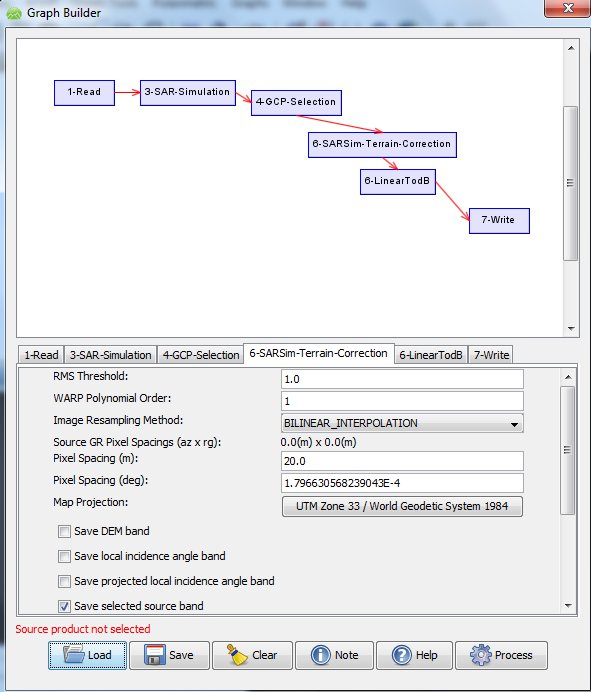
You set the values in Graph Builder and save it, lets say as "SARSIM_TC.xml". You still should check and edit the XML file for the parameters you need (map projection, resolution, etc) and you will have to modify the saved XML file at twoplaces for batch command line use as follows:
Make sure that the filenames in the XML file have $file and $target as placeholders as in the following examples:
<node id="1-Read">and the Write part (sourceProduct refid may vary in your case):
<operator>Read</operator>
<sources/>
<parameters class="com.bc.ceres.binding.dom.Xpp3DomElement">
<file>$file</file>
</parameters>
</node>
<node id="2-Write">Now you create a SARSIM_TC.bat file containing
<operator>Write</operator>
<sources>
<sourceProduct refid="6-SARSim-Terrain-Correction"/>
</sources>
<parameters class="com.bc.ceres.binding.dom.Xpp3DomElement">
<formatName>BEAM-DIMAP</formatName>
<file>$target</file>
</parameters>
</node>
for /r C:Usersmaxlocation_of_files %%X in (*.dim) do (gpt C:Usersmaxlocation_of_XMLfile SARSIM_TC.xml -Pfile="%%X" -Tfile=" C:Usersmaxlocation_of_files\%%~nX_SarSimTC.dim")
What happens here?
- The for-command goes through the directory containing your files to find files named "*.dim" and passes the file name to "%%X".
- For each of these input files "-Pfile="%%X", the NEST command "gpt" applies the Graph Builder production chain saved in "SARSIMTC_dB.xml"
- The output is saved in the parameter -Tfile, which here is written "%%~nX_SarSimTC.dim", taking the filename and between original name and filetype adding "_SarSimTC" to indicate this is having been processed with SarSim. You may choose different naming, but I find this convenient.
Tuesday, February 17, 2015
Java program to find sum of harmonic series 1 1 2 1 3 1 4 1 5 1 n
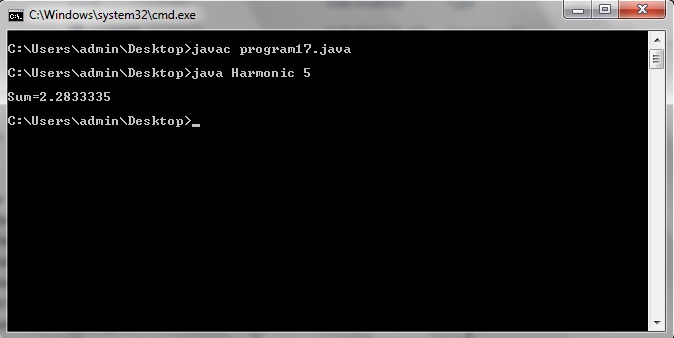
class Harmonic
{
public static void main(String...s)
{
int n,i;
float sum=0;
n=Integer.parseInt(s[0]);
for(i=1;i<=n;i++)
{
sum=sum+(float)1/i;
}
System.out.println("
Sum="+sum);
}
}
Basic concepts of OOP
Also Read: How to write and run c/c++ programs in Ubuntu
1. Data Abstraction
2. Encapsulation
3. Modularity
4. Inheritance
5. Polymorphism
Also Read: Complete guide to run any program from this blog
Advantages of OOP
- It models real world well.
- With OOP, programs are easy to understand.
- OOP offers classes reusability. Already created classes can be reused without having to write them again.
- OOP facilitates Quick Development as parallel development of classes is possible.
- With OOP, programs are easier to test manage and maintain.
Disadvantages of OOP
- With OOP, classes tend be overly generalised.
- The relations among classes become artificial at times.
- The OOP programs design is tricky.
- Also one needs to do proper planning and proper design for OOP programming.
- To program with OOP, programmer need proper skills such as design skills, programming skills, thinking in terms of objects etc.
Monday, February 16, 2015

The History of Programming Languages Infographic
Also Read: The Top 10 Greatest Programmers in the World of all Time

Source: http://blog.veracode.com/2013/04/the-history-of-programming-languages-infographic/
Sunday, February 15, 2015
Point of Sale System Project in VB Net
Also Read: Lab Login System Mini Project in VB.Net
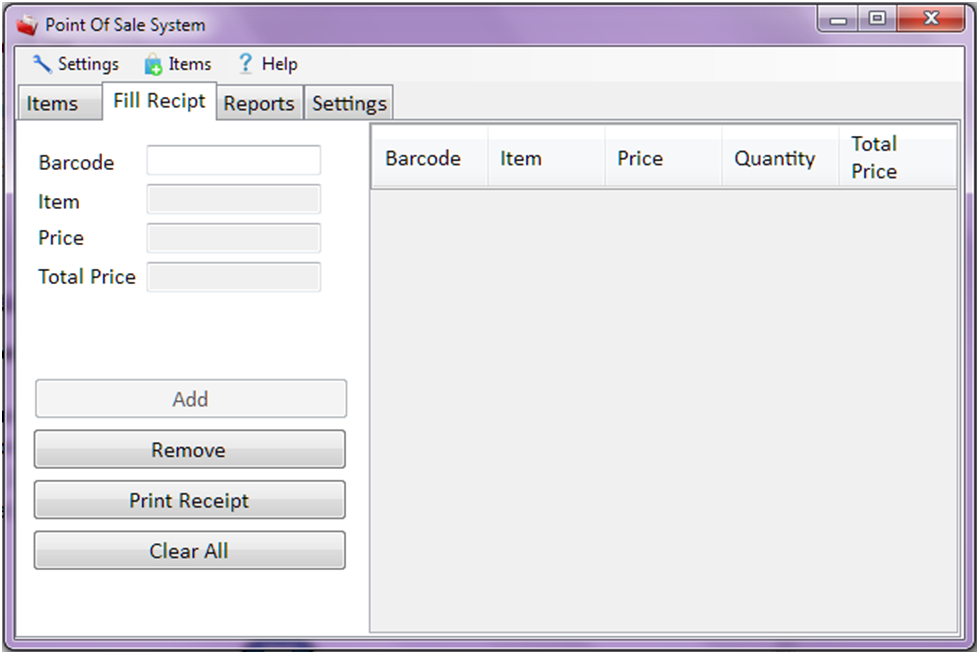
Details of Point of Sale System Project in VB.Net
Functions:
- Add an item
- Updates an item
- Removes an Item
- Add items to Receipt
- Generate Total Amount
- Print Receipts
- Generates Report
- Adjust Receipts settings (width, height)
- Adjust Printer settings
Programming Language used : VB.Net
Friday, February 13, 2015
C Program to calculate roots of quadratic equation ax 2 bx c 0
#include<iostream.h>
#include<conio.h>
#include<math.h> //to claculate square root
void main()
{
clrscr(); //to clear the screen
float root1,root2,a,b,c,d;
cout<<"Quadratic Equation is ax^2=bx+c=0";
cout<<" Enter values of a,b and c:";
cin>>a>>b>>c;
d=(b*b)-(4*a*c);
if(d>0)
{
cout<<"
Two real and distinct roots";
root1=(-b+sqrt(d))/(2*a);
root2=(-b-sqrt(d))/(2*a);
cout<<"
Roots are "<<root1<<" and "<<root2;
}
else
if(d==0)
{
cout<<"
Two real and equal roots";
root1=root2=-b/(2*a);
cout<<"
Roots are "<<root1<<" and "<<root2;
}
else
cout<<"
Roots are COMPLEX and IMAGINARY....!!!";
getch(); //to stop the screen
}
Thursday, February 12, 2015
New Features in 14 06 18 14 07 29 Quick Introduction of Bootstrap Column Properties Bootstrap Panlel in LayOut section of Pentaho CDE
Guys, who work on Pentaho C-Tools should be up to date yourself on its new releases. The latest stable version of C-Tools in this week is : 14.07.29. (blog written date : 4th Aug 2014)
I dont remember exactly, but Pedro somewhere on social networking has informed the community that the C-Tools are up-datable over the time for every 6 weeks.
This post will cover my sample work out on 14.06 & 14.07 releases especially about the column properties & built in bootstrap panel.
These new features will reduce writing Bootstrap html code in HTML section either for rows or columns & increase the development speed of project.
We get information like below for columns with bootstrap latest releases..
| Features Bootstrap 3 Grid System | Extra small devices Phones (<768px) | Small devices Tablets (≥768px) | Medium devices Desktops (≥992px) | Large devices Desktops (≥1200px) |
|---|---|---|---|---|
| Max container width | None (auto) | 750px | 970px | 1170px |
| Class prefix | .col-xs- | .col-sm- | .col-md- | .col-lg- |
| Max column width | Auto | ~62px | ~81px | ~97px |
| Gutter width | 15px on each side of a column (i.e. 30px) | |||
Bootstrap is of 12 columns based grid system ..and the above table implementation in CDE is similar to below
i.e.,
Large Devices =3
Medium Devices=6
Small Devices=9 or 12
Extra Small Devices=12

14.07 added bootstrap panel concept in its Layout section & it can be implemented as shown in below image.

Notes:
# Find Bootstrap Panel icon on the Layout Structure tool bar.
# Click on it (for a column) and itll be having 3 sections. They are Header, Body & Footer.
# Give all the properties(for instance, name, height, corners and etc).
# Similarly for the Body & Footer.
# You can remove any of the 3 sections for Bootstrap Panel.. highlight the section & click on X mark on the tool bar of Layout structure.
Sample Layout Design Download : Click Me
Deployment :
1) Your environment should be of 14.07.29 version of C-Tools or later before deploying this example.
2) Pentaho Server version : 5.x version.
3) Upload example using Uploader utility of server.
Sample output:
Extra Large Devices :


References :
1) http://www.tutorialrepublic.com/twitter-bootstrap-tutorial/bootstrap-grid-system.php
2) http://scotch.io/bar-talk/understanding-the-bootstrap-3-grid-system