Wednesday, March 11, 2015
Managing groups using the new Groups Settings API
The recently launched Groups Settings API allows Google Apps domain administrators to write client applications for managing groups in their domain. Once you have created the groups and added members using the Provisioning API, you can use the Groups Settings API to perform actions like:
- manage access to the group
- configure discussion archiving
- configure message moderation
- edit a groups description, display format and custom fields
Let’s have a look at how you can make authorized calls to the Groups Settings API from your client application.
Getting Started
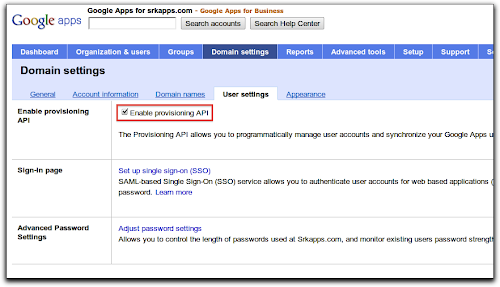
You must enable the Provisioning API to make requests to the Groups Settings API. You can do so by enabling the Provisioning API checkbox in the Domain settings tab of your Google Apps control panel.
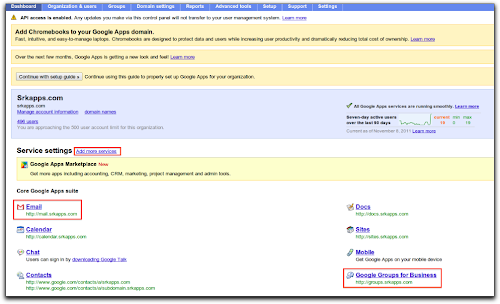
Next, ensure that the Google Groups for Business and Email services are added to your domain by going to the Dashboard. If these services are not listed, add them by going to Add more services link next to the Service settings heading.
Now you are set to write client applications. Lets discuss the steps to write an application using the Python client library. You need to install the google-api-python-client library first.
You can register a new project or use an existing one from the APIs console to obtain credentials to use in your application. The credentials (client_id, client_secret) are used to obtain OAuth tokens for authorization of the API requests.
Authorization using OAuth 2.0
The Groups Settings API supports various authorization mechanisms, including OAuth 2.0. Please see the wiki for more information on using the library’s support for OAuth 2.0 to create a httplib2.Http object. This object is used by the Groups Settings service to make authorized requests.
Make API requests with GroupSettings service
The Python client library uses the Discovery API to build the Groups Settings service from discovery. The method build is defined in the library and can be imported to build the service. The service can then access resources (‘groups’ in this case) and perform actions on them using methods defined in the discovery metadata.
The following example shows how to retrieve the properties for the group staff@example.com.
service = build(“groups”, “v1”, http=http)
group = service.groups()
g = group.get(groupUniqueId=”staff@example.com”).execute()
This method returns a dictionary of property pairs (name/value):
group_name = g[name]
group_isArchived = g[isArchived]
group_whoCanViewGroup = g[whoCanViewGroup]
The update method can be used to set the properties of a group. Let’s have a look at how you can set the access permissions for a group:
body = {whoCanInvite: ALL_MANAGERS_CAN_INVITE,
        whoCanJoin: ‘INVITED_CAN_JOIN’,
        whoCanPostMessage: ‘ALL_MEMBERS_CAN_POST’,
        whoCanViewGroup: ‘ALL_IN_DOMAIN_CAN_VIEW’
       }

 # Update the properties of group
 g1 = group.update(groupUniqueId=groupId, body=body).execute()
Additional valid values for these properties, as well as the complete list of properties, are documented in the reference guide. We have recently added a sample in the Python client library that you can refer to when developing your own application. We would be glad to hear your feedback or any queries you have on the forum.
 | Shraddha Gupta profile Shraddha is a Developer Programs Engineer for Google Apps. She has her MTech in Computer Science and Engineering from IIT Delhi, India. |

Monday, March 9, 2015
New security management features for domain users with the Admin SDK
We launched the Admin SDK in May as a new way for developers to build customized administrative tools for organizations that use Google Apps. A top priority for most administrators is keeping their users safe. Today, were adding new security management features to the Directory API to help administrators manage:
- Access granted by domain users to third-party applications
- Application specific passwords created by users
- Backup verification codes for users using 2-step verification.
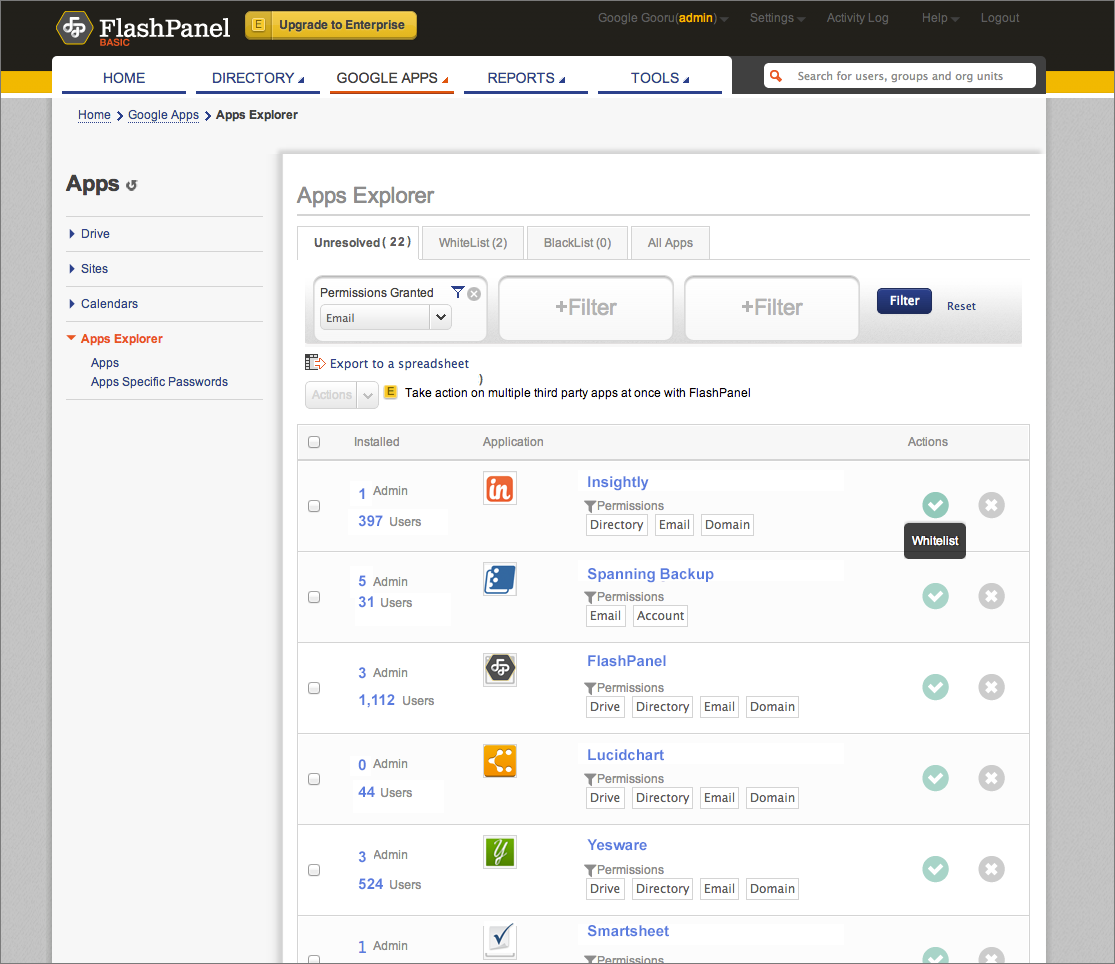
As an example, FlashPanel, a popular tool used by Google Apps administrators, is using these new features to allow domain admins to review installed applications and manage or revoke access to them. The Apps Explorer in FlashPanel allows admins to see which are the most installed apps in his domain or use a filter to review applications by type of permissions (Drive, GMail, etc). It also allows admins to review the number of users who have granted access to a particular application.
The screenshot below shows an example of FlashPanel’s customized view of third-party application installs.
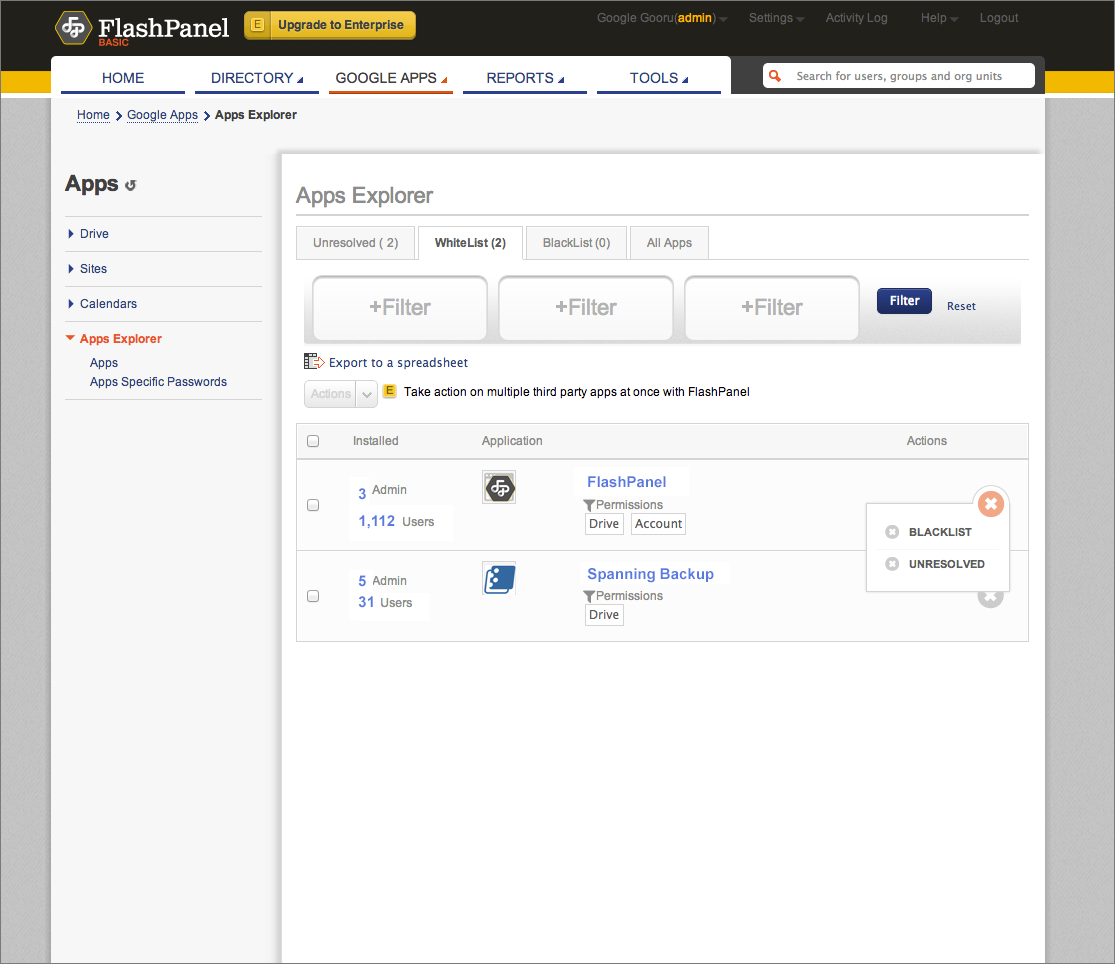
In FlashPanel’s integration, admins have the power to whitelist or blacklist apps, as shown below.
The Directory API now also provides the ability to manage admin notifications that are delivered to the Admin Console. Currently, admins receive notifications for events that affect their domains such as users approaching their storage limits or monthly bills that are due. Now you can use the API to list notifications, update their read status, or pull them into custom tools.
If you are interested in using these new endpoints, please refer to the Directory API documentation.
 | Ajay Guwalani Ajay Guwalani is Product Manager on Google Apps Admin APIs. His current focus is to build next generation admin APIs to make enterprise developers and admins happy. |
New Image Metadata for the Google Drive SDK
Do you like to store photos in Google Drive? You are not alone! Photographs are one of the most common file types stored in Google Drive. The Google Drive API now exposes Exif data for photos, so that Google Drive Apps can use it. The Exif data contains information about camera settings and photo attributes.
Despite being an awful photographer, I love photographing benches, and here is one I took while at the beach. Let’s have a look at some of these new fields for this photo.

When I examine the metadata for this image using a drive.files.get call, there is now a field, imageMediaMetadata, containing the detailed photo information:
"imageMediaMetadata": {
  "width": 2888,
  "height": 1000,
  "rotation": 0,
  "date": "2012:07:08 15:22:25",
  "cameraMake": "NIKON CORPORATION",
  "cameraModel": "NIKON D90",
  "exposureTime": 8.0E-4,
  "aperture": 5.6,
  "flashUsed": false,
  "focalLength": 105.0,
  "isoSpeed": 200
 }
So whether you are just storing your amateur snaps like me, or using Google Drive to store serious photographs, we hope this will be useful information for Drive apps. For example, a photo organizing application will be able to create thumbnail and information views for photos without ever having to download them.
For more information, please visit our documentation, and if you have any technical questions, please ask them on StackOverflow. Our team are waiting to hear from you.
 | Ali Afshar profile | twitter Tech Lead, Google Drive Developer Relations. As an eternal open source advocate, he contributes to a number of open source applications, and is the author of the PIDA Python IDE. Once an intensive care physician, he has a special interest in all aspects of technology for healthcare |
Improved Analytics New Staff Picks Section on the Apps Marketplace
Like any Google service, we’re always working to refine the Google Apps Marketplace for our vendors and their customers. Normally we make small, incremental improvements and let the better experience speak for itself, but this week we think several of the new features are noteworthy enough to point out.
View Enhanced Analytics

A frequently requested feature has been improved analytics. If you have Google Analytics configured for your listing, your analytics profile will now receive the search terms and category selected by your customers.
When a customer searches on the Marketplace, the search results will all have two parameters attached: query and category. You’ll want to add these terms to your Google Analytics Website Profile. The query term will include all of the search terms the user entered into the search box, or it could be blank if the customer found your application through browsing. Similarly, the category parameter will be blank unless the customer narrowed his search or browse by picking the category you chose in your application listing, e.g. Accounting & Finance. Now you’ll have much better data about how a customer has reached your application, whether through browsing, searching, or a combination.
Count Installs
Another developer-focused enhancement we’ve made is adding a count of installs and uninstalls on each application’s listing when signed into the vendor account:

"Net install count" represents the number of current installs -- any uninstalls have already been deducted. If you add "Net install count" to "Uninstall count" you will have the total number of installations for the app since it launched. You are also able to retrieve this information from the Licensing API, but it is nice to have it easily accessible on your listing pages.
Sweep Away Those Dusty Apps
On the Vendor Profile page you’ll also that we’ve added the ability to hide unused applications (and show them again) so that you can manage your applications better and remove clutter on your dashboard. You still cannot delete applications, but you can sweep them under the rug! Note that Hiding and Unhiding are just for managing your list as a Vendor -- they do not change your Publish/Unpublish settings for each app. You can hide a published app as easily as an unpublished app.

Browse Staff Picks on the Home Page
Since announcing the Staff Picks program in May, we’ve featured a number of especially well-integrated and innovative applications on the @GoogleAtWork twitter stream and here on the Google Apps Developer Blog. Now we also feature Staff Picks on the front page of the Marketplace.
You can find four Staff Picks on the Marketplace landing page, chosen from the pool of apps selected as staff picks. See the Staff Picks page on code.google.com for more information on how we choose these apps.

 | Andy "Rufus" Rothfusz blog Rufus is a Developer Programs Engineer working on Google Apps APIs and the Google Apps Marketplace. He has over 14 years of experience in developer programs covering a wide range of applications including 3D graphics acceleration, natural language processing, device security, video games and video streaming. |
Introducing a New Version of the Email Migration API
This API is now part of our Admin SDK, which is useful for managing applications for Google Apps users through the Google APIs Console. Additionally, the Email Migration API v2 now includes support for:
- Delegated administrators
- OAuth 2.0
- Media uploads
engineering/backend-support can be migrated with the label engineering-backend-support to retain the previous organization structure. For more information about the API, visit the the Getting Started guide or explore the API Reference.
 | Greg Knoke Google+ Greg Knoke is a technical writer in the Google Drive Developer Relations Team. Prior to joining Google, he worked as a scientist developing image and signal processing algorithms. His current interests include new technologies, content management, information architecture, cooking, music, and photography. |
Thursday, February 12, 2015
New Features in 14 06 18 14 07 29 Quick Introduction of Bootstrap Column Properties Bootstrap Panlel in LayOut section of Pentaho CDE
Guys, who work on Pentaho C-Tools should be up to date yourself on its new releases. The latest stable version of C-Tools in this week is : 14.07.29. (blog written date : 4th Aug 2014)
I dont remember exactly, but Pedro somewhere on social networking has informed the community that the C-Tools are up-datable over the time for every 6 weeks.
This post will cover my sample work out on 14.06 & 14.07 releases especially about the column properties & built in bootstrap panel.
These new features will reduce writing Bootstrap html code in HTML section either for rows or columns & increase the development speed of project.
We get information like below for columns with bootstrap latest releases..
| Features Bootstrap 3 Grid System | Extra small devices Phones (<768px) | Small devices Tablets (≥768px) | Medium devices Desktops (≥992px) | Large devices Desktops (≥1200px) |
|---|---|---|---|---|
| Max container width | None (auto) | 750px | 970px | 1170px |
| Class prefix | .col-xs- | .col-sm- | .col-md- | .col-lg- |
| Max column width | Auto | ~62px | ~81px | ~97px |
| Gutter width | 15px on each side of a column (i.e. 30px) | |||
Bootstrap is of 12 columns based grid system ..and the above table implementation in CDE is similar to below
i.e.,
Large Devices =3
Medium Devices=6
Small Devices=9 or 12
Extra Small Devices=12

14.07 added bootstrap panel concept in its Layout section & it can be implemented as shown in below image.

Notes:
# Find Bootstrap Panel icon on the Layout Structure tool bar.
# Click on it (for a column) and itll be having 3 sections. They are Header, Body & Footer.
# Give all the properties(for instance, name, height, corners and etc).
# Similarly for the Body & Footer.
# You can remove any of the 3 sections for Bootstrap Panel.. highlight the section & click on X mark on the tool bar of Layout structure.
Sample Layout Design Download : Click Me
Deployment :
1) Your environment should be of 14.07.29 version of C-Tools or later before deploying this example.
2) Pentaho Server version : 5.x version.
3) Upload example using Uploader utility of server.
Sample output:
Extra Large Devices :


References :
1) http://www.tutorialrepublic.com/twitter-bootstrap-tutorial/bootstrap-grid-system.php
2) http://scotch.io/bar-talk/understanding-the-bootstrap-3-grid-system