Thursday, March 12, 2015
Introducing Add ons for Google Forms
Google Forms is a free and simple way to collect information — from quickly polling your friends about wholl be attending your trip to the haunted hayride, to getting thousands of responses to an awareness survey for work.
Over the last few months, Forms has been getting a bunch of updates to help you make good looking surveys, like new theme choices and the ability to create your own personalized themes.
To give you even more flexibility and options, we’re introducing add-ons for Forms—new tools, created by developer partners, that deliver even more features to your surveys (just like add-ons for Docs and Sheets).
Add-ons bring handy extras to your survey building experience, like setting a survey end date, sending custom emails based on responses, storing lists of choices that you frequently add to questions, and more.
You can access Add-ons from the “Add-ons” menu in Forms, or by directly visiting the Forms add-on store.

Here are just a few of the growing list of add-ons that you can use today with Google Forms:
- formLimiter: Close your survey automatically, after a maximum number of responses is reached, or at a date and time of your choosing.
- Ultradox Trigger: Create custom emails, reports, invoices, newsletters, etc., based on information that people enter into your form.
- Form Values: Store and pull from lists that you use regularly in Forms, like a list of staff, students, rooms, resources or anything you want.
PS: If you’re a developer with ideas for creating your own add-on for Forms, here’s some documentation to get you started.
Posted by Saurabh Gupta, Product Manager

Best practices for launching your Marketplace app
Next week, we’ll be hosting a webinar detailing best practices for a successful launch in the Marketplace. We’ll cover the most critical tactics for generating installs of your app based on our learnings from apps that have already launched. We’ll also cover some of the extras you may want to consider to get added mileage out of your launch, as well as ongoing marketing tactics for you to pursue.
Whether you’re totally unfamiliar with the Marketplace, currently developing an app, or have already launched an app in the Marketplace, this webinar should help you maximize your chances of successfully launching an app in the Marketplace. Please join us!
Best practices for a successful launch in the Google Apps Marketplace
Thursday, April 29, 2010 - 10:00 a.m. PDT / 1:00 p.m. EDT / 6:00 p.m. London
Register here for the Webinar.
Announcing Version 1 8 of the NET library for Google Data APIs
- Google Apps Audit API
- Google Content API for Shopping
- Google Calendar Resource API
In order to improve security and stability, SSL is now turned on by default for all APIs that support it and, since the previous major release (1.7.0.1), more than 30 issues have been Fixed.
For all details, please check the Release Notes:
Want to weigh in on this topic? Discuss on Buzz
Wednesday, March 11, 2015
Enabling Single Sign on with OpenID for the Google Apps Marketplace
We chose to power our Single Sign On (SSO) using OpenID because it’s the predominant open standard for federated identity on the web. The protocol is supported by a large number of OpenID identity providers and many sites around the web accept it. And to make Single Sign On easy to access, Marketplace apps also plug in to both the universal navigation bar inside Gmail, Calendar, Docs, and Sites, as well as the administrative control panel.

<Extension id="navLink" type="link">
  <Name>Amazing Cloud App</Name>
  <Url>http://www.example.com/home.php?domain=${DOMAIN_NAME}</Url>
</Extension>

<Extension id="realm" type="openIdRealm">
  <Url>http://www.example.com</Url>
</Extension>
With this XML in the application manifest, a link called “Amazing Cloud App” will appear in the universal navigation of all Google Apps. Also, if one of the realms specified in the manifest file precisely matches the openid.realm in the OpenID request, then the user will be seamlessly signed into the app after clicking on the link in the universal navigation (without seeing a typical OpenID interstitial allow/deny page).
Of course, you’ll also need code in your application which accepts OpenID logins. In addition to open source libraries, here are a few companies that are making it easier for cloud applications to integrate with the Google Apps Marketplace. Their code provides simple APIs with which developers can integrate, leaving some of the complexities of the OpenID protocol to be implemented by the experts -- no need to hand-roll your own OpenID code.
- JanRain
JanRain’s open source PHP and Ruby OpenID libraries and on-demand RPX solution enabled the implemention of OpenID for many of the companies that launched on the Google Apps Marketplace by writing simple code or web service calls. - Ping Identity
Ping’s PingFederate is an on-premise service that allows SaaS applications to easily accept OpenID and SAML-based logins by integrating with their libraries or using their web server or application server plug-ins. - TriCipher
TriCipher’s myOneLogin Identity Services is an on-demand application that allows developers to accept OpenID, SAML and other federation protocols by writing simple web service calls.
Their are plenty of open source OpenID libraries available for other platforms, such as OpenID4Java (using Step2 code for Google Apps) and DotNetOpenAuth. More information on implementing Single Sign On in Google Apps Marketplace apps can be found on code.google.com.
If you need additional information on building apps for the Google Apps Marketplace, see the Developer’s Overivew on code.google.com.
Admin SDK and Google APIs for business
Today, were announcing the Admin SDK, which enables developers to build customized administrative tools for organizations that use Google Apps. The new Admin SDK consolidates many of the existing domain APIs into a new uniform structure and introduces new functionality with the Directory API and Reports API. We’re starting to pilot Google+ Domains API.
Directory API
The new Directory API provides a simple, RESTful interface to support all basic operations required to query & manage users, groups, organizational units, Chromebooks and mobile devices.Reports API
The new Reports API gives developers a consolidated view of reporting and auditing for domains. Developers can build applications that can monitor and search across usage statistics and activities within a domain.Google+ Domains API
Businesses are using Google+ to help employees collaborate more easily and get things done. Developers will soon be able to auto-provision Circles, read/write posts, and more from the new APIs. Let us know if youre interested in learning more about this API when its available.To begin using the Admin SDK follow the instructions in the API documentation. You will need to sign in to the Google APIs Console and activate the Admin SDK. If you have any questions, join the conversation at Stack Overflow.
Note about API deprecation:
With the introduction of the Directory and Reporting APIs in the new Admin SDK the following APIs will be deprecated per their standard deprecation policy: Google Apps Profiles, Provisioning, Admin Audit, Reporting, Reporting Visualization.
 | Ajay Guwalani Ajay Guwalani is Product Manager on Google Apps Admin APIs. His current focus is to build next generation admin APIs to make enterprise developers and admins happy. |
Monday, March 9, 2015
New security management features for domain users with the Admin SDK
We launched the Admin SDK in May as a new way for developers to build customized administrative tools for organizations that use Google Apps. A top priority for most administrators is keeping their users safe. Today, were adding new security management features to the Directory API to help administrators manage:
- Access granted by domain users to third-party applications
- Application specific passwords created by users
- Backup verification codes for users using 2-step verification.
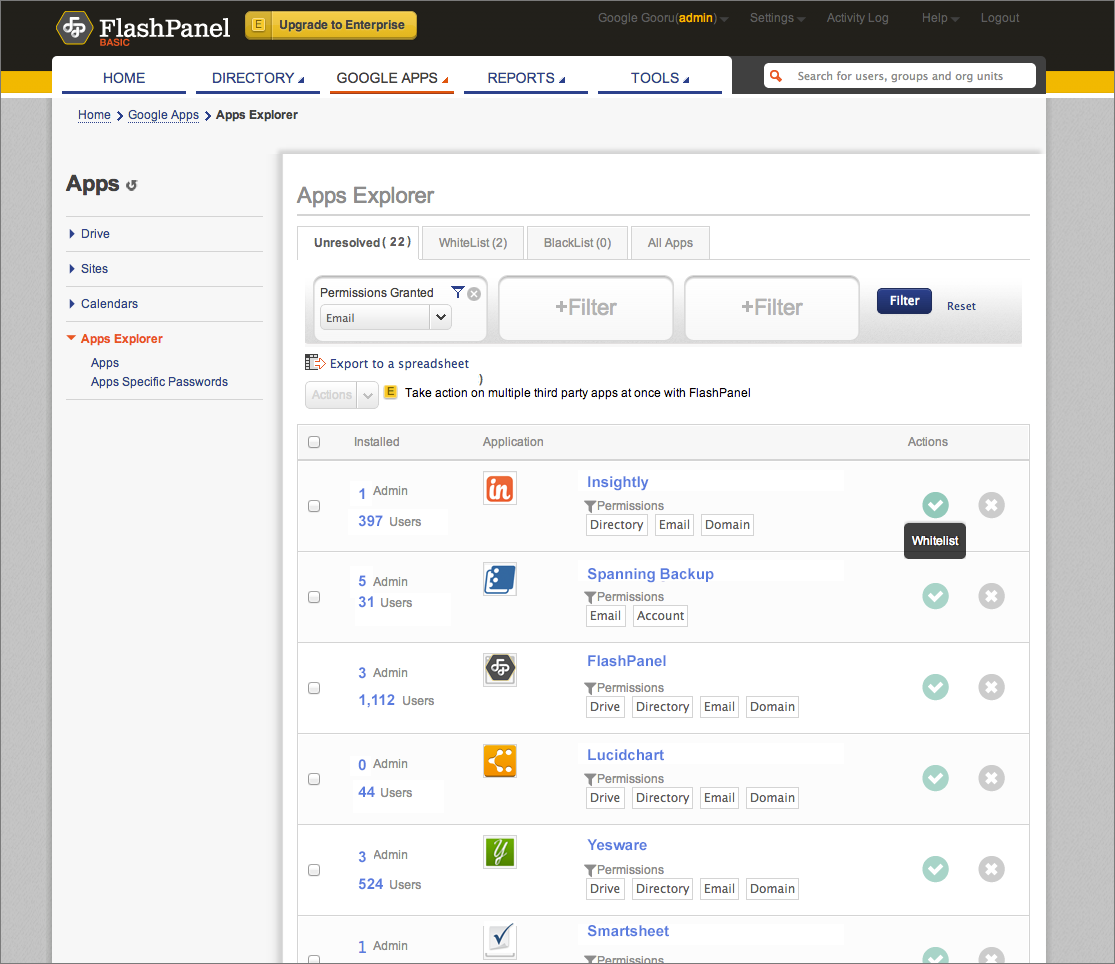
As an example, FlashPanel, a popular tool used by Google Apps administrators, is using these new features to allow domain admins to review installed applications and manage or revoke access to them. The Apps Explorer in FlashPanel allows admins to see which are the most installed apps in his domain or use a filter to review applications by type of permissions (Drive, GMail, etc). It also allows admins to review the number of users who have granted access to a particular application.
The screenshot below shows an example of FlashPanel’s customized view of third-party application installs.
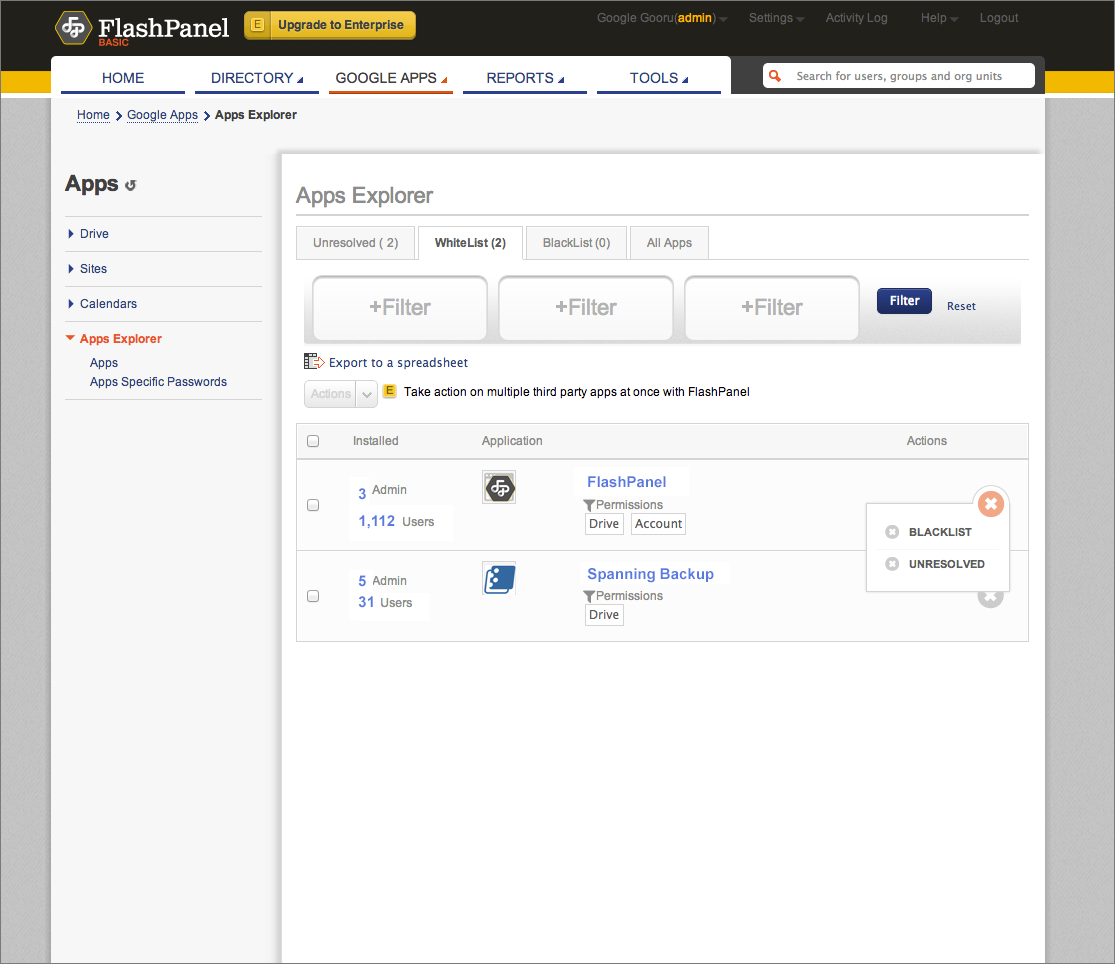
In FlashPanel’s integration, admins have the power to whitelist or blacklist apps, as shown below.
The Directory API now also provides the ability to manage admin notifications that are delivered to the Admin Console. Currently, admins receive notifications for events that affect their domains such as users approaching their storage limits or monthly bills that are due. Now you can use the API to list notifications, update their read status, or pull them into custom tools.
If you are interested in using these new endpoints, please refer to the Directory API documentation.
| Ajay Guwalani Ajay Guwalani is Product Manager on Google Apps Admin APIs. His current focus is to build next generation admin APIs to make enterprise developers and admins happy. |
New Image Metadata for the Google Drive SDK
Do you like to store photos in Google Drive? You are not alone! Photographs are one of the most common file types stored in Google Drive. The Google Drive API now exposes Exif data for photos, so that Google Drive Apps can use it. The Exif data contains information about camera settings and photo attributes.
Despite being an awful photographer, I love photographing benches, and here is one I took while at the beach. Let’s have a look at some of these new fields for this photo.

When I examine the metadata for this image using a drive.files.get call, there is now a field, imageMediaMetadata, containing the detailed photo information:
"imageMediaMetadata": {
  "width": 2888,
  "height": 1000,
  "rotation": 0,
  "date": "2012:07:08 15:22:25",
  "cameraMake": "NIKON CORPORATION",
  "cameraModel": "NIKON D90",
  "exposureTime": 8.0E-4,
  "aperture": 5.6,
  "flashUsed": false,
  "focalLength": 105.0,
  "isoSpeed": 200
 }
So whether you are just storing your amateur snaps like me, or using Google Drive to store serious photographs, we hope this will be useful information for Drive apps. For example, a photo organizing application will be able to create thumbnail and information views for photos without ever having to download them.
For more information, please visit our documentation, and if you have any technical questions, please ask them on StackOverflow. Our team are waiting to hear from you.
 | Ali Afshar profile | twitter Tech Lead, Google Drive Developer Relations. As an eternal open source advocate, he contributes to a number of open source applications, and is the author of the PIDA Python IDE. Once an intensive care physician, he has a special interest in all aspects of technology for healthcare |
What does storage quota unification mean for the Drive API
The new values for quotaBytesUsed field will reflect the total amount of storage used across the unified products. (This field used to reflect the total amount of storage used by Google Drive.)
| Ali Afshar profile | twitter Tech Lead, Google Drive Developer Relations. As an eternal open source advocate, he contributes to a number of open source applications, and is the author of the PIDA Python IDE. Once an intensive care physician, he has a special interest in all aspects of technology for healthcare |
Tuesday, March 3, 2015
Facebook for Learning at Unirazak!

 |
| *Poster: Visualized by Dr. Dewi Binti Amat Sapuan |
WORKSHOP
LEARNING OUTCOMES
After this workshop, you will be able to:- Use Facebook to facilitate learning and teaching.
- Create Facebook Groups to engage students and conduct assignments.
- Create Facebook Pages to build learning communities.
- Facebook for Educators
- Facebook Groups
- Facebook Pages
- Facebook Group
- Facebook Page
SLIDES
Here are the presentation slides for the Facebook for Learning workshop:Monday, March 2, 2015
How to Make a Form for Your Blog or Website!

Heres the poll so you can see just how close it was!

Now... onto the tutorial!


Now, I know that I didnt detail how to embed the form on your blog... if thats something youre interested in doing, be sure to vote on the poll for "How to add HTML/embed code to a blog post!" For those of you who are familiar with how to add the code on your blog, you can use the embed code from the drop-down menu in the picture just above this text!

For next weeks poll, Im going to add another request - how to take the background out of a photograph (so that the photo has a white background!
Sunday, March 1, 2015
IMU LS 11 Instructional Design for the Real World Jane Bozarth


Jane Bozarth!!! WOW! Need I say anymore? What are you waiting for?
Title : Instructional Design for the Real World
Date : 27June, 2012 (Check time differences)
Time : 10:00 AM, Kuala Lumpur
Venue : Online (WizIQ)
Speaker
RECORDING
UPCOMING WEBINARS?
CLICK HERE!Saturday, February 28, 2015
60 Killer OCW Collections for Web Designers Jessica Hupp
- Link to 60+ OCW Collections for Web Designers
- Via Stephen Carson

2ND GENERATION OCW COLLECTIONS?
Stephen Carson (in his super OpenFiction blog!) talks about a 2nd generation type of OCW (OpenCourseWare) collection, which assembles a list of courses from various university OCWs into a curriculum. And then he shares with us a great example...
OCW COLLECTION FOR WEB DESIGNERS
Jessica Hupp has managed to compile and organize an amazing collection of OCW for web designers. Click here to enjoy more than 60 OCW, covering everything from design theory to Internet culture!
Here are a few gems that caught my attention:
- Information Visualization: Consider space, order, focus, context, and more in this course. [University of British Columbia]
- Art of Color: In this course, you’ll learn the basic principles of color in visual arts. [MIT]
- Algorithms for Computer Animation: Learn about the algorithms that make animations possible. [MIT]
- People-Centered Design: Consider how you can design for people with this course. [The Open University]
- Social Visualization: In this course, you’ll learn how to visualize people and their interactions. [MIT]
- Common Sense Reasoning for Interactive Application: Use this course to discover how you can use common sense knowledge in your design. [MIT]
- Networking Infrastructure for E-Commerce: Learn about the capabilities and limitations you’ll have to work with in e-commerce. [NC State]
- Communicating in Cyberspace: Take a look at digital communication with this course. [MIT]
- The Anthropology of Computing: Consider computers as meaningful tools for society and culture in this course. [MIT]
- The Future of the Internet: You’ll learn about Internet architecture as well as current issues like network neutrality. [Stanford]
- Foundations of American Cyber-Culture: Consider new media, demographics, open source, and lots more in this course. [Berkeley]
- Web 2.0: Get a good look at web 2.0 as it relates to users, online business models, and new technologies. [Weber State University]
- A New Era?: This course takes on the new economy and innovation. [The Open University]
- Search Engines: Technology, Society and Business: Get an introduction to search engines, intellectual property in searches, advertising, spam, and more. [Berkeley]
A 3rd generation type of OCW collection, assembles a list of individual learning resources (e.g. audio/video lectures) for a specific course (outline) from various OCWs around the world (We used to call it Learning Objects or LO, but I am not sure if this buzz word is dead!). Basically, lecturers (and students) explore, discover, collect and assemble what they consider to be the best learning resources found in OCW (or OER) collections around the world related to the negotiated course outline. The challenge will be to filter (resource overload!) and tailor (remix, mashup, synthesize, adapt, etc.) the assembled learning resources to the learners.
Friday, February 27, 2015
50 Ideas 15 tools for Free or low cost E Learning
"Matthew Fox at Kineo reviews 15 free or low cost tools and gives 50 ideas on how to use them in your own organization."
An excellent 58 page free article or white paper worth reading (or at least browse through). If your educational institutions or organization are looking for e-learning tools (or content) that are free or low cost that actually has some proven record, then this resource can be of tremendous value. Also, it provides many useful ideas to fuel our minds on thinking wiser in terms of e-learning implementation, usage and practice.
Who said that e-learning needs to be time consuming or expensive?
Who came up with that funny term "White paper"? Another funny one is "Blue Print". We need to be more creative with the selection of colors for these terms .
Thursday, February 26, 2015
iPad for Learning Teaching at eLi3!

IPAD WORKSHOP
- Download and annotate presentations/articles/notes.
- Use social media to connect and collaborate with others.
- Create interactive multimedia e-books.
- Create and publish online interactive video tutorials.
- Use a variety of apps to engage students in and beyond the classroom.
PRESENTATION SLIDES
Click here to download the PowerPoint (.pptx) version.
CHALLENGE
RESOURCES
1. BASICS- How to Make a Stylus in 2-Minutes
- 17 iPad Tips & Tricks
- 16 New iPad Tips 2012
- iPad Tutorials and Tips
- iPad Apps to Support Blooms Revised Taxonomy (Kathy Schrock)
- Blooms Taxonomy for iPads (Silvia Rosenthal Tolisano)
- Gardners Multiple Intelligences for iPads (Silvia Rosenthal Tolisano)
- The Digital Learning Farm: Apps for iPads (Silvia Rosenthal Tolisano)
- 21st Century Skills & Literacies for iPads (Silvia Rosenthal Tolisano)
- Evaluation Rubric for Educational Apps?
- SETT – A Framework for Making Informed Decisions About Inclusive Technologies
- The iPad as Assistive Technology
- Technological Pedagogical Content Knowledge (TPACK) Framework
- iTunes U
- TED
- Keeping Yourself Updated?
- Zite
- Feedly
- Saving Online Articles for Offline reading?
- Instapaper($)
- Reading e-Books?
- iBooks
- Google Play Books
- Taking Notes?
- Notes
- Evernote
- Notability($)
- Annotate Notes & Documents?
- iBooks
- Subtext
- PaperPort Notes
- DocAS($)
- Pages($)
- Notability ($)
- Storing & Accessing Files?
- Dropbox
- Google Drive
- Box
- iCloud
- 9 Mindmapping & Brainstorming Tools
- QR Code Reader Apps
- Creating Presentations?
- Haiku Deck
- Prezi
- CloudOn
- Keynote($)
- Presenting Slides with Animations?
- SlideShark
- Keynote($)
- Writing Content?
- Evernote
- CloudOn
- GoDocs($)
- Pages($)
- Creating, Editing & Sharing Images?
- Skitch
- Flickr
- Explain Everything($)
- Visualize($)
- Recording & Editing Audio?
- GarageBand($)
- SoundCloud
- Fotobabble
- SoundCloud
- AudioBoo
- Recording & Editing Videos?
- Videos
- Videolicious
- iMovie($)
- FiLMiC Pro($)
- Creating Screencasts?
- Explain Everything($)
- Educreations
- ScreenChomp
- ShowMe
- Teach
- Doodlecast Pro($)
- Digital Story Telling?
- Animoto
- VoiceThread
- Creating e-Books?
- Book Creator($)
- Book Writer($)
- Comic Life($)
- iBooks Author (for MAC only)
- Blogging (Journal/e-Portfolio)?
- Blogger
- WordPress
- Tumblr
- Posterous
- Live Online Video Discussions?
- Skype
- Google+ (Hangouts)
- WizIQ
- Collaborative Learning & Sharing?
- Google+
- Box
- Google Drive
- Edmodo
6. ASSESSING
- Poll Everywhere
- Socrative
- Infuse Learning
7. MOVE FORWARD?
- 5 Critical Mistakes Schools Make With iPads (Tom Daccord)
- Roadmap for Success? Source (Slide 73)
- Best Starting Point: Apps according to Learning Objectives
- iMedicalApps
- The Best of iPad Apps
- Apps in Education
- Reflector
- My Delicious iPad Collection
Are you up for the challenge? :)
Wednesday, February 18, 2015
Dremel releases a 3D printer for the masses
 |
Dremels Idea Builder 3D printer retails for $999.00 Credit: Dremel |
The user-friendly printer can make objects using 10 different colors.
Dremel has announced the first 3D printer to come from a major tool manufacturer, the $999 Dremel 3D Idea Builder. Dremel called it a desktop machine for the masses.
The 3D Idea Builder is a fused deposition modeling (FDM) machine that uses a printer head that melts and extrudes a plastic filament layer upon layer to build an object; the thinner the layers, the better the "resolution" or smoothness of an 3D objects surface.
Tuesday, February 17, 2015
Zuma Deluxe for PC full version with system requirements

This could get messy. Were not exactly sure on what planet it is that guardian frogs must protect the spiralling corridors of their temples from an unholy invasion of coloured balls, but we suspect its the same one Bub and Bob visited.
Yes folks, you are now entering ball-bursting territory. Abandon all hope of having normal dreams for several days.
Not content with raining down from the skies above in Bust-A-Move, these evil, merciless, relentless coloured balls are now intent on invading and terrorising the confines of the musty, once-deserted chambers of these eerie old shrines. But a wise old frog knows the weaknesses of the nefarious spherical menace; you could call it a good old fashioned trichotomy: twos company, threes a crowd. Its satisfying in the knowledge that however many hundreds pour through the defenceless temple doors, this ball-spitting frog idol can send them packing back from whence they came... with a satisfying pop.
In case we hadnt rammed home the point enough lately, Xbox Live Arcade on 360 is just about the most instantly entertaining way to get your kicks on a home console these days, and thanks to the complete lack of any definable storylines or premise, we get to completely make them up off the top of our heads. Its a win win, and no mistake.
Zuma Deluxe is another one of those games youll probably be familiar with from the previous Live Arcade, or from the shareware scene it originated from. As with almost everything available for download on the 360, it doesnt look anything worth bothering with from the outset. Sure, its in high definition, but it looks simple, dated, low budget and certainly nothing to get excited about. And then, unexpectedly, six hours later youre hauling yourself off to bed with spiralling eyes and humming that tune forever. Read more
System requirements:
Windows 98/ME/2000/XP
Pentium II 350MHz Processor
64MB RAM
DirectX 7
16-bit Video Card
DirectX compatible Sound Card
30MB Hard Disk Space
CD-ROM or DVD-ROM Drive
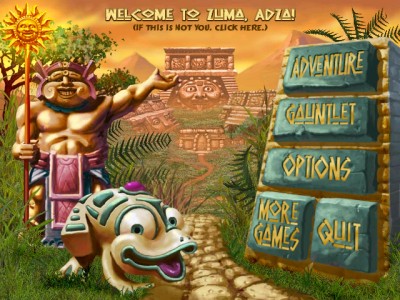
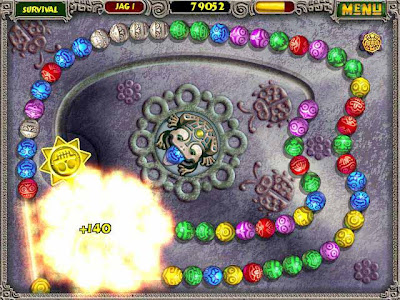
Screen Shots: click on the image to view large
 |  |  |

Zuma Deluxe game for PC: Download
Saturday, February 14, 2015
GTA Vice City for PC full version with system requirements

Grand Theft Auto: Vice City for the PC needs no introduction. Not only is this game in many ways better than its amazing predecessor Grand Theft Auto III, but its also technically superior to the original version of Vice City that was released on the PlayStation 2 a number of months ago. Like GTAIII for the PC, Vice City is identical to the original PS2 version in terms of content, so if youve already played that version to death, you wont find the PC version to be much different. However, the PC version of Vice City does offer enhanced visuals and controls, improved loading times, and a few extra frills. More importantly, it offers the same refreshingly open-ended gaming experience, which has occasionally been reviled for its controversial subject matter, but has far more often elicited much-deserved praise. Simply put, if by some chance youve put off playing Vice City up till now, dont wait any longer.
To be clear, Vice City is an extension of Grand Theft Auto III, rather than a completely overhauled sequel. Thats definitely a good thing, because GTAIIIs freestyle gameplay was extremely entertaining and offered tremendous replay value, yet still had more potential. Vice City fulfills a lot of that potential, as it features improved production values (including over eight hours of licensed music and plenty of Hollywood voice actors), new types of drivable vehicles (motorcycles, helicopters, and golf carts), new weapons, better vehicle damage modeling, indoor environments, and more.
Yet the most obvious difference between GTAIII and Vice City is that in the new game, youre in a brand-new setting, a sprawling city styled after Miami, Florida, circa 1986. Laced with neon and featuring miles of beachfront property, Vice City simply looks a lot more pleasant than GTAIIIs oppressive New York City-inspired Liberty City. Nevertheless, like Liberty City, Vice City is actually a den of corruption and evil. And its your playground. Youre free to roam Vice City on foot or in any manner of vehicle you can get your hands on, and you can undertake a wide variety of action-packed missions, explore the town, wreak havoc, or whatever. The games convincing physics and terrific atmosphere make any of the huge variety of activities available in Vice City enjoyable in themselves, and even greater than the sum of their parts when you put them all together. Youd be hard-pressed to find a single-player action game with more variety than this one, and Vice City will more than likely surprise and impress you even if youve already played GTAIII to death.
System requirements:
MINIMUM PC REQUIREMENTS
Windows 98/ME/2000/XP
MINIMUM
Pentium III or AMD Athlon 800MHz Processor or Intel Celeron or AMD Duron 1.2GHz Processor
128MB RAM
8X CD-ROM Drive
915MB Hard Disk Space
32MB DirectX compatible Video Card
DirectX compatible Sound Card
Keyboard
Mouse
DirectX 9.0
RECOMMENDED
Pentium IV or AMD Athlong XP Processor
256MB RAM
16X CD-ROM Drive
1.55MB Hard Disk Space
64MB DirectX compatible Video Card
DirectX compatible Sound Card with Surround Sound
GamePad
Keyboard
Mouse
DirectX 9.0
Screen Shots: Click on the image to view large
 |  |  |

Friday, February 13, 2015
Road Rash 2002 for PC full version with system requirements

There are two game modes in Road Rash. Thrash mode allows you to select from five skill levels, choose your course, and race. Your progress is not saved, you cannot buy new bikes, nothing. You *can* however race any track at any level and vent your frustration on the other bikers with wanton abandon.
While thrash mode is reasonably cathartic, most people will play most of their games in "Big Game Mode". In this mode, you select which character to play from a list of nearly a dozen "interesting" individuals, each of which has different fighting and racing characteristics, as well as a different model of motorcycle and their own cash reserve. Although most of the rashers are men, there are three female characters available, and my wife had no trouble identifying with at least one of them :-).
You start the "Big Game" on "The Street" in front of "Der Panzer Klub" and "Olleys Skoot-A-Rama". Entering the club allows you to "schmooze" with other rashers who may give you useful information or simply intimidate you. The content of the messages in this area seems to be loosely related to your treatment of your fellow rashers in past races. If you beat up on a particular character, he/she will be hostile. Leaving an individual alone race after race may result in friendlier comments. Pretty cool. I personally got the most enjoyment out of getting Mike and Axel upset, but running Pearl off the road resulted in a particularly nasty surprise as well :-).
From within the club, you can also choose to enter the "Restroom". The restroom is essentially the options menu, allowing you to change the game mode (thrash or big game), select one or two player mode, choose your game level (only in thrash mode), individually turn the engine sounds and in- game music on and off, load and save games, or play with the "jukebox" (more on this in the "sound" section below).
Lastly, you can select the bulletin board to view the available courses and select the one upon which you want to race.
The second major location that you can visit is "Olleys Skoot-A-Rama" cycle shop. Olley has fifteen different bikes from which to choose which are divided into three categories. You can browse all of the bikes to determine prices and set goals for yourself. You can also see stat sheets and a "fly-by" video of each one. The characteristics of each bike are entertaining, if not useful, with adjectives like "blinding" and "orgasmic" used to describe the handling, acceleration, and top speed of each. Judging only from the limited number of cycles that my friends and I have purchased, the variations dramatically affect the gameplay.
There are five courses on which you can race, each of which has different distinguishing characteristics. On one course you race along beaches and through tunnels; on another, you dodge taxis, joggers, and mailboxes; while on yet another, you race through valleys with steep, texture mapped walls. The variety is extremely refreshing. Different levels of the game however, do *not* introduce new tracks, but rather lengthen the same five courses. This results in the first few miles of every area being seen over and over again, although you get to race a few miles farther along each course with each new level. There are several points in the various courses where the road forks into two distinct paths which rejoin before crossing the finish line. Usually, each branch has a different length, number of curves, traffic density, etc. Other racers will sometime suggest a particular branch, although how much you trust them might depend on the number of dents youve made in their skull in previous races :-).
System requirements:
Ram: 16 Mb
Hard: 25 Mb
Cpu:75 Mhz
Windows Xp,Vista
Screen Shots: click on the image to view large
 |  |  |
Java Variable Types and Rules for Declaring Variables

Rules for Declaring Variables in Java
Java Variable Types
1. Instance Variables
2. Local Variables
3. Static Variables
Thursday, February 12, 2015
Need For Speed 2 II SE

Like its predecessor, Need for Speed II allows players to race exotic cars, either against computer-controlled opponents or human opponents via a LAN, modem or serial connection. There are three distinct gameplay modes:
Single Race is largely carried over from the previous game, in which a player simply chooses a car and a course and completes a single race. The player can customize both the number and type of opponents as well as the number of laps to be completed.
Tournament is also carried over from The Need for Speed, in which the player must complete a series of races successfully to unlock a bonus car.
Knockout is a new type of tournament to the series. It consists of a series of 2-lap races with 8 opponents; the last-place finisher at the end of each race is eliminated from the competition. Successfully completing an entire Knockout (being the last surviving racer) unlocks a bonus track.
A total of 9 cars are available to race:
Ferrari F50
Ford GT90
Isdera Commendatore 112i
Italdesign Cala
Jaguar XJ220
Lotus Esprit V8
Lotus GT1
McLaren F1
Ford Indigo (initially unavailable; becomes unlocked upon winning a tournament series)
The cars can be raced on seven different courses. Unlike The Need for Speed, which featured a mix of both point-to-point and circuit courses, Need for Speed II features circuit courses only. Each tracks scenery is inspired by real-life locations around the world:
Mediterrano (Greece)
Mystic Peaks (Nepal)
North Country (Northern Europe, Germany)
Outback (Australia)
Pacific Spirit (Canada)
Proving Grounds (Norway)
Monolithic Studios (Hollywood, California) (Not available at the start of the game; becomes unlocked upon winning a Knockout series)[1]
A Jaguar XJ220 racing on the Mystic Peaks track
Last Resort (Mexico) (Only available for the Special Edition version.)
Unlike the previous games tracks, which were realistically-rendered generic locales, Need for Speed IIs tracks mix real-world landmarks with elements of fantasy, in a somewhat similar fashion to the Cruisn series of arcade games. For example, the Outback course has the player racing from the Sydney Harbour Bridge and the Sydney Opera House to the rural Australian Outback and back again in a matter of minutes.
Need for Speed II also introduced several new elements to the game. For the first time, players could customize the color of each car; additionally, a basic tuner allowed players to adjust each cars performance elements, including gear ratios, tires, and spoilers. Unlike The Need for Speed, however, Need for Speed II did not feature any police chases. Read more
System requirements:
Video Card: 16 Mb
Windows Xp,98
Ram: 64 Mb
Hard: 100 Mb
Screen Shots: click on the image to view large
 |  |  |