Friday, March 13, 2015
Sudoku Linear Optimization and the Ten Cent Diet
In 1945, future Nobel laureate George Stigler wrote an essay in the Journal of Farm Economics titled The Cost of Subsistence about a seemingly simple problem: how could a soldier be fed for as little money as possible?
The “Stigler Diet” became a classic problem in the then-new field of linear optimization, which is used today in many areas of science and engineering. Any time you have a set of linear constraints such as “at least 50 square meters of solar panels” or “the amount of paint should equal the amount of primer” along with a linear goal (e.g., “minimize cost” or “maximize customers served”), that’s a linear optimization problem.
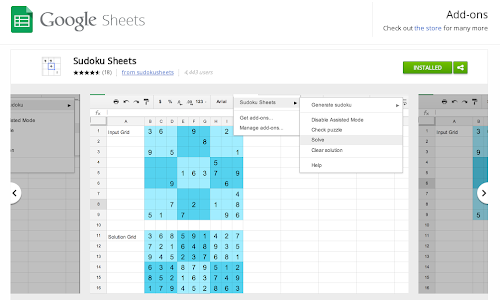
At Google, our engineers work on plenty of optimization problems. One example is our YouTube video stabilization system, which uses linear optimization to eliminate the shakiness of handheld cameras. A more lighthearted example is in the Google Docs Sudoku add-on, which instantaneously generates and solves Sudoku puzzles inside a Google Sheet, using the SCIP mixed integer programming solver to compute the solution.
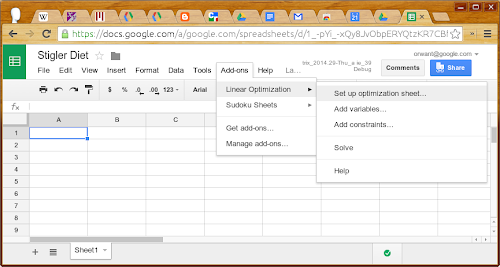
Second, we’re open-sourcing the linear solver underlying the add-on: Glop (the Google Linear Optimization Package), created by Bruno de Backer with other members of the Google Optimization team. It’s available as part of the or-tools suite and we provide a few examples to get you started. On that page, you’ll find the Glop solution to the Stigler diet problem. (A Google Sheets file that uses Glop and the Linear Optimization add-on to solve the Stigler diet problem is available here. You’ll need to install the add-on first.)
Stigler posed his problem as follows: given nine nutrients (calories, protein, Vitamin C, and so on) and 77 candidate foods, find the foods that could sustain soldiers at minimum cost.
The Simplex algorithm for linear optimization was two years away from being invented, so Stigler had to do his best, arriving at a diet that cost $39.93 per year (in 1939 dollars), or just over ten cents per day. Even that wasn’t the cheapest diet. In 1947, Jack Laderman used Simplex, nine calculator-wielding clerks, and 120 person-days to arrive at the optimal solution.
Glop’s Simplex implementation solves the problem in 300 milliseconds. Unfortunately, Stigler didn’t include taste as a constraint, and so the poor hypothetical soldiers will eat nothing but the following, ever:
- Enriched wheat flour
- Liver
- Cabbage
- Spinach
- Navy beans

This optimal meal consists of seared calf liver dredged in flour, atop a navy bean purée with marinated cabbage and a spinach pesto.
Chef Marco reported that the most difficult constraint was making the dish tasty without butter or cream. That said, I had the opportunity to taste our linear optimization solution, and it was delicious.

Thursday, March 12, 2015
Creating More Responsive Applications with Client Handlers and Validators
When it comes to writing UI applications in Apps Script, we get a lot of requests to support event callbacks that are handled in the user’s browser. For example, if your application has a form, you may want to disable a button after it is clicked the first time. Until now, the only way to do that would be by using an event handler on the server to disable that button. Using Client Handlers, your application can now respond to events in the browser without the need to perform a round trip to Google Apps Script servers.
By cutting out the round trip to the server, your app can respond instantly to user input. Imagine, for example, you want to provide your users with instant feedback within your app when a user types text where a number is expected. Ideally, you would want to warn users as they type the value, instead of waiting until the form is submitted. Having a server event handler for each keystroke is definitely overkill for such a simple and common task. Luckily, these use cases are now supported with Apps Script’s new Client Handlers and validators!
Let’s take a look at some code.
Client Handlers
A Client Handler allows you to react to any event in a browser without connecting to the server. What you can do in response to an event is limited to a set of predefined common actions, but you have a lot of flexibility in making your app more responsive.
You can use Client Handlers in any UiApp regardless of whether you are embedding in a Spreadsheet or a Sites Page or publishing as a service. This simple application enables the user to click a button to display the classic “Hello world” message:
function doGet() {
  var app = UiApp.createApplication();
  var button = app.createButton("Say Hello");

  // Create a label with the "Hello World!" text and hide it for now
  var label = app.createLabel("Hello World!").setVisible(false);

  // Create a new handler that does not require the server.
  // We give the handler two actions to perform on different targets.
  // The first action disables the widget that invokes the handler
  // and the second displays the label.
  var handler = app.createClientHandler()
    .forEventSource().setEnabled(false)
    .forTargets(label).setVisible(true);

  // Add our new handler to be invoked when the button is clicked
  button.addClickHandler(handler);

  app.add(button);
  app.add(label);
  return app;
}
The Client Handlers in the above example are set up in two steps:
- Create a Client Handler just as we would create the server handlers you all know and love.
- Define the target widget for this handler. The target widget is the widget on which the handler will take action. We set the handler’s target in one of two ways: (a) By using the
forTargetsmethod to define the target widget. (b) By using theforEventSourcemethod which lets widget wire itself to the client handler.
In the above example, we set the handler’s target to be the event source, so that it will apply to the button that is clicked. Finally, we define the action that the handler should take, in this case disabling the button using setEnabled(false). Aside from setEnabled, you can also change styles using setStyleAttribute, change text using setText, and so on. One Client Handler can perform multiple actions — just chain them together - and you can even change the target so that some actions apply to one set of widgets and some actions to another set. In our example, along with disabling the button, we set the handler to display the label when it is invoked, using setVisible.
Validators
Another new addition to Apps Script is support for validators in handlers. Validators allow handlers to check simple and complex conditions before they are invoked. For example, the following application adds two numbers given by the user, while using validators to make sure the server is only called if both of the text boxes contain numbers.
function doGet() {
  var app = UiApp.createApplication();

  // Create input boxes and button
  var textBoxA = app.createTextBox().setId(textBoxA).setName(textBoxA);
  var textBoxB = app.createTextBox().setId(textBoxB).setName(textBoxB);
  var addButton = app.createButton("Add");

  // Create a handler to call the adding function
  // Two validations are added to this handler so that it will
  // only invoke add if both textBoxA and textBoxB contain
  // numbers
  var handler = app.createServerClickHandler(add)
      .validateNumber(textBoxA)
      .validateNumber(textBoxB)
      .addCallbackElement(textBoxA)
      .addCallbackElement(textBoxB);

  addButton.addClickHandler(handler)

  app.add(textBoxA);
  app.add(textBoxB);
  app.add(addButton);
  return app;
}

function add(e) {
  var app = UiApp.getActiveApplication();
  var result = parseFloat(e.parameter.textBoxA) + parseFloat(e.parameter.textBoxB);
  var newResultLabel = app.createLabel("Result is: " + result);
  app.add(newResultLabel);
  return app;
}
There’s a variety of validators to choose from that perform different tasks. You can verify the input to be a number, an integer, or an e-mail address. You can check for a specific length, or for any numerical value in a defined range. You can also use general regular expressions. Lastly, each validator has its negation.
Note that validators work with both client and server handlers.
Putting it all together
Of course, validators and Client Handlers work best together. For example, in our addition application above, the “Add” button should be disabled as long as the current input is not numeric. We would also like to let the user know why the button is disabled by displaying an error message. To do so, we combine the power of server handlers, Client Handlers, and validators in the following way:
function doGet() {
  var app = UiApp.createApplication();

  // Create input boxes and button.
  var textBoxA = app.createTextBox().setId(textBoxA).setName(textBoxA);
  var textBoxB = app.createTextBox().setId(textBoxB).setName(textBoxB);
  var addButton = app.createButton("Add").setEnabled(false);
  var label = app.createLabel("Please input two numbers");

  // Create a handler to call the adding function.
  // Two validations are added to this handler so that it will
  // only invoke add if both textBoxA and textBoxB contain
  // numbers.
  var handler = app.createServerClickHandler(add)
      .validateNumber(textBoxA)
      .validateNumber(textBoxB)
      .addCallbackElement(textBoxA)
      .addCallbackElement(textBoxB);

  // Create handler to enable the button well all input is legal
  var onValidInput = app.createClientHandler()
      .validateNumber(textBoxA)
      .validateNumber(textBoxB)
      .forTargets(addButton).setEnabled(true)
      .forTargets(label).setVisible(false);

  // Create handler to mark invalid input in textBoxA and disable the button
  var onInvalidInput1 = app.createClientHandler()
      .validateNotNumber(textBoxA)
      .forTargets(addButton).setEnabled(false)
      .forTargets(textBoxA).setStyleAttribute("color", "red")
      .forTargets(label).setVisible(true);

  // Create handler to mark the input in textBoxA as valid
  var onValidInput1 = app.createClientHandler()
      .validateNumber(textBoxA)
      .forTargets(textBoxA).setStyleAttribute("color", "black");

  // Create handler to mark invalid input in textBoxB and disable the button
  var onInvalidInput2 = app.createClientHandler()
      .validateNotNumber(textBoxB)
      .forTargets(addButton).setEnabled(false)
      .forTargets(textBoxB).setStyleAttribute("color", "red")
      .forTargets(label).setVisible(true);

  // Create handler to mark the input in textBoxB as valid
  var onValidInput2 = app.createClientHandler()
      .validateNumber(textBoxB)
      .forTargets(textBoxB).setStyleAttribute("color", "black");

  // Add all the handlers to be called when the user types in the text boxes
  textBoxA.addKeyUpHandler(onInvalidInput1);
  textBoxB.addKeyUpHandler(onInvalidInput2);
  textBoxA.addKeyUpHandler(onValidInput1);
  textBoxB.addKeyUpHandler(onValidInput2);
  textBoxA.addKeyUpHandler(onValidInput);
  textBoxB.addKeyUpHandler(onValidInput);
  addButton.addClickHandler(handler);

  app.add(textBoxA);
  app.add(textBoxB);
  app.add(addButton);
  app.add(label);
  return app;
}

function add(e) {
  var app = UiApp.getActiveApplication();
  var result = parseFloat(e.parameter.textBoxA) + parseFloat(e.parameter.textBoxB);
  var newResultLabel = app.createLabel("Result is: " + result);
  app.add(newResultLabel);
  return app;
}
All of these features can be used to create more advanced and responsive applications. Client handlers can be used to change several attributes for widgets, and validators can help you check a variety of different conditions from well formed email addresses to general regular expressions.
If youd like to chat about these new features or have other questions about Google Apps Script, please join several members of the Apps Script team in the Google Apps Developer Office Hours on Google+ Hangouts tomorrow, Wednesday November 16th at 10am PST. You can also ask questions at any time in the Apps Script forum.
 | Omer Strulovich profile Omer was an intern on the Google Docs team for the summer of 2011. He is now back to pursuing his master’s degree in the field of cryptography. |
Colour and its relationship to usability
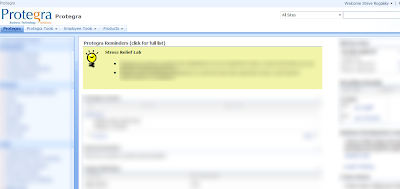
As I returned to work the following week, I noticed that a change was made to our internal dashboard at Protegra. A reminders and announcements section was added and highlighted in yellow/green while the rest of the site remained in blue. Everytime I looked at this site and my eyes were drawn to the words highlighted by the use of colour I thought of Davids presentation.
Here are few other examples that David showed to us to demonstrate how the use of colour could be used to influence user behaviour effectively:
1. Twitter
What are they trying to get you to do?
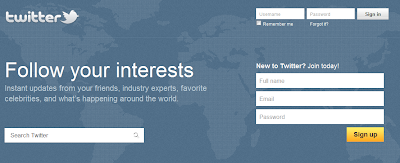
Sign-Up is highlighted in yellow to attract new users while Search and Sign-in are blue like the rest of the site. Twitter is assuming that if you are already signed up then you are committed to finding the Sign In button on your own.
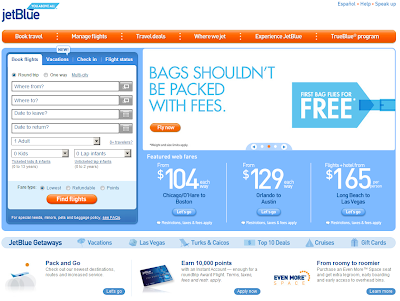
2. JetBlue
What is important to them?
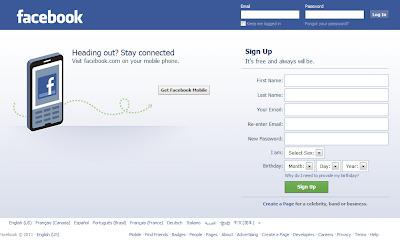
3. Facebook
What are they trying to influence you to do?
Davids presentation has peaked my interest and Ill be looking to find other ways to use colour like this on projects (external facing or not) to guide the user to the actions we would like them to take and discourage them from unwanted actions or workflows. Also, as the Dashboard example shows, it isnt just about highlighting buttons - it can also be about highlighting sections of the site.
Thanks David.
You can find more positive and negative examples and other UX strategies in his presentation found on his site - or join us at SDEC11 to hear him present.
Wednesday, March 11, 2015
Concurrency and Google Apps Script
Here’s the scenario: you create a form, you have a script that triggers onFormSubmit and all is well... until it gets popular. Occasionally you start having interlacing modifications from separate invocations of your script to the spreadsheet. Clearly, this kind of interlacing is not what you intended for the script to do. Up until now, there was no good solution to this problem -- except to remain unpopular or just be lucky. Neither are great solutions.
Now, my friend, you are in luck! We’ve just launched the LockService to deal with exactly this problem. The LockService allows you to have only one invocation of the script or portions thereof run at a time. Others that would’ve run at the same time can now be made to wait nicely in line for their turn. Just like the line at the checkout counter.
The LockService can provide two different kinds of locks-- one that locks for any invocation of your script, called a public lock, and another that locks only invocations by the same user on your script, called a private lock. If you’re not sure, using a public lock is the safest bet.
For example, in the scenario in the previous paragraph you would want something like this:
function onFormSubmit() {
  // we want a public lock, one that locks for all invocations
  var lock = LockService.getPublicLock();
  lock.waitLock(30000);  // wait 30 seconds before conceding defeat.
  // got the lock, you may now proceed
  ...whatever it used to do here....
  lock.releaseLock();
}
It’s best to release the lock at the end, but if you don’t, any locks you hold will be released at the end of script execution. How long should you wait? It depends on two things mainly: how long the thing you’re going to do while holding the lock takes, and how many concurrent executions you expect. Multiply those two and you’ll get your timeout. A number like 30 seconds should handle a good number of cases. Another way to pick the number is frankly to take an educated guess and if you guess too short, the script will occasionally fail.
If you want to avoid total failure if you can’t get the lock, you also have the option trying to get the lock and doing something else in the event of not being able to get it:
function someFunction() {
  var lock = LockService.getPublicLock();
  if (lock.tryLock(30000))  {
    // I got the lock!  Wo000t!!!11 Do whatever I was going to do!
  } else {
    // I couldn’t get the lock, now for plan B :(
    GmailApp.sendEmail(“admin@example.com”, “epic fail”,
        “lock acquisition fail!”);
  }
}
So now your scripts can be as popular as they can get with no worries about messing up shared resources due to concurrent edits! Check out the LockService documentation for more information.
 | Drew Csillag Drew is a Software Engineer and Manager at Google on the Google Apps Script project, based in New York. He previously worked on Billing at Google, and for the 13 years before, he has worked on everything from hardware up to GUI frontends and everything in between. |
Why is collective team ownership and commitment better than individual ownership and commitment
Team ownership reduces the risk of having or creating one smart person in the room (i.e. bottleneck) who does all the work. Even though Jim may be the best person to complete the job, if Tim and Jane work on it together with Jim it will take a little longer initially to complete the task, but those gains will be realized over the long term as the whole team becomes better at accomplishing each task and filling each role. While a cross functional team isnt always easily or immediately created, eventually that team can function effectively to complete any task even if one or more team members are missing.
Collective ownership should result in less items that are in progress. Work in progress tasks have zero realized value to the organizations goals. If we commit to and own items as a team, we should work hard to get them done one at a time so that we can realize the value of those items sooner. Rather than 5 people completing 5 tasks individually that are finished together at the end of the month, task 1 is finished and creating value at the end of week 1, task 2 at the end of week 2, etc.
Quality has a better chance of being built in from the beginning when a team owns and takes responsibility of a task together. As the team works together on a backlog item, we will collectively discover our quality blind spots earlier in the process and adjust accordingly. When I work on an item myself and then present it to the team for review after Im finished, there will be more re-work required to incorporate the ideas of my team members in order to mark the item as done. It is critical to get feedback early and often in order to fail fast and improve quality. Teamwork is an effective way to accomplish this.
Finally, collective team ownership promotes... teamwork. Individual accountability and responsibility tend to generate selfish behaviour (Im working on my task that Ill be measured on so I cant help you with yours). Team accountability and responsibility builds a stronger team because if any one task is sub par it reflects on the whole team and not on an individual.
Of course, this doesnt work very well if we dont sit together - which is why we do.
Admin SDK and Google APIs for business
Today, were announcing the Admin SDK, which enables developers to build customized administrative tools for organizations that use Google Apps. The new Admin SDK consolidates many of the existing domain APIs into a new uniform structure and introduces new functionality with the Directory API and Reports API. We’re starting to pilot Google+ Domains API.
Directory API
The new Directory API provides a simple, RESTful interface to support all basic operations required to query & manage users, groups, organizational units, Chromebooks and mobile devices.Reports API
The new Reports API gives developers a consolidated view of reporting and auditing for domains. Developers can build applications that can monitor and search across usage statistics and activities within a domain.Google+ Domains API
Businesses are using Google+ to help employees collaborate more easily and get things done. Developers will soon be able to auto-provision Circles, read/write posts, and more from the new APIs. Let us know if youre interested in learning more about this API when its available.To begin using the Admin SDK follow the instructions in the API documentation. You will need to sign in to the Google APIs Console and activate the Admin SDK. If you have any questions, join the conversation at Stack Overflow.
Note about API deprecation:
With the introduction of the Directory and Reporting APIs in the new Admin SDK the following APIs will be deprecated per their standard deprecation policy: Google Apps Profiles, Provisioning, Admin Audit, Reporting, Reporting Visualization.
 | Ajay Guwalani Ajay Guwalani is Product Manager on Google Apps Admin APIs. His current focus is to build next generation admin APIs to make enterprise developers and admins happy. |
Get coding fast with Code School and the Google Drive API
Code School has been doing exciting things with learning to program online. This is why we decided to team up with them to create a way for developers to learn to use the Google Drive API, with no setup required. In the Discover Drive course, you can learn at your own pace from your web browser. You’ll spend less time fussing with coding environments and more time writing code.
To find out what the course is all about, go check it out at Code School. Happy coding!
Cross-posted on the Google Developers Blog.
 | Greg Knoke Google+ Greg Knoke is a technical writer in the Google Drive Developer Relations Team. Prior to joining Google, he worked as a scientist developing image and signal processing algorithms. His current interests include new technologies, content management, information architecture, cooking, music, and photography. |
Monday, March 9, 2015
MindMeister mind mapping and Google Drive
Editor’s note: This is a guest post by Laura Bârlădeanu, lead programmer at MindMeister.
-- Steve Bazyl
MindMeister is a market innovator for providing collaborative online mind mapping solutions. Launched in May 2007, our site has since attracted hundreds of thousands of businesses, academic institutions and creative consumers who have mapped over 100 million ideas online. We were one of a few web applications invited to take part in the Google Drive launch earlier this year.
Requirements
The goal was to provide users with an intuitive integration between Google Drive and Mindmeister that would cover all the cases provided by the Google Drive guidelines at that time:
- Create mind maps directly from Google Drive
- Open mind map files from Google Drive using MindMeister
- Create a mind map file on Google Drive from MindMeister
Aside from these main integration points, we wanted to make use of the SDK and provide many useful Google Drive features, so we added a few more requirements to the list:
- Export all the user’s maps as a backup .zip file on Google Drive
- Import a file from Google Drive using the Google File Picker
- Attach a file from Google Drive directly to a node in a mind map
- Provide users the possibility to share mind maps with their Google contacts
- Provide users with an application setting that would allow them to sync all their mind maps with Google Drive
- Allow Google users opening the same file from Google Drive to collaborate in real time on the mind map directly in MindMeister
- Enable users to login with their Google account without providing any extra information
Authentication and authorization
Google Drive applications are required to use OAuth 2.0 as an authorization mechanism, and are recommended to use OpenID Connect for login. The authorization scope for Drive files is added by default for all registered drive apps. Additionally, the application can require extra scopes that would fit its needs. For our requirements, we needed the following scopes:
https://www.googleapis.com/auth/drive.file(Drive)https://www.google.com/m8/feeds/(Contacts)https://www.googleapis.com/auth/userinfo.profile(User information)https://www.googleapis.com/auth/userinfo.email(User email)
However, we didn’t want the user to turn away from our application by being asked for too many scopes straight from the beginning. Instead, we defined sets of actions that required a subset of these scopes:
[‘drive’, ‘profile’, ‘email’]- any Google Drive action[‘profile’, ‘email’]- login with a Google account[‘contacts’, ‘profile’, ‘email’]- access the user’s Google contacts
Whenever the user wanted to execute an action that would require more scopes than they initially provided, we redirected them to a Google authorization dialog that requested the extra scope. Upon authorization, we stored the individual refresh tokens for each combination of scopes in a separate model (UserAppTokens).

Whenever the application needed the refresh token for a set of scopes (eg. for [‘profile’, ‘email’]) it would fetch the refresh token from the database which corresponded to a superset of the required scopes (eg. [‘drive’, ‘profile’, ‘email’] would fit for the required [‘profile’, ‘email’]). The access token would then be obtained from Google and stored in the session for future requests.
Challenges
The main challenge we encountered during design and implementation was dealing with the special cases of multiple users (Google users or internal users) editing on the same map which is a Google Drive file, as well as dealing with the special cases of the map being edited in multiple editors. We also had to find a solution for mapping the Google Drive user’s permissions (owner, reader, or writer) to the MindMeister’s existing permission mechanism.
The MindMeister application is registered for opening four types of files: our own .mind format, MindManager’s .mmap format, Freemind’s .mm format, as well as .xmind. However, since these formats are not 100% compatible with each other, there is always a chance of losing more advanced features when opening a file in a format other than .mind. We wanted to provide the user with the possibility to chose whether the opened file would be saved in its original format, thus risking some features loss, or saving the file in MindMeister format. This option should be per user, per file and with the possibility to be remembered for future files.
Solutions
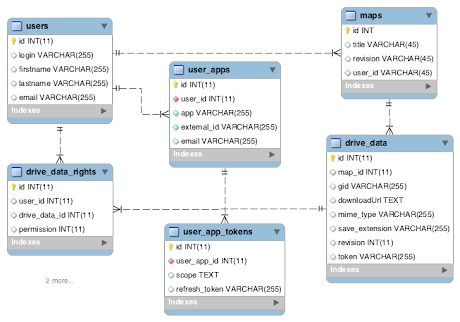
After analyzing the requirements and the use cases, we designed the following architecture:
Out of sync maps and files
Using the revision fields in both Map and DriveData we always know if the map has been edited on MindMeister’s side without it being synced with the corresponding file on Google Drive. On the other hand, the token field from DriveData represents the file’s MD5 checksum at the moment of the last update and is supplied via the Google Drive SDK. So if the file is edited externally using another application than MindMeister, we have a mechanism in place for detecting this issue and presenting the user with a few courses of action.
Handling 3rd party formats
Upon opening a file that has a different format than .mind, the user is prompted with an option dialog where they can chose if they want the file to be saved back in the same format or in MindMeister’s own format. These options are then remembered in the current session and the per map settings are stored in the extension (the original format) and save_extension (the format to save back in) fields present in the DriveData model.
Handling user’s permissions
A map on MindMeister can always be shared with other MindMeister users and the collaborators can have reading or writing access to the map. However, only some of these users will have a corresponding Google account with access to the MindMeister Google Drive application and furthermore, only some of them will have access to the same file on Google Drive with writing permission. This is why it is important for us to know which users can write back to the file and the solution for these access levels was achieved with the help of the permission field in the DriveDataRight model.
Results
Now more than two weeks on from the Google Drive launch and we can confidently say that our integration was successful, with more than 14,000 new users using Google login and with over 7,000 users that have enabled the Google Drive integration. All in all, the Google Drive SDK was very easy to use and well documented. The developer support, especially, was always there to help and our contacts were open to our suggestions.
 | Laura Bârlădeanu Laura is the lead programmer at MindMeister, an online mind mapping tool built in HTML5 that features real-time collaboration. |
Making Google Calendar Applications Faster Partial Response and Update
We recently launched the partial response and update feature for the Google Calendar Data API. Partial response and update allows you to request and update feeds containing only the elements that you’re interested in.
To request a partial response, you’ll need to add the fields query parameter to the end of the feed URL.
Request:
GET http://www.google.com/calendar/feeds/example@google.com/private/full?fields=entry(title,gd:when)Response:
<?xml version="1.0" encoding="UTF-8"?>
<feed xmlns="http://www.w3.org/2005/Atom" xmlns:gd="http://schemas.google.com/g/2005">
 <entry>
   <title type="text">Example meeting</title>
   <gd:when endTime="2010-03-25T09:00:00.000-07:00" startTime="2010-03-25T08:00:00.000-07:00">
     <gd:reminder method="alert" minutes="10"/>
     <gd:reminder method="sms" minutes="10"/>
   </gd:when>
 </entry>
 ... more entries ...
</feed>
To partially update a feed, you simply need to modify the partial request with your updates and submit it back to the server using HTTP
PATCH. The HTTP PATCH method prompts for the requested changes to be applied to the resource defined by the request URL. To remove elements, partial updates can use the gd:field attributes, which specifies elements to remove before merging with the target source. The example below updates the event title and time.Request:
PATCH http://www.google.com/calendar/feeds/default/private/full/eventID HTTP/1.1As you can see, the ability to partially request and update feeds greatly reduces the amount of data transferred, which is especially important in the mobile world.
Content-Type: application/xml
Host: www.google.com
GData-Version: 2
If-Match "FE8LQQJJeSp7IWA6WhVa"
<?xml version="1.0" encoding="UTF-8"?>
<entry>
<title type="text">Example meeting update</title>
<gd:when endTime="2010-03-27T10:00:00.000-07:00" startTime="2010-03-27T09:00:00.000-07:00">
<gd:reminder method="alert" minutes="10"/>
<gd:reminder method="sms" minutes="10"/>
</gd:when>
</entry>
For documentation on Google Calendar partial response and update, please refer to our Developer’s Guide.
We’ve also launched partial response and update for the YouTube Data API and Picasa Web Albums Data API and partial retrieval for the read-only Sidewiki Data API. For full details, please refer to our post on the Google Code Blog.
Wednesday, March 4, 2015
How to Have Both Portrait and Landscape Slides in One PowerPoint! ish!
For those of you interested, here was the final tally of the poll!

Before I start the tutorial, I do have to post a slight "disclaimer" on this post! PowerPoint itself does not allow you to have both portrait and landscape slides in the same presentation. Since so many of you asked about this, I wanted to be sure to address your issues... even though I cant change the limitations of the programs itself!
I pretty much detail this in the tutorial, but youll need to think about the reason you would want both portrait and landscape slides in a presentation. Personally, I could think of two reasons:
- To make an actual presentation (e.g. using PowerPoint for what it was meant to be used for)
- To make printables for your classroom (e.g. the "teacher" way to use PowerPoint! lol!)
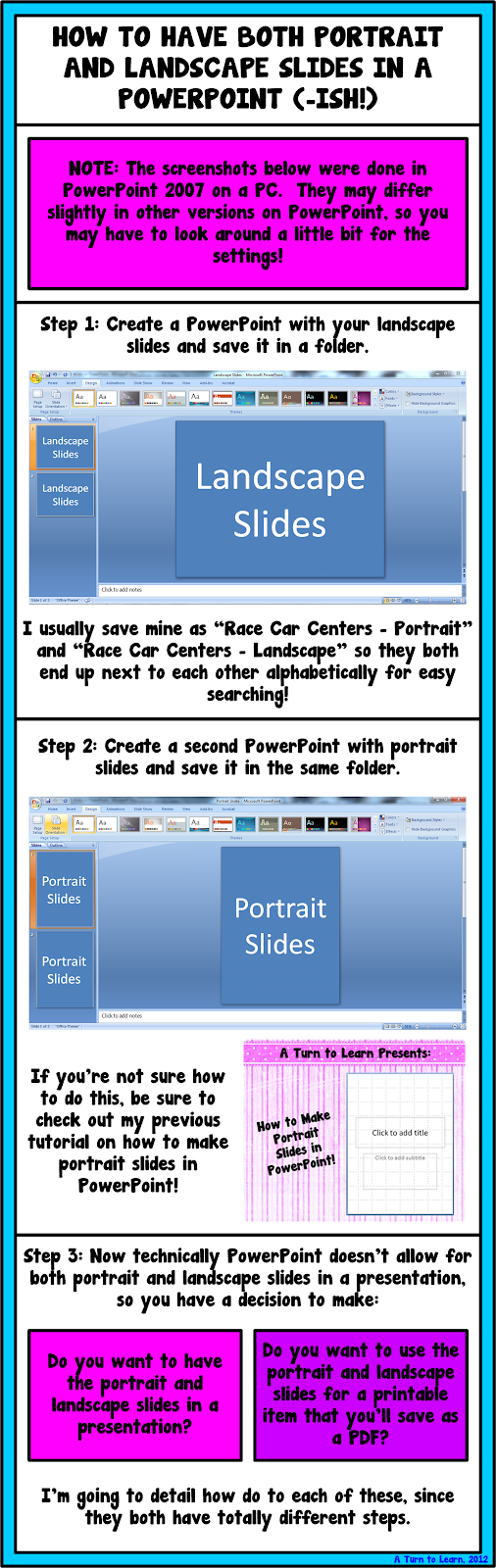
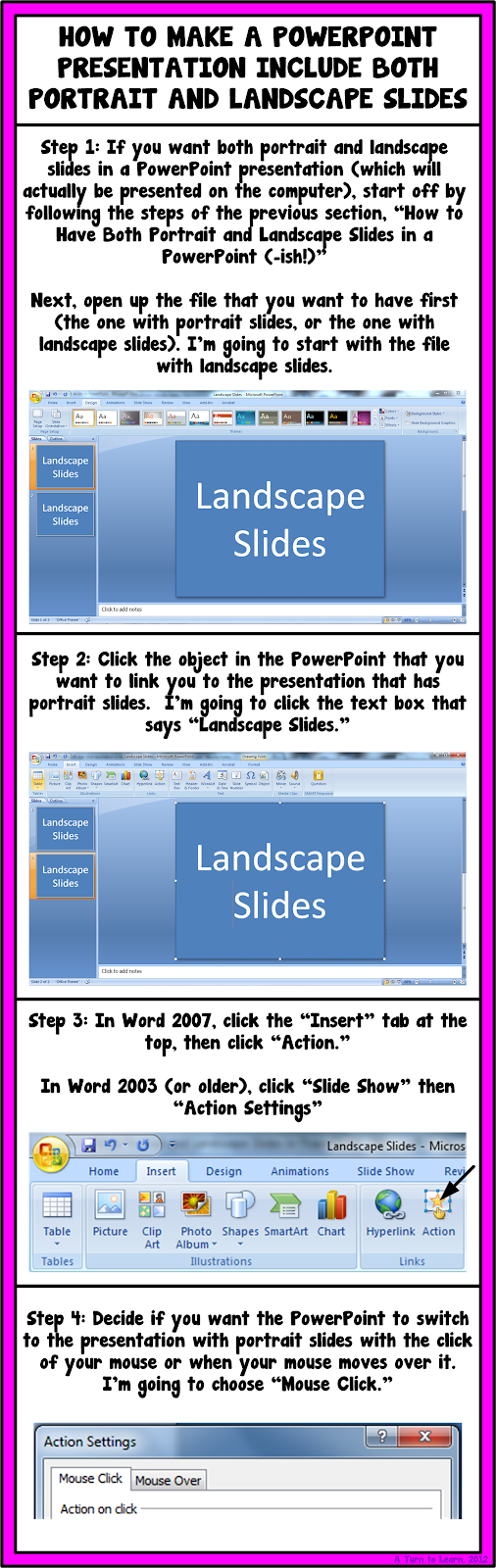

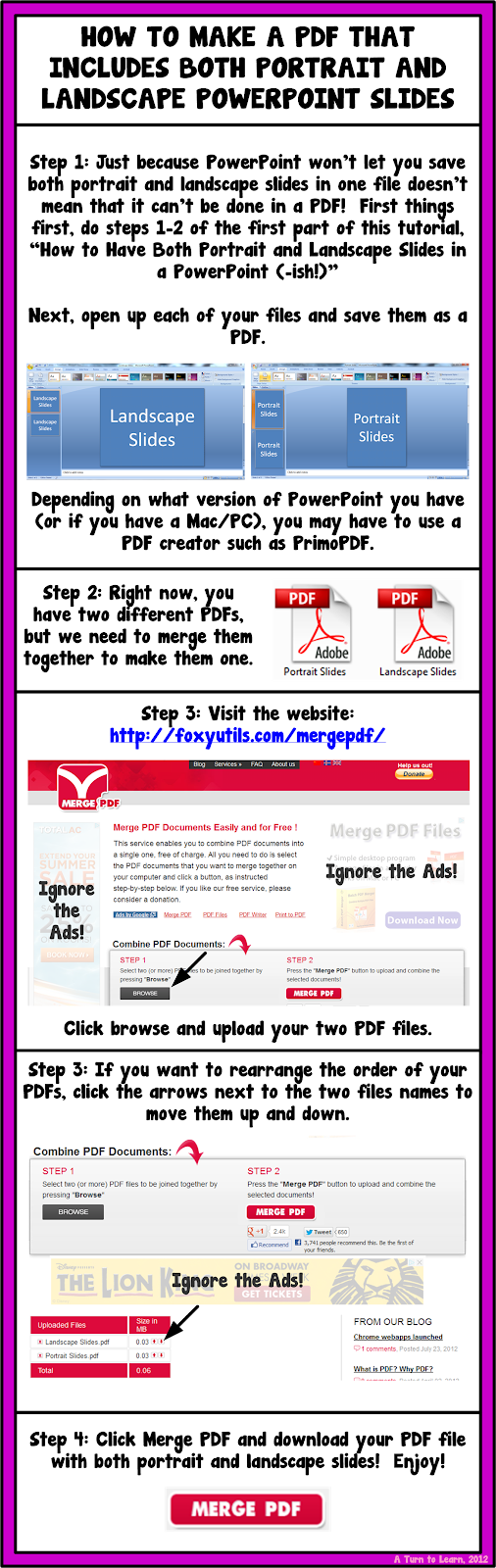
I hope those workarounds helped!

For next weeks poll, Im going to add how to embed fonts in a Microsoft Word/PowerPoint document!
Tuesday, March 3, 2015
LearnOutLoud com Free Audio Books Lectures and Speeches!
- Link to LearnOutLoud.com Free Stuff
- Reference - Learn Out Loud (Wynn Williamson)

WHAT?
LearnOutLoud.com is a one-stop destination for audio and video learning. Its collection allows you to browse over 15,000 educational audio books, MP3 downloads, podcasts, and videos.
JUICE?
As ZaidLearn is really about discovering, exploring, and reflecting free and/or open educational resources and tools, my interest on this site is only for the FREE STUFF. And LearnOutLoud.com has got some really juicy stuff not worth missing, including the:
- Free Directory - LearnOutLoud.com has scoured the Internet to bring you over 500 free audio and video titles (looking at the item numbers, it looks like it is more than 2000 items now, but I suppose that some of the items are in more than one category). Most audio titles can be downloaded in digital formats such as MP3 and most video titles are available to stream online.
- Authors - Complete resource to audio books from some of the greatest authors in self development, business, and more.
- Publishers - Comprehensive database of audio publishers including resources for language learning, rental services, and more.
- Articles - Dozens of free articles covering specific topics with audio & video suggestions to get you learning.
- Podcasts - It offers a number of its own educational podcasts.
In addition, you can enjoy their E-Magazine along with their Free Resource of the Day Email keep you updated on the world of audio & video learning.
Alright, that sounds cool, but what about the proof-of-juice? Here are a few individual podcasts that might get your learning mind ticking a bit:
- Malcolm X - Message To The Grass Roots
- Bill Gates - Software Breakthroughs
- A Conversation with G. Richard Wagoner, Chairman and CEO, General Motors
- The Search - John Battelle Speaks at Google NYC
- Barack Obama - "The Audacity of Hope"
- Thomas L. Friedman - The World is Flat
- A Conversation with Jack Welch
- Hedrick Smith - Is Wal-Mart Good for America?
- Martin Luther King, Jr. - I Have a Dream
- Mohandas Gandhi - A Spiritual Message to the World
I arrest my case :)
Monday, March 2, 2015
Phonics Worksheets Mega Pack Soft C Freebie and a Giveaway!

Since I really only need to review phonics for short vowels with a handful of students, I decided to print these pages in a binder and use dry-erase markers for those targeted for Response to Intervention! I printed it on colorful paper since it was almost all black and white ink... and I LOVE how it looked (as did the kids!) Check it out below!


And of course, next year, Ill be using many of the worksheets earlier in the year when I teach phonics. Now that I have so many cute worksheets for phonics, I kind of wish I taught a Letter of the Week, but I know I wouldnt have time for that!
Since Im also working on Soft C now, I decided to make a coordinating set of worksheets to go along with my soft c lesson plans... and as a thanks to all my loyal followers, here those are for free!

If you want to win this set for the whole alphabet along with some other amazing items, be sure to check out my friend Lianns blog for her Spring Giveaway! Click the link below to check out her giveaway (which ends May 27th!)

Saturday, February 28, 2015
The Quality and Extent of Online Education in the United States
Link to site & full report (PDF, 27 pages, 695K)
"The online enrollment projections have been realized, and there is no evidence that enrollments have reached a plateau. Online enrollments continue to grow at rates faster than for the overall student body, and schools expect the rate of growth to further increase:
- Over 1.9 million students were studying online in the fall of 2003.
- Schools expect the number of online students to grow to over 2.6 million by the fall of 2004.
- Schools expect online enrollment growth to accelerate ? the expected average growth rate for online students for 2004 is 24.8%, up from 19.8% in 2003.
Are students as satisfied with online courses as they are with face-to-face instruction?
- 40.7% of schools offering online courses agree that students are at least as satisfied? with their online courses, 56.2% are neutral and only 3.1% disagree.
- Medium and large schools strongly agree (with less than 3% disagreeing).
- The smallest schools (under 1,500 enrollments) are the least positive, but even they have only 5.4% disagreeing compared to 32.9% agreeing.
- Doctoral/Research, Masters, and Associates schools are very positive, Specialized and Baccalaureate schools only slightly less so."
Read the summary (at least) or the full report . This report is excellent (27 pages), and gives us insight to the e-learning or online education state and progress in U.S. higher education.
Friday, February 27, 2015
How to Make an Editable PowerPoint and Lock Down Clipart
This week the winner of the poll was how to make an editable powerpoint! For anyone who has purchased clipart online for your teacher products, youll notice it always says that the images need to be locked down... but how do you lock the images down and still keep an item editable!? Well... heres how!

This was a close one in the poll!

Now, onto the tutorial!


Adobe Photoshop Tips and Tricks
 |
| Adobe Photoshop Tips and Tricks |
- You can download about more then 1000 tips and tricks about Adobe Photoshop from the link below.
- Click Here to Download Adobe Photoshop Tips and Tricks guide.
Thursday, February 26, 2015
Excitment a Giveaway Reminder and a Poll!
If you havent entered yet, click the picture below to check out the giveaway for my new Uno game!

Also, to check out my post at Classroom Freebies Too, click the picture below!

Also, I think Im going to start a weekly tradition: a Technology Tuesday. Im going to add a poll to my sidebar to get your opinion on what I should blog about first! Be sure to vote!
Wednesday, February 25, 2015
Help Your Students Work on Teen Numbers and Introduce Coins!!!
I usually start the lesson reading a book about pennies and talking about how pennies are worth one cent. Then of course I model how to count pennies into the tens frames. I place a card at each students seat at the table, and have them go to their seats and count out that many pennies.
Then, comes the fun part... the dancing! I have the students dance around to room, usually to an instrumental of some popular song... last year it was Party Rock Anthem, this year it was Gangham Style! When the music stops, they have to find a chair and count out that many pennies!

They just love it... and its the perfect way to introduce counting pennies to a kindergartener while reviewing numbers 11-20!
You can grab this item, as well as all of my other items, for 28% off today only!!!

A Comparative Analysis with Traditional and Fully Online Graduate Courses
"(Abstract) Blended learning is a hybrid of classroom and online learning that includes some of the conveniences of online courses without the complete loss of face-to-face contact. The present study used a causal-comparative design to examine the relationship of sense of community between traditional classroom, blended, and fully online higher education learning environments. Evidence is provided to suggest that blended courses produce a stronger sense of community among students than either traditional or fully online courses...
Hara and Kling (2001), conducting a study of online courses, found that feelings of isolation were an important stress factor for online students, but not the primary factor as frequently mentioned in the professional literature. Rather, ?[s]tudents reported confusion, anxiety, and frustration due to the perceived lack of prompt or clear feedback from the instructor, and from ambiguous instructions on the course website and in e-mail messages from the instructor? ...
(Conclusion) The blended concept of learning is highly consistent with the three areas of change identified in the introduction:
- thinking less about delivering instruction and more about producing learning,
- reaching out to students through distance education technologies, and
- promoting a strong sense of community among learners.
Indeed, the concept of blended learning may be a synthesis of these areas as the learning environment becomes more learning-centered, with emphasis on active learning through collaboration and social construction of understanding. Such a concept is moving toward O?Banion?s (1997) vision of a learning college as a place where learning comes first and educational experiences are provided for learners anyway, anyplace, and anytime. Graham B. Spanier, president of The Pennsylvania State University, referred to this convergence of online and traditional instruction as the single-greatest unrecognized trend in higher education today (Young, 2002). "
Can Facebook Twitter and Linkedin GET YOU A JOB


Wednesday, February 18, 2015
C Program to do Addition subtraction and multiplication of two numbers using function
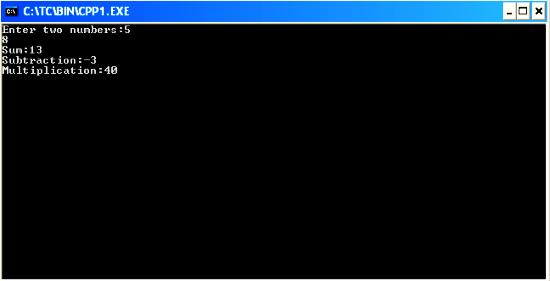
#include<iostream.h>
#include<conio.h>
int res;
void main()
{
clrscr();
int sum(int,int);
int sub(int,int);
int mul(int,int);
int a,b,m,su,s;
cout<<"Enter two numbers:";
cin>>a>>b;
s=sum(a,b);
su=sub(a,b);
m=mul(a,b);
cout<<"Sum:"<<s<<"
Subtraction:"<<su<<"
Multiplication:"<<m;
getch();
}
sum(int a,int b)
{
res=a+b;
return(res);
}
sub(int a,int b)
{
res=a-b;
return(res);
}
mul(int a,int b)
{
res=a*b;
return(res);
}