Showing posts with label c. Show all posts
Showing posts with label c. Show all posts
Monday, March 2, 2015
Phonics Worksheets Mega Pack Soft C Freebie and a Giveaway!
I had to do report cards this weekend... so of course it was time for some major procrastinating! I decided to "cute up" some items for RTI for my struggling students. I mostly have to focus on beginning short vowel sounds with a few of my little ones, but of course, I was on a roll, so I decided to re-vamp the whole alphabet! Heres the whole set of letters... with a whopping 13 pages per letter!!!

Since I really only need to review phonics for short vowels with a handful of students, I decided to print these pages in a binder and use dry-erase markers for those targeted for Response to Intervention! I printed it on colorful paper since it was almost all black and white ink... and I LOVE how it looked (as did the kids!) Check it out below!


And of course, next year, Ill be using many of the worksheets earlier in the year when I teach phonics. Now that I have so many cute worksheets for phonics, I kind of wish I taught a Letter of the Week, but I know I wouldnt have time for that!
Since Im also working on Soft C now, I decided to make a coordinating set of worksheets to go along with my soft c lesson plans... and as a thanks to all my loyal followers, here those are for free!

If you want to win this set for the whole alphabet along with some other amazing items, be sure to check out my friend Lianns blog for her Spring Giveaway! Click the link below to check out her giveaway (which ends May 27th!)

Read more »
Since I really only need to review phonics for short vowels with a handful of students, I decided to print these pages in a binder and use dry-erase markers for those targeted for Response to Intervention! I printed it on colorful paper since it was almost all black and white ink... and I LOVE how it looked (as did the kids!) Check it out below!
And of course, next year, Ill be using many of the worksheets earlier in the year when I teach phonics. Now that I have so many cute worksheets for phonics, I kind of wish I taught a Letter of the Week, but I know I wouldnt have time for that!
Since Im also working on Soft C now, I decided to make a coordinating set of worksheets to go along with my soft c lesson plans... and as a thanks to all my loyal followers, here those are for free!
If you want to win this set for the whole alphabet along with some other amazing items, be sure to check out my friend Lianns blog for her Spring Giveaway! Click the link below to check out her giveaway (which ends May 27th!)

Wednesday, February 18, 2015
C Program to do Addition subtraction and multiplication of two numbers using function
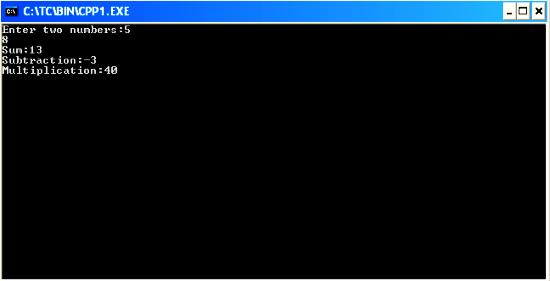
#include<iostream.h>
#include<conio.h>
int res;
void main()
{
clrscr();
int sum(int,int);
int sub(int,int);
int mul(int,int);
int a,b,m,su,s;
cout<<"Enter two numbers:";
cin>>a>>b;
s=sum(a,b);
su=sub(a,b);
m=mul(a,b);
cout<<"Sum:"<<s<<"
Subtraction:"<<su<<"
Multiplication:"<<m;
getch();
}
sum(int a,int b)
{
res=a+b;
return(res);
}
sub(int a,int b)
{
res=a-b;
return(res);
}
mul(int a,int b)
{
res=a*b;
return(res);
}
C if Statement Part 2
In the last tutorial we have learnt about the basic use of decision control instruction using if statement. Today we will extend that tutorial with some advanced examples.
So the general form of if statement is
if(expression)
{
Statement 1
Statement 2
. . . . .
. . . . .
}
if(3+2)
printf("This will print everytime");
if(6/2+4)
printf("This will print everytime");
if(0)
printf("This will never execute");
During the running of decision control instruction, a compiler checks the expression either it evaluates 0 or not. If the result is 0 then it will never execute the body of if statement. But if the expression evaluate to any non-zero number then it will execute the body of if statement.
In the first two examples, expression under if evaluates a non-zero value. So it will print the message.
In the last example, I have written 0. So the printf() statement is not executed.
Note: Usage of expression is very important in C language. While writing big programs it is used very frequently. So I recommend you to understand the basic logic behind it correctly. If you have any problems then you can also post your queries in comments.
Now lets take one slightly complicated program to understand all the basics associated with if statement.
Output
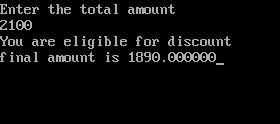
Now let’s try to understand this program
1. I hope you must understand the basic initial steps of this program. I will give the explanation for only if statement.
2. In if statement I have given the condition of (amnt>2000), it means it will check the amount if it is greater than 2000. Say, if it is greater than the amount then it will execute the statements in the body of if. Otherwise it will skip it.
3. In our test run we have given the value 2100, as it is greater than 2000. So the control passes inside the if statement body and do following things.
- First it will display the message "You are eligible for discount"
- In the next step it will calculate the discount i.e. 10% of the total amount.
- In the final step it will deduct the discount from the final amount.
4. Now in the last step it will display the final amount.
A bit more about conditions
As I told you earlier that if statement is used with some conditions. Truly speaking it can also be used with some expression.So the general form of if statement is
if(expression)
{
Statement 1
Statement 2
. . . . .
. . . . .
}
What is expression?
This expression can be any valid expression including relational and arithmetic expression. Some common examples are given below.if(3+2)
printf("This will print everytime");
if(6/2+4)
printf("This will print everytime");
if(0)
printf("This will never execute");
Conclusion
Truly speaking in C language any non-zero number is considered to be TRUE whereas zero is considered as FALSE.During the running of decision control instruction, a compiler checks the expression either it evaluates 0 or not. If the result is 0 then it will never execute the body of if statement. But if the expression evaluate to any non-zero number then it will execute the body of if statement.
In the first two examples, expression under if evaluates a non-zero value. So it will print the message.
In the last example, I have written 0. So the printf() statement is not executed.
Note: Usage of expression is very important in C language. While writing big programs it is used very frequently. So I recommend you to understand the basic logic behind it correctly. If you have any problems then you can also post your queries in comments.
Now lets take one slightly complicated program to understand all the basics associated with if statement.
Sample Program
Make one program which will display the total amount after deducting the discount of 10%, if the total is more than 2000./*Program to show discount*/
#include <stdio.h>
void main()
{
float amnt,famnt,dis;
printf("Enter the total amount
");
scanf("%f",&amnt);
famnt=amnt;
if (amnt>2000)
{
printf("You are eligible for discount
");
dis=0.1*amnt;
famnt=famnt-dis;
}
printf("final amount is %f",famnt);
}
Output
Now let’s try to understand this program
1. I hope you must understand the basic initial steps of this program. I will give the explanation for only if statement.
2. In if statement I have given the condition of (amnt>2000), it means it will check the amount if it is greater than 2000. Say, if it is greater than the amount then it will execute the statements in the body of if. Otherwise it will skip it.
3. In our test run we have given the value 2100, as it is greater than 2000. So the control passes inside the if statement body and do following things.
- First it will display the message "You are eligible for discount"
- In the next step it will calculate the discount i.e. 10% of the total amount.
- In the final step it will deduct the discount from the final amount.
4. Now in the last step it will display the final amount.
Make Analog Clock in C Using Graphics
In this tutorial you will learn how you can create an analog clock in C using graphics. This tutorial is written in a way that a beginner C graphics programmer can also understand.
Before getting into the main let me explain the functions I have used in the program.
Also Read: C/C++ Program to Create a Digital Stopwatch
Also Read: Simple program to create a circular loading bar using graphics
clockLayout()
Ive used this function to print the clock layout i.e. clock dial and the markings on the clock. If we observe clearly, the clock has hours marking each separated by 30 degrees and each hour is divided into 5 markings each making an angle of 6 degrees. So, iterating the markings for every 30 degrees gives hours and iterating markings with 6 degrees give minutes markings on the clock. The clock would look like this after executing this function.

secHand()
It is clear from the name that this gonna do something with the seconds hand. This function is going to get the present second from the system clock and incline the line according to a particular angle. Eg: if the present seconds is 5 then the angle of the seconds hand with respect to the vertical must be 30 degrees, i.e. 5*6=30.
minHand()
This function fulfills the task of moving the minutes hand based on the system clock. The minutes hand must be inclined 6 degrees for every minute passing. Eg: if the elapsed minutes are 30 then the minutes hand angle must be making 180 degrees with the vertical.
hrHand()
This function is going to print an inclined hours line. The function is designed to get the present hour and also the no. of elapsed minutes from the system clock and incline the line according to a particular angle. For every hour elapsed the hour hand moves 30 degrees and every 12 minutes it moves 6 degrees.
main()
The first lines in main are graphic initialization, you must change the path "c:\turboc3\bgi\" to your compilers BGI file path otherwise program will not work. Coming to the while loop, the while loop iterates for every 100 milliseconds reprinting all the functions. This program is like getting the static picture of clock every second and combining all the pictures to make a moving analog clock.
Also Read: Simple program to create a moving car in graphics
About Author
Prathap is a passionate blogger and a very good programmer presently studying B.Tech in Computer Science. He is fascinated of latest technology, gadgets and also love to exploit technology and learn new tips and tricks in internet. He is the founder of Tech Google.
Before getting into the main let me explain the functions I have used in the program.
Also Read: C/C++ Program to Create a Digital Stopwatch
Also Read: Simple program to create a circular loading bar using graphics
clockLayout()
Ive used this function to print the clock layout i.e. clock dial and the markings on the clock. If we observe clearly, the clock has hours marking each separated by 30 degrees and each hour is divided into 5 markings each making an angle of 6 degrees. So, iterating the markings for every 30 degrees gives hours and iterating markings with 6 degrees give minutes markings on the clock. The clock would look like this after executing this function.
secHand()
It is clear from the name that this gonna do something with the seconds hand. This function is going to get the present second from the system clock and incline the line according to a particular angle. Eg: if the present seconds is 5 then the angle of the seconds hand with respect to the vertical must be 30 degrees, i.e. 5*6=30.
minHand()
This function fulfills the task of moving the minutes hand based on the system clock. The minutes hand must be inclined 6 degrees for every minute passing. Eg: if the elapsed minutes are 30 then the minutes hand angle must be making 180 degrees with the vertical.
hrHand()
This function is going to print an inclined hours line. The function is designed to get the present hour and also the no. of elapsed minutes from the system clock and incline the line according to a particular angle. For every hour elapsed the hour hand moves 30 degrees and every 12 minutes it moves 6 degrees.
main()
The first lines in main are graphic initialization, you must change the path "c:\turboc3\bgi\" to your compilers BGI file path otherwise program will not work. Coming to the while loop, the while loop iterates for every 100 milliseconds reprinting all the functions. This program is like getting the static picture of clock every second and combining all the pictures to make a moving analog clock.
Also Read: Simple program to create a moving car in graphics
Check out this video for demo
Program for Analog Clock in C
/* Graphical Analog Clock designed in C*/
/*Note press ctrl+pause break to stop the clock while executing in TC*/

#include<stdio.h>
#include<graphics.h>
#include<stdlib.h>
#include<math.h>
#include<dos.h>
#include<time.h>

#define PI 3.147

void clockLayout();
void secHand();
void hrHand();
void minHand();
int maxx,maxy;

void main()
{
 int gdriver=DETECT,gmode,error;
 initgraph(&gdriver,&gmode,"c:\turboc3\bgi\");
 error=graphresult();
 if(error!=grOk)
 {
  printf("Error in graphics, code= %d",grapherrormsg(error));
  exit(0);
 }

 while(1)
 {
  clockLayout();
  secHand();
  minHand();
  hrHand();
  sleep(1);                /* pausing the outputscreen for 1 sec */
  cleardevice();           /* clearing the previous picture of clock */
 }
}

void clockLayout()
{
 int i,x,y,r;
 float j;
 maxx=getmaxx();
 maxy=getmaxy();

 for(i=1;i<5;i++)
 {                   /* printing a round ring with outer radius of 5 pixel */
  setcolor(YELLOW);
  circle(maxx/2,maxy/2,120-i);
 }

 pieslice(maxx/2,maxy/2,0,360,5);    /* displaying a circle in the middle of clock */
 x=maxx/2+100;y=maxy/2;
 r=100;
 setcolor(BLUE);

 for(j=PI/6;j<=(2*PI);j+=(PI/6))
 {    /* marking the hours for every 30 degrees */
  pieslice(x,y,0,360,4);
  x=(maxx/2)+r*cos(j);
  y=(maxy/2)+r*sin(j);
 }

 x=maxx/2+100;y=maxy/2;
 r=100;
 setcolor(RED);

 for(j=PI/30;j<=(2*PI);j+=(PI/30))
 {  /* marking the minutes for every 6 degrees */
  pieslice(x,y,0,360,2);
  x=(maxx/2)+r*cos(j);
  y=(maxy/2)+r*sin(j);
 }
}

void secHand()
{
 struct time t;
 int r=80,x=maxx/2,y=maxy/2,sec;
 float O;

 maxx=getmaxx();maxy=getmaxy();
 gettime(&t);                     /*getting the seconds in system clock */
 sec=t.ti_sec;
 O=sec*(PI/30)-(PI/2);           /* determining the angle of the line with respect to vertical */
 setcolor(YELLOW);
 line(maxx/2,maxy/2,x+r*cos(O),y+r*sin(O));
}

void hrHand()
{
 int r=50,hr,min;
 int x,y;
 struct time t;
 float O;

 maxx=getmaxx();
 maxy=getmaxy();
 x=maxx/2,y=maxy/2;
 gettime(&t);                     /*getting the seconds in system clock */
 hr=t.ti_hour;
 min=t.ti_min;

 /* determining the angle of the line with respect to vertical */
 if(hr<=12)O=(hr*(PI/6)-(PI/2))+((min/12)*(PI/30));
 if(hr>12) O=((hr-12)*(PI/6)-(PI/2))+((min/12)*(PI/30));
 setcolor(BLUE);
 line(maxx/2,maxy/2,x+r*cos(O),y+r*sin(O));
}

void minHand()
{
 int r=60,min;
 int x,y;
 float O;
 struct time t;
 maxx=getmaxx();
 maxy=getmaxy();
 x=maxx/2;
 y=maxy/2;
 gettime(&t);  /*getting the seconds in system clock */
 min=t.ti_min;
 O=(min*(PI/30)-(PI/2)); /* determining the angle of the line with respect to vertical */
 setcolor(RED);
 line(maxx/2,maxy/2,x+r*cos(O),y+r*sin(O));
}
About Author
Prathap is a passionate blogger and a very good programmer presently studying B.Tech in Computer Science. He is fascinated of latest technology, gadgets and also love to exploit technology and learn new tips and tricks in internet. He is the founder of Tech Google.
Tuesday, February 17, 2015
C program to multiply two matrices
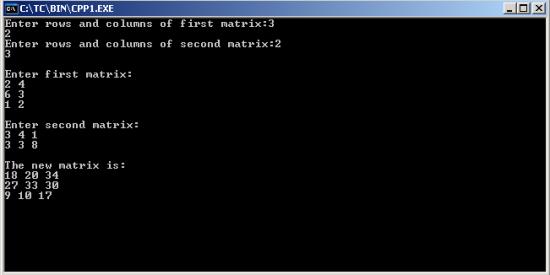
#include<iostream.h>
#include<conio.h>
void main()
{
clrscr();
int a[5][5],b[5][5],c[5][5],m,n,p,q,i,j,k;
cout<<"Enter rows and columns of first matrix:";
cin>>m>>n;
cout<<"Enter rows and columns of second matrix:";
cin>>p>>q;
if(n==p)
{
cout<<"
Enter first matrix:
";
for(i=0;i<m;++i)
for(j=0;j<n;++j)
cin>>a[i][j];
cout<<"
Enter second matrix:
";
for(i=0;i<p;++i)
for(j=0;j<q;++j)
cin>>b[i][j];
cout<<"
The new matrix is:
";
for(i=0;i<m;++i)
{
for(j=0;j<q;++j)
{
c[i][j]=0;
for(k=0;k<n;++k)
c[i][j]=c[i][j]+(a[i][k]*b[k][j]);
cout<<c[i][j]<<" ";
}
cout<<"
";
}
}
else
cout<<"
Sorry!!!! Matrix multiplication cant be done";
getch();
}
do while loop in C
Till now we have learnt the most frequently used loops in C programming which are for and while loop. Now lets learn about the third loop control instruction which is do while loop.
do while loop is just like a normal loop control instruction which executes a set of statements until the condition turns false.
do
{
do this
and this atleast once!
}while(condition);
Note: Remember writing semi colon after while keyword in do while loop. This is the most common mistake of a beginner C programmer.
Lets make one program to grasp this loop too.
Output
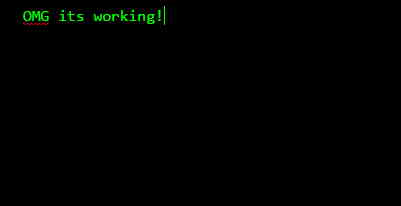
Explanation
Well it’s a very simple program to demonstrate the use of do while loops. As you can see the condition is wrong with while keyword. But still the printf() function will get executed once.
Usage of break and continue with do while loop
break: It will work similar to other loops. By introducing break keyword it will take control outside the loop. Remember it is not recommended to use break keyword inside loops without if statement.
continue: The functioning of continue will also work similar to other ones. However do while loop can make some good twist to the programs, if used properly with continue keyword.
This is the last loop control instruction of C programming. I recommend to try your hands on do while loops too. In the next tutorial I will tell you the best way to make Menu in C programming.
do while loop is just like a normal loop control instruction which executes a set of statements until the condition turns false.
do while loop in C
Till now we have learnt that loops checks the condition first before executing the set of statements inside its body. But this loop is a bit different than others. It is compulsory that the statements under the body of do while loop will get executed at least once in a program. This loop control instruction executes its statements first, after that it checks the condition for it.Why do we use do while loops?
Well that’s a really silly question. You cannot predict anything before programming some big thing. While writing some complex big programs, there is a need of a loop which will execute statements at least once. That’s why do while loop is introduced in C.Syntax
{
do this
and this atleast once!
}while(condition);
 |
| Flowchart of do while loop in C - Image Source |
Note: Remember writing semi colon after while keyword in do while loop. This is the most common mistake of a beginner C programmer.
Lets make one program to grasp this loop too.
#include<stdio.h>

void main()
{
	do
	{
		printf("OMG its working!");
	}while(7>10);
}
Output
Well it’s a very simple program to demonstrate the use of do while loops. As you can see the condition is wrong with while keyword. But still the printf() function will get executed once.
Usage of break and continue with do while loop
break: It will work similar to other loops. By introducing break keyword it will take control outside the loop. Remember it is not recommended to use break keyword inside loops without if statement.
continue: The functioning of continue will also work similar to other ones. However do while loop can make some good twist to the programs, if used properly with continue keyword.
This is the last loop control instruction of C programming. I recommend to try your hands on do while loops too. In the next tutorial I will tell you the best way to make Menu in C programming.
Monday, February 16, 2015
C program to find whether a number is an Armstrong number or not
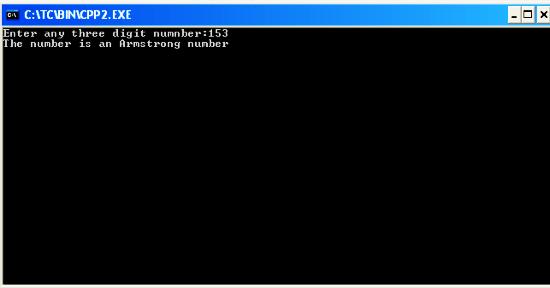
#include<iostream.h>
#include<conio.h>
#include<math.h>
void main()
{
clrscr();
int n,m=0,x,y;
cout<<"Enter any three digit numnber:";
cin>>n;
y=n;
while(n!=0)
{
x=n%10;
m+=pow(x,3);
n=n/10;
}
if(y==m)
cout<<"The number is an Armstrong number";
else
cout<<"The number is not an Armstrong number";
getch();
}
Sunday, February 15, 2015
Functions in C Programming Part 2
Read: Functions in C Programming - Part 1
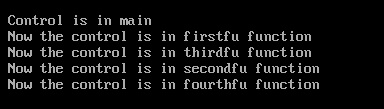
In my last tutorial I gave an overview to the functions in C programming. Today I will tell you about the multiple calls within one function and its nuances. So without wasting any time lets head over to a program.
Output
A simple concept to learn
Suppose main() function calls another function msg(). When the control reach to the msg() function then the activity of main() will be suspended temporarily. After executing all the statements from the msg() function, the control will automatically goes to the original calling function (main() in our case).
Explanation
Points to Remember
1. Any C program contains at least one function and it should be main().
void main()
{
msg();
}
5. We can call one function any number of times.
void main()
{
msg();
msg();
}
6. A function can also called by itself. Such an execution is called recursion.
7. We cannot define one function inside another. We can only call one function from another.
In my last tutorial I gave an overview to the functions in C programming. Today I will tell you about the multiple calls within one function and its nuances. So without wasting any time lets head over to a program.
Functions in C Programming
#include<stdio.h>

void firstfu();
void secondfu();
void thirdfu();
void fourthfu();


void main()
{
 printf(" Control is in main
");
 firstfu();
}

void firstfu()
{
 printf(" Now the control is in firstfu function
");
 thirdfu();
}

void secondfu()
{
 printf(" Now the control is in secondfu function
");
 fourthfu();
}

void thirdfu()
{
 printf(" Now the control is in thirdfu function
");
 secondfu();
}

void fourthfu()
{
 printf(" Now the control is in fourthfu function
");
}
Output
Suppose main() function calls another function msg(). When the control reach to the msg() function then the activity of main() will be suspended temporarily. After executing all the statements from the msg() function, the control will automatically goes to the original calling function (main() in our case).
Explanation
- The program starts with main() function and it will print the message inside it. After that I have called the firstfu() function from main(). Remember here main() is calling function and firstfu() is called function.
- Now the control reaches to firstfu() function and the activity of main() function is suspended temporarily. Inside firstfu() function, printf() will print a message. Now I have called thirdfu() function. Remember here firstfu() is calling function and thirdfu() is called function
- Now the control reaches to the thirdfu() function and the activity of firstfu() function is suspended temporarily. And it will execute its printf() function. Now I have called the secondfu() function.
- Same thing will happened to the secondfu() function and it will call the fourthfu() function.
- Now the printf() statement will be executed inside the fourthfu() function. As there is no further call to other function there. So the control will goes back to the calling function. Calling function of fourthfu() is secondfu().
- No more statements is left in secondfu(). So the control will reach to the calling function. thirdfu() is the calling function of secondf().
- Same execution will be done for all of them. And the control will reach to the main() function again. Now no statement is left in main() function, so the program will be terminated.
Points to Remember
1. Any C program contains at least one function and it should be main().
The execution of the program always starts with main() function. We cannot alter it in any case.
2. A typical C program may contain any number of functions. But it should contain one main() function and the program will start executing with main() function.
3. Any function can call any other function. Even main() function can be called from other functions. To call a function we have to write the function name followed by a semi colon.
{
msg();
}
4. We should define a function before calling it. A function can be defined by following below syntax.
5. We can call one function any number of times.
void main()
{
msg();
msg();
}
6. A function can also called by itself. Such an execution is called recursion.
7. We cannot define one function inside another. We can only call one function from another.
Friday, February 13, 2015
C program that accepts marks in 5 subjects and outputs average marks

#include<stdio.h>
#include<conio.h>
void main()
{
int a,b,c,d,e,average;
clrscr();
printf("Enter marks of subject 1:");
scanf("%d",&a);
printf("Enter marks of subject 2:");
scanf("%d",&b);
printf("Enter marks of subject 3:");
scanf("%d",&c);
printf("Enter marks of subject 4:");
scanf("%d",&d);
printf("Enter marks of subject 5:");
scanf("%d",&e);
average=(a+b+c+d+e)/5;
printf("
Average=%d",average);
getch();
}
C Program to calculate roots of quadratic equation ax 2 bx c 0
#include<iostream.h>
#include<conio.h>
#include<math.h> //to claculate square root
void main()
{
clrscr(); //to clear the screen
float root1,root2,a,b,c,d;
cout<<"Quadratic Equation is ax^2=bx+c=0";
cout<<" Enter values of a,b and c:";
cin>>a>>b>>c;
d=(b*b)-(4*a*c);
if(d>0)
{
cout<<"
Two real and distinct roots";
root1=(-b+sqrt(d))/(2*a);
root2=(-b-sqrt(d))/(2*a);
cout<<"
Roots are "<<root1<<" and "<<root2;
}
else
if(d==0)
{
cout<<"
Two real and equal roots";
root1=root2=-b/(2*a);
cout<<"
Roots are "<<root1<<" and "<<root2;
}
else
cout<<"
Roots are COMPLEX and IMAGINARY....!!!";
getch(); //to stop the screen
}
Structure in C Part 2
Read: Structure in C - Part 1
In the last tutorial I told you about the basic use of structure in C programming. I gave an overview of declaration and definition of structures. Armed with that basic knowledge, today I will tell you about how to access structure elements. Apart from this I will also tell you about the memory allocation of structure elements and array of structure. So lets get started.
Above code will display the name, roll number and marks of student s1. Consider carefully I have accessed the elements using dot operator.
Making an array of structure is similar to creating a normal array. For this we only need to define a structure. After that we have to make an array of structure. Consider below program to understand it properly.
Output

Explanation
In this example I am storing the records of books in a library system. You can see I have created an array of structure of size 3 and that is storing 3 records from the user and then displaying the same on the screen.
In the last tutorial I told you about the basic use of structure in C programming. I gave an overview of declaration and definition of structures. Armed with that basic knowledge, today I will tell you about how to access structure elements. Apart from this I will also tell you about the memory allocation of structure elements and array of structure. So lets get started.
Structure in C
Accessing Elements of Structure
It is important to define the structure before accessing it. In arrays we use subscript to access the array elements. But this concept is slightly different from them. To access the structure elements we use dot operator or member access operator (.). We have to write the name of structure variable followed by a dot and structure element. One small example is given below.//structure definition
struct student
{
char name[10];
int roll;
int marks;
}s1;
struct student s1={"Rishi",4,56}; //storing values
//accessing structure elements
printf("%s%d%d",s1.name,s1.roll,s1.marks);
Memory Allocation of Structure Elements
Structure elements are stored similar to array elements. It means the structure elements are also stored in contiguous memory locations. As I have said earlier, at the time of structure variable declaration, memory is allotted to it. In our above example 14 bytes (10 for string and 4 for two integers) will be allocated for s1.Array of Structure
Before proceeding to this topic I want to ask you – Is it possible to create array of structure? Well of course Yes. If we can make array of pointers, array of chars and so on then we can also make array of structure.Making an array of structure is similar to creating a normal array. For this we only need to define a structure. After that we have to make an array of structure. Consider below program to understand it properly.
#include<stdio.h>

int main()
{
 struct library
 {
  char lang[10];
  int pages;
  char name[20];
 };

 struct library lib[3];
 int i;

 for(i=0;i<3;i++)
 {
  printf("
Enter language, pages and name
");
  scanf("%s%d%s",&lib[i].lang,&lib[i].pages,&lib[i].name);
 }

 for(i=0;i<3;i++)
  printf ( "
%s	%d	%s
",lib[i].lang,lib[i].pages,lib[i].name);

 return 0;
}
Output
In this example I am storing the records of books in a library system. You can see I have created an array of structure of size 3 and that is storing 3 records from the user and then displaying the same on the screen.
Thursday, February 12, 2015
Download Dev C 5 5 3 C C IDE for Free

Also Read: GCC Compiler: Download Code::Blocks 12.11 a Free C/C++ IDE
Also Read: Download Turbo C++ for Windows 8 for Free
Size: 41.66 MB
OS: Windows All
License: Free
- Download -
Features of Dev C++ 5.5.3
- MinGW GCC 4.7.2 32bit
- TDM-GCC 4.7.1 32/64bit
- Syntax highlighting
- Code completion
- Shows information about code when hovering above code
- Provides user-editable shortcuts and tools
- GPROF profiling
- GDB debugging
- Devpak IDE extensions
Screenshots


If you liked the article then don’t forget to comment and share!!
Wednesday, February 11, 2015
What is Virtual Base Class in C

Take a situation where all the three types of inheritance, multiple, multilevel and hierarchical inheritance are used together. This situation is illustrated in above image.
The child has two base classes parent1and parent2 and these two have a common base class grandparent. All the public and protected members of grandparentare inherited into child twice, first from parent1 and again from parent2. This means that child have duplicate sets of members inherited from grandparent. It causes ambiguity in the program.
Also Read: What is Recursive Permutation in C++? [Algorithm and Source Code]
Also Read: C++ Templates: Program to Swap Two Numbers Using Function Template
This kind of problem can be resolved by making the common base class as a virtual base class. It can be done in following way:
class grandparent
{
. . . . . .
. . . . . .
};
class parent1: virtual public grandparent
{
. . . . . .
. . . . . .
};
class parent2: public virtual grandparent
{
. . . . . .
. . . . . .
};
class child: public parent1, public parent2
{
. . . . . .
. . . . . .
};
If a class is made a virtual base class, only one copy of that class is inherited in derived class. Remember one thing that the keyword virtual and public may be used in either order.
Below I have written a program that implements the concept of virtual base class.
Also Read: Menu Driven C Program to Perform Insert, Display and Delete Operations on a Singly Linked List (SLL)

#include<iostream>
using namespace std;
class student
{
protected:
int roll_no;
public:
void get_no(int x)
{
roll_no=x;
}
void put_no()
{
cout<<"Roll Number:"<<roll_no;
}
};
class test: virtual public student
{
protected:
float sub_marks;
public:
void get_submarks(float y)
{
sub_marks=y;
}
void put_submarks()
{
cout<<"
Subject Marks:"<<sub_marks;
Subject Marks:"<<sub_marks;
}
};
class sports: public virtual student
{
protected:
float sp_marks;
public:
void get_spmarks(float z)
{
sp_marks=z;
}
void put_spmarks()
{
cout<<"
Sports Marks:"<<sp_marks;
Sports Marks:"<<sp_marks;
}
};
class result: public test, public sports
{
float total_marks;
public:
void put_result()
{
total_marks=sub_marks+sp_marks;
put_no();
put_submarks();
put_spmarks();
cout<<"
Total Marks:"<<total_marks;
Total Marks:"<<total_marks;
}
};
int main()
{
result R;
R.get_no(20);
R.get_submarks(75.6);
R.get_spmarks(81.2);
R.put_result();
return 0;
}
In the above example student class is an abstract class, as it is not used to create any object. It is used only for deriving other classes.
If you liked this article then don’t forget to comment and share.
Subscribe to:
Posts (Atom)