Tuesday, March 3, 2015
Any Free Hosted CMS or LMS Yes Obama Says!
- Related Posts - Edu2.0 & LectureShare
Can We Host and Facilitate Our Courses Online For Free?
 Are there any FREE Course/Learning Management Systems (C/LMS) out there that require no financial hardware, software and hosting investments? In other words, are the any free hosted C/LMS that we can explore and perhaps use?
FREE HOSTED C/LMS?
Here are a few free hosted C/LMS that you might want to explore, before considering investing hardcore money on a commercial alternative:
- Schoology
A free web-based learning management system (LMS) built on a social network. Schoology leverages the familiarity of popular social media tools to improve communication and collaboration. - Nfomedia
A web application designed especially to enable interaction outside of the classroom for higher education courses. Features include: wiki content editing, course blogs, online grades, announcements, text messaging, Nfo mail, message boards, student journals, and chat. - Edu2.0
A Free web-based education site with a comprehensive set of features for teachers, students and parents. Features include: content management/sharing, calendar, attendance tracking, quiz, forums, notifications, and grade book with graphical reports. - MyiCourse
Provides tools for users to build, manage and deliver courses. Users can even construct private and public universities. It allows a multi-media approach using video, audio, images and PDFs. Students can be timed, tested and they can send their transcripts after course completion. It also allows sharing of academic courses for all to use. - LectureShare
A service that connects students and instructors by allowing instructors to post course material and allowing students to get course updates via text messages, emails or RSS. - SchoolRack
Is a free online tool for K-12 teachers to establish classroom portals for students and parents. Features include calendar, file sharing, discussion boards, internal messaging, mailing lists, and online assignment collection for teachers to use. - eLearning Community 2.0
A social site for knowledge seekers to enrich their knowledge through online learning, sharing and socializing to make new friends without boundaries (It even includes an online conferencing tool! Then again you could always integrate WiZiQ or DimDim if this is not already included in your system). - Ecto
A collaborative personal learning environment. Any member of Ecto (students, teachers, publishers) can create and share content. It claims to be the only learning management system built from the ground up on the principles and architecture of social software. - Chalksite
A web package designed for teachers, giving them class-level Web sites and tools. Features include: content management, messages, assignments, forums, and grade books. - CollegeBrain.net
A free web-based Course Management Service (CMS) that enables instructors to manage their courses online and provides students with collaborative tools to interact with their classmates. They dont allow the usage of advertisements on their course management tools, nor do they charge license fees. This is certainly a great plus, because I would love to learn without being stuffed with advertisements from every corner of the screen.
If we explore further, I suppose we will discover several more free hosted C/LMS. By the end of 2008, it wouldnt surprise me if the number of free hosted C/LMS will increase to beyond 100. How do they make money? Advertising, donations, venture capital, etc.! I suppose some are holding on (while loosing money!) hoping that some big Giant (e.g. MSN, Yahoo, Google and Facebook) will soon acquire them for a big buck.
For whatever reason they are doing it (noble and/or business), we users are going to increasingly be spoilt for choice, and issue of free will not be sufficient. In addition, these learning solutions would need to be easy-to-learn/use, and empower us with the necessary learning tools, features and capacities (storage, scalability, export/import tools, 24/7 support, etc.) to enable us to facilitate effective and engaging learning environments tailored to students learning needs.
 IMAGINE!
Alright, we have time-ported to 2012. I suppose the University has its own system (commercial, open source, or in-house built) to manage all the critical student, staff, and course data (records, billing, results, registration, etc.), but interestingly most systems have managed to go beyond, and now enable educators to choose which C/LMS (or social/collaborative learning system) that they would want to use to facilitate learning, if the local one does not meet their needs. Not only can they change template and customize features used, they can also use externally hosted C/LMS if they want (application assembly tool! Widgets!). This has been enabled, because all systems now communicate through a common language, enabling educators to easily import and export (or integrate) courses, content, and results with a few simple clicks.
The beauty of all this is that now Universities, Colleges, and Schools can invest more of their funds instead on hiring top-notch educators, and have larger budgets for training and faculty support. e-Learning CMS/LMS/PLE (Personal Learning Environments) providers will get their share via advertising, donations, and venture capital. Tools are free! Content is free! Learning is free!
Interestingly, some entrepreneurial students would have figured out ways to make money sense out of all this! They will be making money by selling their lecture notes, exams information, written reports, study guides, examination tips, etc. using tools like ShareNotes. Also, new advertising models will have blossomed basically paying both the students study fees and lecturers basic salaries, so that will also not be much of an issue. The Internet will be everywhere, computer devices will be charged by human touch. The only thing separating us from learning is our will or motivation to learn!
The free (at least partially!) global formal learning network ecosystem is complete. What a wonderful world! Can we do it? Yes, we can! Is this a good idea? I suppose I will use my imagination to come up with a better one soon :)

Monday, March 2, 2015
How to Make a Form for Your Blog or Website!

Heres the poll so you can see just how close it was!

Now... onto the tutorial!


Now, I know that I didnt detail how to embed the form on your blog... if thats something youre interested in doing, be sure to vote on the poll for "How to add HTML/embed code to a blog post!" For those of you who are familiar with how to add the code on your blog, you can use the embed code from the drop-down menu in the picture just above this text!

For next weeks poll, Im going to add another request - how to take the background out of a photograph (so that the photo has a white background!
Friday, February 27, 2015
Find a Word or Phrase in a Document or on a Website!
This one is a gem... it can be used in so many programs! Use it in Word and PowerPoint... or use it in Internet Explorer, Chrome, Safari or Firefox! As far as Ive been able to find, it works in almost every program! So... if you want a quick way to find a word or phrase in a document or on a website, this is the perfect tip for you!

Try it out and let me know how you like it!
50 Ideas 15 tools for Free or low cost E Learning
"Matthew Fox at Kineo reviews 15 free or low cost tools and gives 50 ideas on how to use them in your own organization."
An excellent 58 page free article or white paper worth reading (or at least browse through). If your educational institutions or organization are looking for e-learning tools (or content) that are free or low cost that actually has some proven record, then this resource can be of tremendous value. Also, it provides many useful ideas to fuel our minds on thinking wiser in terms of e-learning implementation, usage and practice.
Who said that e-learning needs to be time consuming or expensive?
Who came up with that funny term "White paper"? Another funny one is "Blue Print". We need to be more creative with the selection of colors for these terms .
Monday, February 16, 2015
C program to find whether a number is an Armstrong number or not
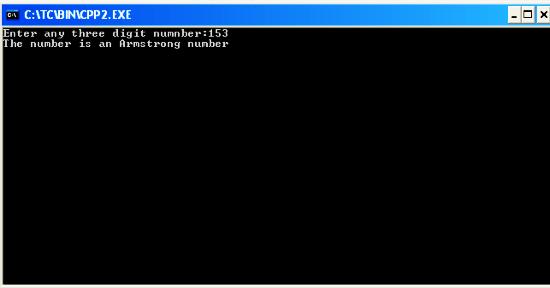
#include<iostream.h>
#include<conio.h>
#include<math.h>
void main()
{
clrscr();
int n,m=0,x,y;
cout<<"Enter any three digit numnber:";
cin>>n;
y=n;
while(n!=0)
{
x=n%10;
m+=pow(x,3);
n=n/10;
}
if(y==m)
cout<<"The number is an Armstrong number";
else
cout<<"The number is not an Armstrong number";
getch();
}
Saturday, February 14, 2015
Internet Download Manager 6 18 Build 7 full version with crack or serial

Review:
Internet Download Manager (IDM) is a tool to increase download speeds by up to 5 times, resume and schedule downloads. Comprehensive error recovery and resume capability will restart broken or interrupted downloads due to lost connections, network problems, computer shutdowns, or unexpected power outages. Simple graphic user interface makes IDM user friendly and easy to use.Internet Download Manager has a smart download logic accelerator that features intelligent dynamic file segmentation and safe multipart downloading technology to accelerate your downloads. Unlike other download managers and accelerators Internet Download Manager segments downloaded files dynamically during download process and reuses available connections without additional connect and login stages to achieve best acceleration performance.
Internet Download Manager supports proxy servers, ftp and http protocols, firewalls, redirects, cookies, authorization, MP3 audio and MPEG video content processing. IDM integrates seamlessly into Microsoft Internet Explorer, Netscape, MSN Explorer, AOL, Opera, Mozilla, Mozilla Firefox, Mozilla Firebird, Avant Browser, MyIE2, and all other popular browsers to automatically handle your downloads. You can also drag and drop files, or use Internet Download Manager from command line. Internet Download Manager can dial your modem at the set time, download the files you want, then hang up or even shut down your computer when its done.
Other features include multilingual support, zip preview, download categories, scheduler pro, sounds on different events, HTTPS support, queue processor, html help and tutorial, enhanced virus protection on download completion, progressive downloading with quotas (useful for connections that use some kind of fair access policy or FAP like Direcway, Direct PC, Hughes, etc.), built-in download accelerator, and many others.
Version 6.18 adds Windows 8 compatibility, adds IDM download panel for web-players that can be used to download flash videos from sites like MySpaceTV, and others. It also features complete Windows 7 and Vista support, video page grabber, redeveloped scheduler, and MMS protocol support. The new version also adds improved integration for IE 10 and IE based browsers, redesigned and enhanced download engine, the unique advanced integration into all latest browsers, improved toolbar, and a wealth of other improvements and new features.
Screen Shots:


Wednesday, February 11, 2015
Exporting table component to Excel Or CSV Button Component Example in Pentaho CDE
We can export the tabular display of data to excel or csv using Button component available in pentaho CDE.
Example:
1) Lay out section
Design your lay out as per your requirement.
For example find the image below.

2) Components Section
i) Select "Export Button" from the list of "Others"
ii) In the properties
Name : Component Name (ExportExcel)
Lable : Name that appear on your button (Eg : ExportExcel_
Component Name: your table component Name(Eg: tableData)
HtmlObject : the column name where you are placing this button (Eg :ExportExcel or Panel1)


NOTE :
Currently(23rd dec 2013 is the post written date) "Export button supports " Excel , CSV formats but not pdf.
In future pentaho may provide the functionality to export.
Formats Tested :
Excel:
xls ->Worked
xlsx -> Not worked
csv -> Worked
Need to figure out the following
1) Exporting to multiple pages
2) Pagination
3) Bulk data exporting to Excel