Thursday, March 12, 2015
An Example of a Self Organizing Team
But before you judge that person, let me tell you a story. In this true story youll have the opportunity to judge me for having the same thoughts before trying a different approach. This is the story of my self organizing daughter.
My kids go to a great school - the kind of school that fosters engaged teachers who go the extra mile to create engaged students. Throughout the school year the teachers run numerous clubs before school, at lunch, or after school including run club, football club, circus club (complete with unicycles!), reading club, wrestling club, girls club, gymnastics club, etc. My kids love attending these clubs and my oldest (aged 10 during this story) was determined to be in every one of those clubs.
This is great, except there were a few problems. Many of the clubs started before the school day so she had to be ready and out the door pretty early. Since most of the clubs had a strict attendance policy (if you miss two days, you are out of the club), being on time was important. Further, because of our cold winter weather, she received a ride on many of the mornings with one of her friends. If she was late getting out the door, her friend also risked being late and missing out on the clubs.
So, being the responsible parents that we are, we nagged her out the door each the morning. "Time to get out of bed", "Have you brushed your teeth yet?" "Go comb your hair", "Its time to make your lunch now!" "Hurray up, youre going to be late!" It made for some pretty frustrating mornings for all of us. We treated her exactly as the statement above: "some people are just lazy and need to be told exactly what to do and when." She would do the task we asked her to do and then wait to be told what to do next. Looking at it now, she was disengaged and dis-empowered. I cringe at the memory.
While this was happening, I was reading the 7 Habits of Highly Effective People by the late Dr. Stephen R. Covey. I had my "Oh crap" moment when he said this:
"You cannot hold people responsible for results if you supervise their methods. You then become responsible for results and rules replace human judgement, creativity, responsibility... Effective leaders set up the conditions of empowerment and then... get out of people’s way, clear their path and become a source of help as requested.“
After talking it over with my wife, we approached our daughter and apologized. We then discussed a new plan with her. Since she clearly was capable of getting out the door on time on her own, she would take over that responsibility. We would make ourselves available to be a source of help if requested but otherwise stay out of it. She jumped at the chance to take ownership of her morning routine. On the first day of this new arrangement she was ready fifteen minutes early and there hasnt been a day since then that she wasnt ready on time. Not so lazy after all I guess - just the victim of well intentioned managers.
After getting over my embarrassment, I pondered how this is a great parallel to self organized teams:
1. Status is known daily. We had daily status of her progress - if she was late she would miss her ride or be kicked out of a club. Our agile teams have daily standups, visual boards, frequent deliveries and demos so that everyone understands that status of the project at all times.
2. Agreed upon goals. She understood the goal (get out the door on time so that she can keep going to clubs) and desired to reach it. Self organized teams need to understand the goals of the project, not just the tasks to complete the project.
3. Freedom over methods. She started out being assigned tasks and moved to taking ownership of her own methods. Self organizing teams are given freedom to achieve the project goals and pull their own tasks rather than being assigned tasks.
4. Ask for help. She wasnt abandoned if she ran into trouble (oh no! I cant find the shirt that matches these pants!) - we stepped into help when asked. An effective scrum master, agile project manager, IT director, etc helps the team in a similar manner.
5. Empowerment brings results. This change turned a painful morning routine into a simple one because she was given the trust and responsibility to achieve the goal. When a team is given the trust and empowerment to accomplish the goal using their own methods, great things occur.
(Note :You can ready a similar story about Dr. Covey and his son entitled "Green and Clean")

Au to do a sample application using Google Apps APIs in the cloud
One of the big focuses of this blog (and the team behind it) has been providing compelling examples of how integration with Google Apps APIs can make a product richer and more engaging. As a part of this effort, earlier today we announced Au-to-do, a sample application built using Google APIs.
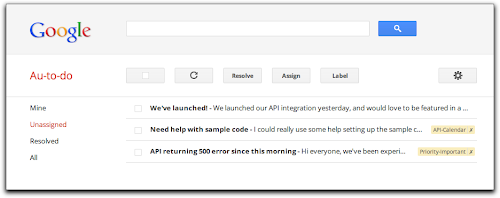
Au-to-do is a sample implementation of a ticket tracker, built using a combination of Google App Engine, Google Cloud Storage, and Google Prediction APIs.
In addition to providing a demonstration of the power of building on Google App Engine, Au-to-do also provides an example of improving the user experience by integrating with Google Apps. Users of Au-to-do can automatically have tasks created using the Google Tasks API whenever they are assigned a ticket. These tasks have a deep link back to the ticket in Au-to-do. This helps users maintain a single todo list, using a tool that’s already part of the Google Apps workflow.
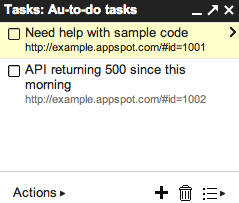
We’re going to continue work on Au-to-do, and provide additional integrations with Google Apps (and other Google APIs) in the following months.
To learn more, read the full announcement or jump right to the getting started guide.
 | Dan Holevoet profile Dan joined the Google Developer Relations team in 2007. When not playing Starcraft, he works on Google Apps, with a focus on the Calendar and Contacts APIs. Hes previously worked on iGoogle, OpenSocial, Gmail contextual gadgets, and the Google Apps Marketplace. |
Tuesday, March 10, 2015
Agile as a risk mitigation technique
| Project Risk | Agile Practice |
| Addressing schedule and estimate risks | Manage to done, Velocity, Relative estimating, User stories |
| Addressing the risk of building the wrong thing | Deliver early and often in small increments, Iteration demos |
| Addressing the risk of validating your architecture | Steel thread, Iterative development |
| Identifying risks and issues as soon as possible | Daily stand-ups, Frequent retrospectives, Iterative Development, Manage to done |
| Addressing scope risks | Iterative development, User stories, User story slicing, Relative Estimating, User story mapping, Trim the tail |
| Addressing people risks | Paired programming, Team ownership practices |
| Addressing quality risks | TDD, BDD, ATDD |
This list doesnt address the risks that accompany any change initiative, but it does underline that many agile techniques are directly targetted at averting project risk. Agile practices help us shorten the distance between guessing (planning, designing, estimating, etc) and knowing.
See also - Chris Matts wrote about this topic recently and gave some nice examples of how he talked about risk during a methodology audit.
http://theitriskmanager.wordpress.com/2011/12/12/the-language-of-risk/
Monday, March 9, 2015
Introducing a New Version of the Email Migration API
This API is now part of our Admin SDK, which is useful for managing applications for Google Apps users through the Google APIs Console. Additionally, the Email Migration API v2 now includes support for:
- Delegated administrators
- OAuth 2.0
- Media uploads
engineering/backend-support can be migrated with the label engineering-backend-support to retain the previous organization structure. For more information about the API, visit the the Getting Started guide or explore the API Reference.
 | Greg Knoke Google+ Greg Knoke is a technical writer in the Google Drive Developer Relations Team. Prior to joining Google, he worked as a scientist developing image and signal processing algorithms. His current interests include new technologies, content management, information architecture, cooking, music, and photography. |
Retiring a Few Apps Script Components
Right now, Apps Script developers have three competing ways to create user interfaces: Ui Service, a visual tool for Ui Service called GUI Builder, and Html Service, which we launched at Google I/O in 2012. We designed Html Service specifically to help developers build complex applications by letting them work with familiar libraries like jQuery and jQuery UI.
Today, we are deprecating GUI Builder and five UiApp widgets — but not Ui Service itself. This will help us further focus our development efforts on Html Service.
The GUI Builder will continue to be available until September 9, 2013. After that point, you will not be able to create or manage GUI Builder components, although existing components will still function. The five deprecated UiApp widgets are Hyperlink, InlineHyperlink, LayoutPanel, RichTextArea, and SuggestBox. These widgets will be also available until September 9, 2013, at which point they will cease to function.
To plan for the future, we recommend that you migrate your user interfaces to Html Service, which will offer the best combination of features and support in the long term.
Meanwhile, we have a few awesome new features planned for 2013. Although we’re not quite ready to announce those features, I dropped a few hints when Arun Nagarajan interviewed me for a State of the Script episode on Google Developers Live last month. Give it a watch, and I’m sure you’ll be as excited about the future of Apps Script as we are.
 | Saurabh Gupta profile | twitter | blog As the product manager for Google Apps Script, Saurabh is responsible for Apps Script’s overall vision and direction. |
Wednesday, March 4, 2015
A Yummy Free Online PDF to Word Converter
- PDF2Word Online
- Via CLC Online

Cool! However, I am sure there are several other interesting FREE PDF-to-Word converters out there.
 Indeed there is! Here is one: Convert PDF-to-Word
"I have only found one so far that does a great job (Convert PDF-to-Word), it actually looks almost identical to the PDF file, its an online converter, sadly enough its with the email thing, but I can live with that when I get great results..." - Kim Celinder
Thanks for the suggestion Kim Celinder!
However, what if you are looking for a free PDF-to-Word desktop application instead of an online version, do you have any options?
Yes, try Smartsofts free PDF-to-Word Converter (Thanks Nedelcho!). What do you think?
Do anyone out there have even a better PDF-to-Word converter to suggest? :)
Tuesday, March 3, 2015
IMU LS 12 Social Media Mobile Technology Learning in a Digital Age Steve Wheeler
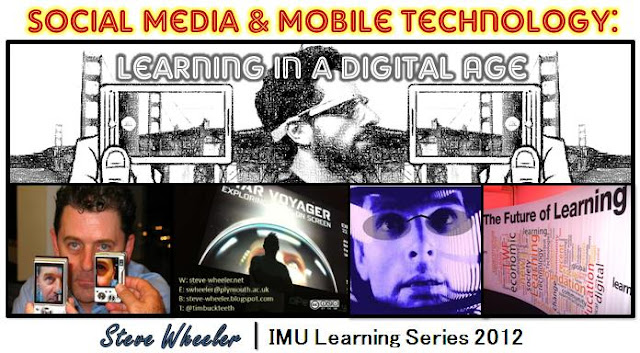
Title : Social Media & Mobile Technology: Learning in a Digital Age
Date : 11th July, 2012
Time : 4:00 PM, Kuala Lumpur (Check time differences)
Venue : Online (WizIQ)
RECORDING
UPCOMING WEBINARS?
CLICK HERE!Monday, March 2, 2015
What Did They Say Wednesday! A Linky Party!
<div align="center"><a href="http://aturntolearn.blogspot.com/2013/01/whatdidtheysay1-8.html" title="What Did They Say!?"><img src="http://4.bp.blogspot.com/-OIhmtxluCS0/ULwEfazkl1I/AAAAAAAADpM/MMMzxm23B0Y/s320/What+Did+They+Say+Wednesday.png" alt="What Did They Say!?" style="border:none;" /></a></div>
This weeks story comes from one of my most mature five year olds... hes definitely an old soul so this was especially surprising coming from him!
When we opened up Safari, there was a picture of an iPad on the screen.
Student: I always wanted one of those but I forgot to ask my dad for one for my birthday.
Me: Oh yeah? Well, maybe you can ask for one next year. But iPads are very expensive.
Student: Do you know what else is really expensive?
Me: What?
Student: A lamborghini.
Me: Thats right. A lamborghini is very expensive. Much more expensive than an iPad.
Student. I know. But a lamborghini is the coolest car in car city!
The best part is... he pronounced lamborghini perfectly!!!
Rules for the Linky Party:
- Share a story that one of your kids said on your blog! If you dont have a blog, leave a comment with your story!
- Use the HTML code at the top of this post to link back to the post!
- Comment on the two blog posts before yours!
);
How to Take a Screenshot of Your Computer Screen!

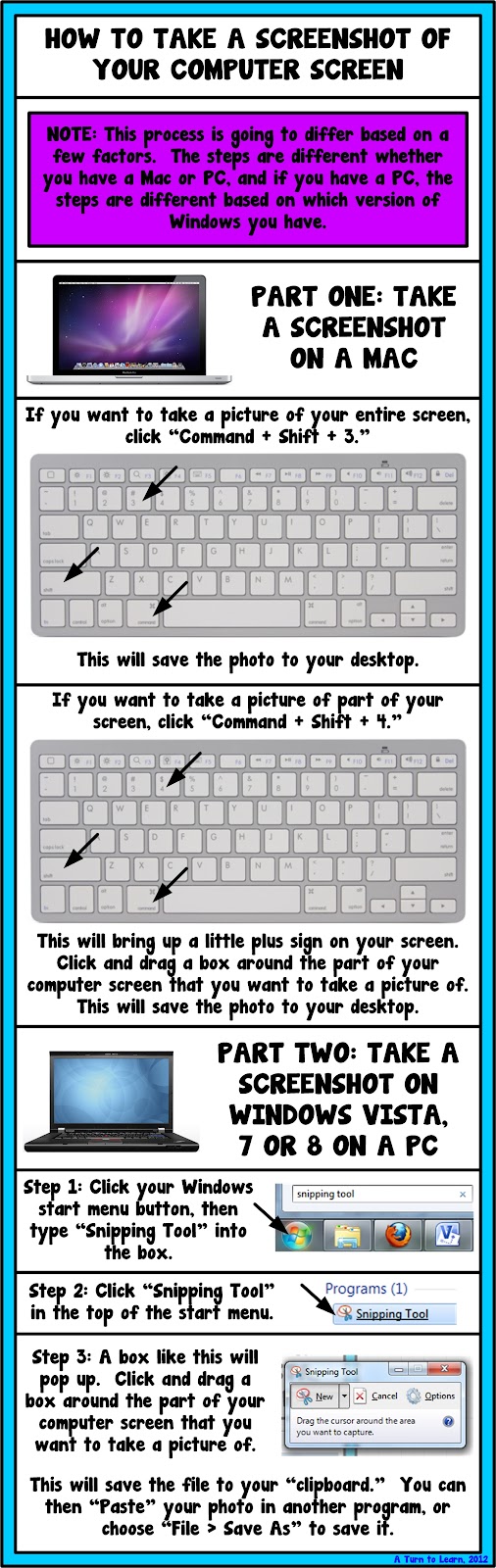
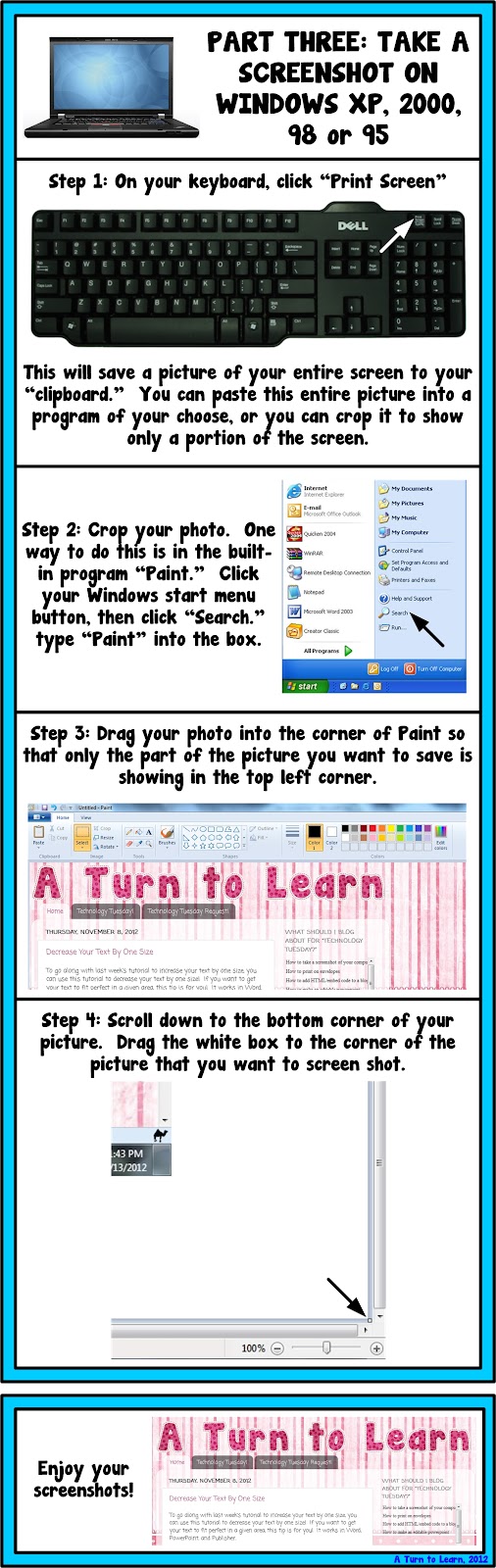

As for next weeks poll, Im going to add a how to embed videos in smart notebook. I havent done any Smart Notebook tutorials yet and I would really love to... so Im curious to see how this one fairs in the poll!
How to Make a Form for Your Blog or Website!

Heres the poll so you can see just how close it was!

Now... onto the tutorial!


Now, I know that I didnt detail how to embed the form on your blog... if thats something youre interested in doing, be sure to vote on the poll for "How to add HTML/embed code to a blog post!" For those of you who are familiar with how to add the code on your blog, you can use the embed code from the drop-down menu in the picture just above this text!
For next weeks poll, Im going to add another request - how to take the background out of a photograph (so that the photo has a white background!
Phonics Worksheets Mega Pack Soft C Freebie and a Giveaway!

Since I really only need to review phonics for short vowels with a handful of students, I decided to print these pages in a binder and use dry-erase markers for those targeted for Response to Intervention! I printed it on colorful paper since it was almost all black and white ink... and I LOVE how it looked (as did the kids!) Check it out below!


And of course, next year, Ill be using many of the worksheets earlier in the year when I teach phonics. Now that I have so many cute worksheets for phonics, I kind of wish I taught a Letter of the Week, but I know I wouldnt have time for that!
Since Im also working on Soft C now, I decided to make a coordinating set of worksheets to go along with my soft c lesson plans... and as a thanks to all my loyal followers, here those are for free!

If you want to win this set for the whole alphabet along with some other amazing items, be sure to check out my friend Lianns blog for her Spring Giveaway! Click the link below to check out her giveaway (which ends May 27th!)

Sunday, March 1, 2015
Reflections How to Show a Documents Reading Level in Word!
I truly miss her more than words can say.

A week after finding out that my Grandma passed, I found out that my ex-boyfriend had passed as well. He was only 25. Though he and I grew apart and havent spoken for years, I truly wished only the best for him. He was my first "love" and he has always had a special place in my heart. As much as I was left speechless by my Grandmas death, I am having just as hard of a time finding the words to express my deepest sympathies and regrets for his death as well.
I truly believe that everything happens for a reason, but I can never find or explain the reasons why we have to lose the ones we love. It truly breaks your heart and makes you question the world. Ive honestly felt like nothing has been going right lately. As hard as it is, I keep reminding myself of something my mom told me once:

As hard as it is to cope with lose and to cope with change, I know I am fortunate for the relationships that I have had and that there are so many more who are going through worse. As hard as things are to cope with or manage, we somehow need to put one foot in front of the other and try to move on. To the same idea, I found this other quote on pinterest and I really like it:

The past week and a half, I have spent a good amount of time crying and a lot of time reminiscing. Fortunately Im surrounded by supportive family, friends, neighbors, co-workers and followers who have put up with my distance and my ramblings. So for now, my rambling will cease for the time being and Ill put one foot in front of the other. Perhaps getting myself back on track with my blog and my life will help ease the pain.
This two week long poll had a lot of votes, and the winner was the most recent addition to the poll... how to find out a Microsoft Word documents reading level. This tutorial is actually SUPER EASY!!!

Here are the official poll results...

And here is the incredibly easy tutorial!!!

As for next weeks poll, Ill be adding a blogger tutorial: how to host a linky party!
Saturday, February 28, 2015
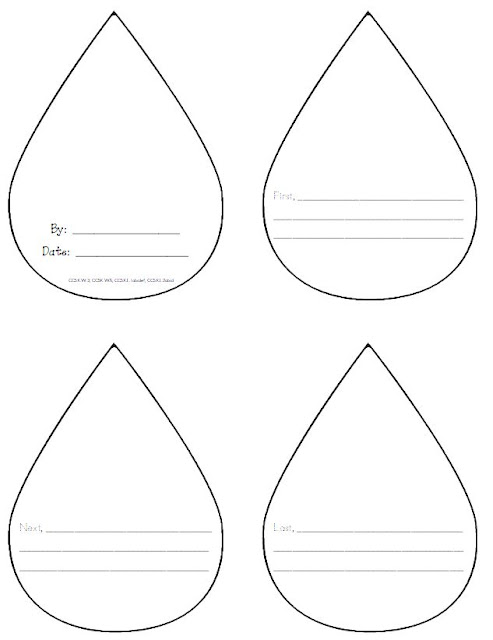
A Rainy Day Freebie
Friday, February 27, 2015
Find a Word or Phrase in a Document or on a Website!
This one is a gem... it can be used in so many programs! Use it in Word and PowerPoint... or use it in Internet Explorer, Chrome, Safari or Firefox! As far as Ive been able to find, it works in almost every program! So... if you want a quick way to find a word or phrase in a document or on a website, this is the perfect tip for you!

Try it out and let me know how you like it!
Thursday, February 26, 2015
Excitment a Giveaway Reminder and a Poll!
If you havent entered yet, click the picture below to check out the giveaway for my new Uno game!

Also, to check out my post at Classroom Freebies Too, click the picture below!

Also, I think Im going to start a weekly tradition: a Technology Tuesday. Im going to add a poll to my sidebar to get your opinion on what I should blog about first! Be sure to vote!
10 Qualities That Make A Good Teacher Richard M Reis
- Article - What Makes a Good Teacher

GOOD TEACHERS?
- Really Want to Be Good Teachers.
- Take Risks.
- Have a Positive Attitude.
- Never Have Enough Time.
- Think of Teaching as a Form of Parenting.
- Try to Give Students Confidence.
- Try to Keep Students-And Themselves-Off Balance.
- Try to Motivate Students by Working Within Their Incentive System.
- Do Not Trust Student Evaluations, Neither do bad teachers.
- Listen to Their Students.
What a great article! Thanks Richard M. Reis (PhD, Stanford University) for sharing your experiences and thoughts about some of the qualities that make a good teacher. I suppose we will not understand how good this reflective article is before we read and reflect the full story. Otherwise, it will be like memorizing PowerPoints without understanding the underlying stories (substance) supporting them. Yeah, we are kind of genetically and mentally engineered to digest stories. Stories that are memorable often hang around us for life. Please click here (or the above link) and reflect.
Yeah, it is easy to read about it. What about applying some of these qualities, or characteristics to our own teaching/coaching/facilitating/training/mentoring/nurturing/guiding... :)
What Did They Say! Wednesday! A Linky Party!
<div align="center"><a href="http://aturntolearn.blogspot.com/" title="What Did They Say!?"><img src="http://4.bp.blogspot.com/-OIhmtxluCS0/ULwEfazkl1I/AAAAAAAADpM/MMMzxm23B0Y/s320/What+Did+They+Say+Wednesday.png" alt="What Did They Say!?" style="border:none;" /></a></div>
Isnt it the best when students admit guilt without even knowing it?!
Now... its time to share your cute kids story from this week!
Rules for the Linky Party:
- Share a story that one of your kids said on your blog! If you dont have a blog, leave a comment with your story!
- Use the HTML code at the top of this post to link back to the post!
- Comment on the two blog posts before yours!
);
Wednesday, February 25, 2015
Top 6 Keys to Being a Successful Teacher
Link to article (By Melissa Kelly)
"The most successful teachers share some common characteristics. Here are the top six keys to being a successful teacher:
- Sense of Humor
- A Positive Attitutude
- High Expectations
- Consistency
- Fairness
- Flexibility
Every teacher can benefit from focusing on these important qualities. Success in teaching, as in most areas of life, depends almost entirely on your attitude and your approach."
A Comparative Analysis with Traditional and Fully Online Graduate Courses
"(Abstract) Blended learning is a hybrid of classroom and online learning that includes some of the conveniences of online courses without the complete loss of face-to-face contact. The present study used a causal-comparative design to examine the relationship of sense of community between traditional classroom, blended, and fully online higher education learning environments. Evidence is provided to suggest that blended courses produce a stronger sense of community among students than either traditional or fully online courses...
Hara and Kling (2001), conducting a study of online courses, found that feelings of isolation were an important stress factor for online students, but not the primary factor as frequently mentioned in the professional literature. Rather, ?[s]tudents reported confusion, anxiety, and frustration due to the perceived lack of prompt or clear feedback from the instructor, and from ambiguous instructions on the course website and in e-mail messages from the instructor? ...
(Conclusion) The blended concept of learning is highly consistent with the three areas of change identified in the introduction:
- thinking less about delivering instruction and more about producing learning,
- reaching out to students through distance education technologies, and
- promoting a strong sense of community among learners.
Indeed, the concept of blended learning may be a synthesis of these areas as the learning environment becomes more learning-centered, with emphasis on active learning through collaboration and social construction of understanding. Such a concept is moving toward O?Banion?s (1997) vision of a learning college as a place where learning comes first and educational experiences are provided for learners anyway, anyplace, and anytime. Graham B. Spanier, president of The Pennsylvania State University, referred to this convergence of online and traditional instruction as the single-greatest unrecognized trend in higher education today (Young, 2002). "
Can Facebook Twitter and Linkedin GET YOU A JOB

