Thursday, March 12, 2015
Au to do a sample application using Google Apps APIs in the cloud
One of the big focuses of this blog (and the team behind it) has been providing compelling examples of how integration with Google Apps APIs can make a product richer and more engaging. As a part of this effort, earlier today we announced Au-to-do, a sample application built using Google APIs.
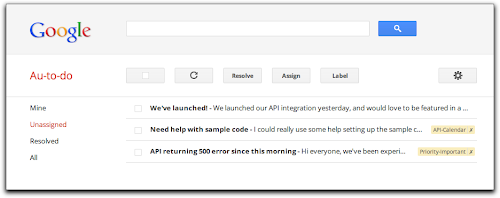
Au-to-do is a sample implementation of a ticket tracker, built using a combination of Google App Engine, Google Cloud Storage, and Google Prediction APIs.
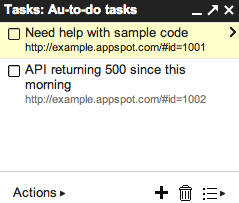
In addition to providing a demonstration of the power of building on Google App Engine, Au-to-do also provides an example of improving the user experience by integrating with Google Apps. Users of Au-to-do can automatically have tasks created using the Google Tasks API whenever they are assigned a ticket. These tasks have a deep link back to the ticket in Au-to-do. This helps users maintain a single todo list, using a tool that’s already part of the Google Apps workflow.
We’re going to continue work on Au-to-do, and provide additional integrations with Google Apps (and other Google APIs) in the following months.
To learn more, read the full announcement or jump right to the getting started guide.
 | Dan Holevoet profile Dan joined the Google Developer Relations team in 2007. When not playing Starcraft, he works on Google Apps, with a focus on the Calendar and Contacts APIs. Hes previously worked on iGoogle, OpenSocial, Gmail contextual gadgets, and the Google Apps Marketplace. |

Tuesday, March 10, 2015
How to make files searchable in Google Drive
When a file of a common type is uploaded to Google Drive, it is automatically indexed so users can easily search for it in their Drive files. Google Drive also tries to recognize objects and landmarks in images uploaded to Drive.
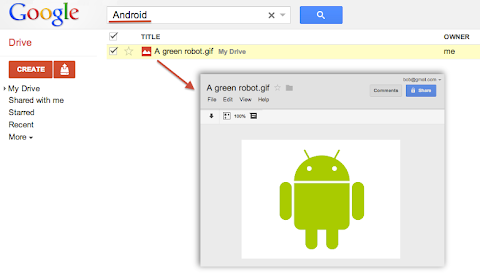
For instance, if a user uploaded a list of customers as an HTML, XML, PDF or text file he could easily find it later by searching for one of its customer’s name that is written inside the file. Users could also upload a picture of their favorite green robot, then search for “Android” and Google Drive would find it in their Drive:
Metadata such as the file’s title and description are always indexed so users can always find a file by name. However, Google Drive does not automatically index the content of less common or custom file types. For example if your application uploads or creates files using the custom MIME-type custom/mime.type, then Drive would not try to read and index the content of these files and your users would not be able to find them by searching for something that’s inside these files.
To have Google Drive index the content of such files you have to use one of the following two options available when uploading files through the Google Drive API.
useContentAsIndexableText URL parameter
We recently added a way for you to indicate that the file you are uploading is using a readable text format. In the case where your file data format is text based — for instance if you are using XML or JSON — you can simply set the useContentAsIndexableText URL parameter to true when uploading the file’s content to Drive. When this flag is set Google Drive will try to read the content of the file as text and index it.
indexableText attribute
There is a more flexible approach which is to set the indexableText attribute on the File Metadata. You can set the value of the indexableText attribute which is a hidden — write-only — attribute that we will index for search. This is very useful if you are using a shortcut file — in which case there is no content uploaded to Google Drive — or if you are using a non-text or binary file format which Google Drive won’t be able to read.
Have a look at our Google Drive API references or watch our latest Google Developer Live video about the topic to learn more.
 | Nicolas Garnier Google+ | Twitter Nicolas Garnier joined Google’s Developer Relations in 2008 and lives in Zurich. He is a Developer Advocate for Google Drive and Google Apps. Nicolas is also the lead engineer for the OAuth 2.0 Playground. |
Reading Query Results from Calendar in Pages
What’s the difference between reality and theory? In theory, there is no difference. But reality often imposes unanticipated constraints on developers. These may come in the form of bandwidth restrictions, memory limits, timeouts, or other requirements of the systems that interact with your application.
My team recently built an application that helps us analyze the scheduling and usage of conference rooms at Google. We use the new Calendar API v3 on Google App Engine to read the rooms’ schedules, which we combine with actual occupancy data to calculate utilization and other metrics.
As you might imagine, Google has a lot of conference rooms (I believe the last official count was “more than twelve.”) And many of the rooms seem to be booked fairly solid. That means we need to read a lot of data from Calendar. So much, in fact, that our queries time out if we try to read an entire calendar at once. But the API team anticipated “Google scale” use and designed a mechanism that allows us to retrieve data in batches.
The idea is simple. When you create a request, you specify the page size: the maximum number of results you’d like Calendar to return in one batch. Calendar returns the data you requested, along with an opaque page token, which you can think of as a bookmark. To retrieve the next batch of data, you ask the API for the next page token and include the new token in your next request. The page token keeps track of the results you’ve already seen, so Calendar can send the next batch each time. You repeat this process until you’ve exhausted all the results.
Here’s how we did this in Java:
public void getRoomEvents(String roomEmail) throws IOException {
// Create a request to list this room’s events (see code, below)
Calendar.Events.List listRequest = getListRequest(roomEmail);
do {
// Retrieve one page of events
Events events = executeListRequest(listRequest);
ListeventList = events.getItems();
// Process each event
for (Event event : eventList) {
processEvent(event);
}
// Update the page token
listRequest.setPageToken(events.getNextPageToken());
// Stop when all results have been retrieved
} while (listRequest.getPageToken() != null);
}
// Create a request to list the events for a room
private Calendar.Events.List getListRequest(String roomEmail)
throws IOException {
return calendarClient.events().list(roomEmail)
.setMaxResults(1000) // Limit each response to 1000 events
.setPageToken(null) // Start with the first page of results
// Return an individual event for each instance occurrence of a
// recurring event
.setSingleEvents(true);
}
We call getRoomEvents() for each room, using the room’s email address to identify it to Calendar. (You can retrieve events from your own calendar by substituting your own email address.) Then getListRequest() creates a request that we will send to Calendar. The request asks for a list of up to 1000 events from the room’s calendar.
The remainder of getRoomEvents() is a loop that executes the request, processes the results, and updates the page token in preparation for the next request. The loop continues, retrieving and processing each subsequent page of results, until the entire list has been returned. The call to getNextPageToken() indicates the end of the results by returning a null value.
By paginating our requests we avoid timeouts and reduce memory requirements. As an added benefit, each request completes fairly quickly, which means it’s also quick to retry if an error should occur. And finally, a multithreaded application may be able to process one or more pages of results while it retrieves the next, speeding execution. These advantages have led developers at Google to adopt pagination as a best practice. Look for it in our APIs when you need to exchange large amounts of data, and consider adding it to your own services.
If you have questions about our services or APIs, or if you want to see what other developers are doing with Google Calendar, check the discussions and documentation in the Google Apps Calendar API forum.
 | Adam Liss profile Adam is an engineer who believes that "technical" shouldnt necessarily mean "difficult." He enjoys building infrastructure and tools that make Googlers more productive. Before joining Google in 2010, he built network-security appliances and one of the first wireless application delivery platforms. |
Monday, March 9, 2015
Deprecating SWF exports of presentations in the Google Documents List API
We are announcing the deprecation of SWF export functionality for presentations from the Google Documents List API. We are taking this action due to the limited demand for this feature, and in order to focus engineering efforts on other aspects of the API.
Clients currently making the following request to the API are affected by this change.
https://docs.google.com/feeds/download/presentations/Export?docID=1234&exportFormat=swf
We recommend clients currently using SWF exports switch to PDF exports, using the appropriate exportFormat value.
https://docs.google.com/feeds/download/presentations/Export?docID=1234&exportFormat=pdf
We are disabling SWF exports in the coming weeks. Clients attempting to export presentations as SWF after the exports are disabled will receive an HTTP 400 response.
For more information on exporting presentations, see the Google Documents List API documentation. If you have any questions, feel free to reach out in the forums.
 | Vic Fryzel profile | twitter | blog Vic is a Google engineer and open source software developer in the United States. His interests are generally in the artificial intelligence domain, specifically regarding neural networks and machine learning. Hes an amateur robotics and embedded systems engineer, and also maintains a significant interest in the security of software systems and engineering processes behind large software projects. |
User Stories in more detail
While Scott recommends capturing stories on cards, I like to capture them initially in a spreadsheet because it makes it easier to organize and prioritize. Once the project starts I print out the cards - instructions are in one of my earlier blogs.
Wednesday, March 4, 2015
How to Have Both Portrait and Landscape Slides in One PowerPoint! ish!
For those of you interested, here was the final tally of the poll!

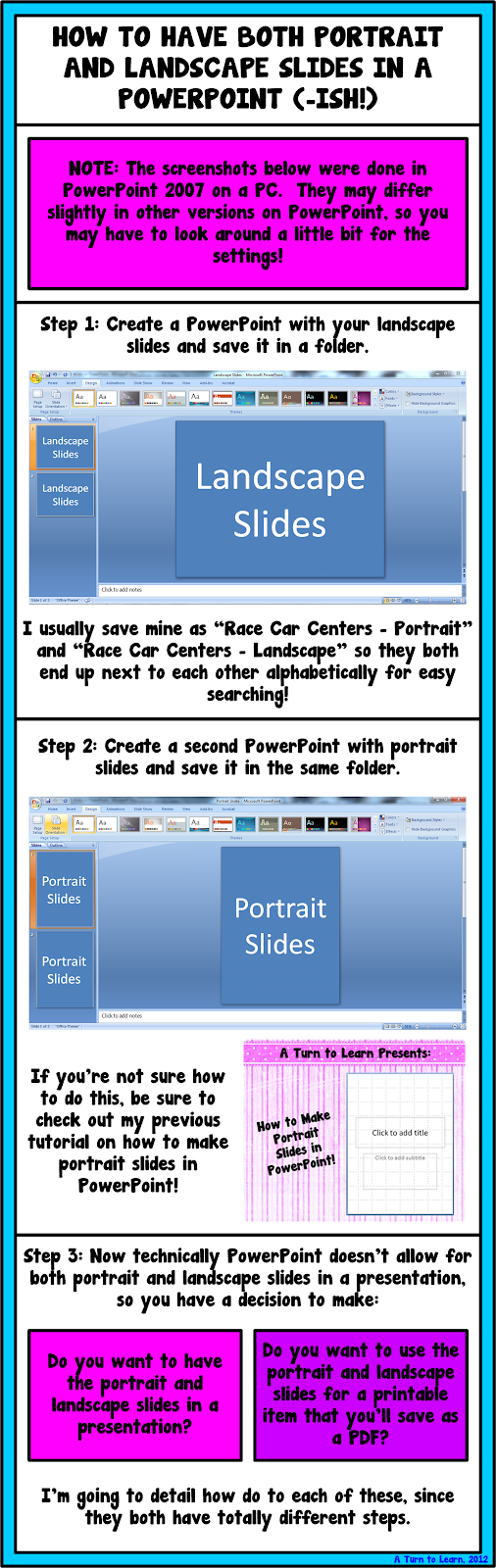
Before I start the tutorial, I do have to post a slight "disclaimer" on this post! PowerPoint itself does not allow you to have both portrait and landscape slides in the same presentation. Since so many of you asked about this, I wanted to be sure to address your issues... even though I cant change the limitations of the programs itself!
I pretty much detail this in the tutorial, but youll need to think about the reason you would want both portrait and landscape slides in a presentation. Personally, I could think of two reasons:
- To make an actual presentation (e.g. using PowerPoint for what it was meant to be used for)
- To make printables for your classroom (e.g. the "teacher" way to use PowerPoint! lol!)
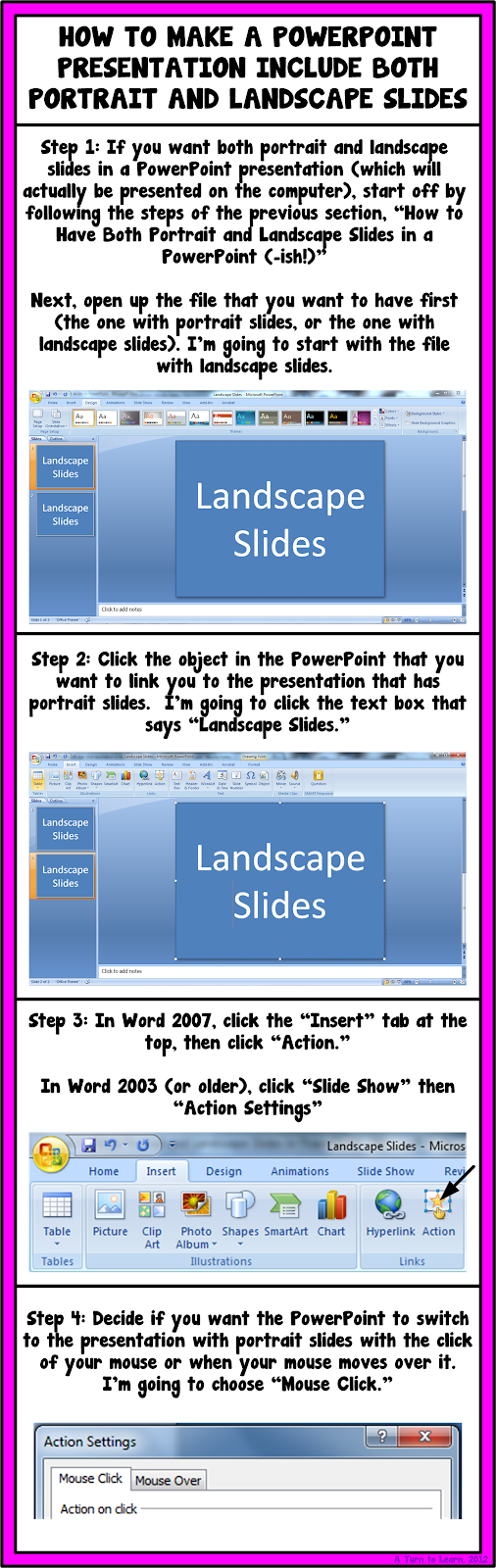

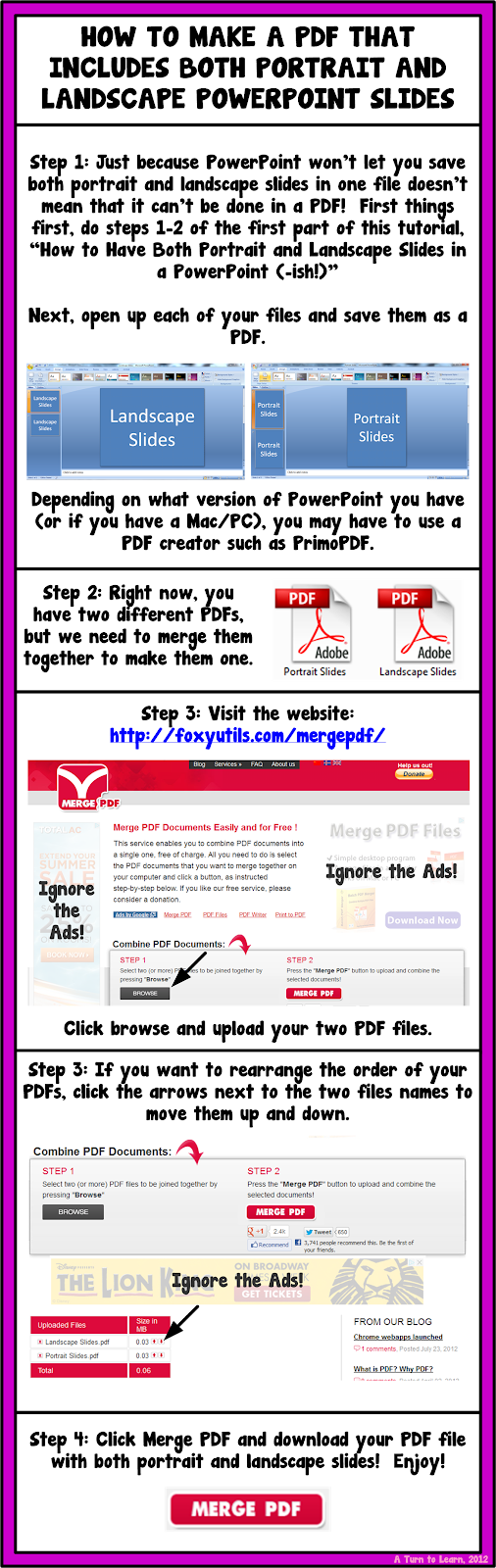
I hope those workarounds helped!

For next weeks poll, Im going to add how to embed fonts in a Microsoft Word/PowerPoint document!
Tuesday, March 3, 2015
30 Minute Masters in Instructional Design Clive Shepherd
IDEA?
 "The 30-minute masters originated from a discussion between Cammy Bean and myself (Clive Shepherd) at the Boston eLearning Guild Annual Gathering earlier this year. We set out to develop a curriculum that could teach subject experts and generalist trainers the essentials of instructional design in just 30 minutes (The 30-minute masters will be presented at DevLearn 2007) ...more "
 - Module I: Prepare
1. Set a realistic goal.
2. Consider the content from the learners point of view. - Module II: Inform
3. Hook learners in emotionally.
4. Present your material clearly, simply and in a logical order.
5. Illuminate your material with imagery.
6. Consider using audio. - Module III: Consolidate
7. Put your material into context with examples, cases and stories.
8. Engage users with challenging interactions.
9. End with a call to action.
(Click here to view the full course curriculum. Still under construction using a Wiki!)
REFLECTION TIME!
If you have time, please check out Father Guido Sarduccis Five Minute University, too. A great laugh with some great points! Anyone that has been through formal education would probably be able to relate to it. Interestingly and seriously, according to the authors anyone can build their own 30-minute masters course based in whole or in part on these materials provided on this site. If you wish you can even sell this course to others, but you should give KUDOS and recognition to the masterminds. Though, keep in mind it is still under construction.
One might be able to go through the Masters curriculum in 30-minutes, but I suppose it would take a longer time to be able to apply the lessons learned effectively (Process + Knowledge = Skills?). But overall it is a great idea and with such experts constructing or nurturing the curriculum it will be interesting to follow the progress. Since they are using a Wiki, we can also contribute.
Yes, I remember when I got my first job in the area of e-learning (2001). I was entitled Instructional Designer without any training. They asked me to read a few books, and get my hands dirty with a huge project. I struggled and suffered, but looking back at it, I realized that Learning-by-Doing (with guidance) is simply the best (at least for skills development, if possible) :)
IMU LS 12 Social Media Mobile Technology Learning in a Digital Age Steve Wheeler

Title : Social Media & Mobile Technology: Learning in a Digital Age
Date : 11th July, 2012
Time : 4:00 PM, Kuala Lumpur (Check time differences)
Venue : Online (WizIQ)
RECORDING
UPCOMING WEBINARS?
CLICK HERE!Monday, March 2, 2015
How to Put Pictures Side By Side in Blogger

This was very popular on the poll!

Before you start the tutorial, I want to forewarn you that doing this can be kind of intimidating since it involves code. I have my fingers crossed for you that you finish it in steps 1-3 (which involves no code)... but if not, just follow the steps in order. Good luck!


 |  |
For next weeks poll, Ill add another blogger option: how to show HTML code on your blog (similar to what I did after step 5, above).
Sunday, March 1, 2015
Reflections How to Show a Documents Reading Level in Word!
I truly miss her more than words can say.

A week after finding out that my Grandma passed, I found out that my ex-boyfriend had passed as well. He was only 25. Though he and I grew apart and havent spoken for years, I truly wished only the best for him. He was my first "love" and he has always had a special place in my heart. As much as I was left speechless by my Grandmas death, I am having just as hard of a time finding the words to express my deepest sympathies and regrets for his death as well.
I truly believe that everything happens for a reason, but I can never find or explain the reasons why we have to lose the ones we love. It truly breaks your heart and makes you question the world. Ive honestly felt like nothing has been going right lately. As hard as it is, I keep reminding myself of something my mom told me once:

As hard as it is to cope with lose and to cope with change, I know I am fortunate for the relationships that I have had and that there are so many more who are going through worse. As hard as things are to cope with or manage, we somehow need to put one foot in front of the other and try to move on. To the same idea, I found this other quote on pinterest and I really like it:

The past week and a half, I have spent a good amount of time crying and a lot of time reminiscing. Fortunately Im surrounded by supportive family, friends, neighbors, co-workers and followers who have put up with my distance and my ramblings. So for now, my rambling will cease for the time being and Ill put one foot in front of the other. Perhaps getting myself back on track with my blog and my life will help ease the pain.
This two week long poll had a lot of votes, and the winner was the most recent addition to the poll... how to find out a Microsoft Word documents reading level. This tutorial is actually SUPER EASY!!!

Here are the official poll results...

And here is the incredibly easy tutorial!!!

As for next weeks poll, Ill be adding a blogger tutorial: how to host a linky party!
Saturday, February 28, 2015
The Quality and Extent of Online Education in the United States
Link to site & full report (PDF, 27 pages, 695K)
"The online enrollment projections have been realized, and there is no evidence that enrollments have reached a plateau. Online enrollments continue to grow at rates faster than for the overall student body, and schools expect the rate of growth to further increase:
- Over 1.9 million students were studying online in the fall of 2003.
- Schools expect the number of online students to grow to over 2.6 million by the fall of 2004.
- Schools expect online enrollment growth to accelerate ? the expected average growth rate for online students for 2004 is 24.8%, up from 19.8% in 2003.
Are students as satisfied with online courses as they are with face-to-face instruction?
- 40.7% of schools offering online courses agree that students are at least as satisfied? with their online courses, 56.2% are neutral and only 3.1% disagree.
- Medium and large schools strongly agree (with less than 3% disagreeing).
- The smallest schools (under 1,500 enrollments) are the least positive, but even they have only 5.4% disagreeing compared to 32.9% agreeing.
- Doctoral/Research, Masters, and Associates schools are very positive, Specialized and Baccalaureate schools only slightly less so."
Read the summary (at least) or the full report . This report is excellent (27 pages), and gives us insight to the e-learning or online education state and progress in U.S. higher education.
Maps of War History of Religion in 90 animated seconds
- Link to Maps-of-War
- Link to History-of-Religion
 MAPS-OF-WAR?
Maps-of-War is a multimedia site dedicated to producing diverse, creative visuals that enhance our understanding of war and its history.
HISTORY-OF-RELIGION?
How has the geography of religion evolved over the centuries, and where has it sparked wars? This animated map gives you a brief history of the worlds most well-known religions: Christianity, Islam, Hinduism, Buddhism, and Judaism. Selected periods of inter-religious bloodshed are also highlighted. Here is 5,000 years of religion in 90 animated seconds:
 OTHER MAPS?
- Leadership-and-War
Which Presidents have led the United States into its deadliest wars? - Imperial-History
Who has controlled the Middle East over the course of history? - Iraqi-Pressure-Vault
From a geographic standpoint, Iraq is caught between a rock and a hard place... - Signs-of-Occupation
Before / after satellite photos of Saddams palace in Baghdad, Iraq... - Shiite-vs-Sunni
The pieces of the puzzle are slowly aligning themselves as Iraqs sectarian divide widens... - CIA-Secret-Prisons
Anatomy of a secret prison... - Recapture - of - Fallujah
In November of 2004, American forces launched Operation Phantom Fury to recapture Fallujah...
In addition, I would not be surprised if more animated maps will be added in the near future.
DOWNLOAD?
Every Maps-of-War animation is available for download so that you can play it on your own computer, even without an internet connection. Maps are provided in Flash SWF Format (.swf).
These Maps-of-War animations are also excellent tools to engage (or motivate) students into thinking and kick-start discussions in your face-to-face or online sessions (as long as they are related in one way or the other to the subject or topic you are teaching/facilitating). Finally, these visual maps should also facilitate great discussions on whether they are really accurate or not :)
Friday, February 27, 2015
Rest in Peace Grandma Vicky

I will be extending the Technology Tuesday poll to next week. I miss you so much, Grandma and I love you always.
Find a Word or Phrase in a Document or on a Website!
This one is a gem... it can be used in so many programs! Use it in Word and PowerPoint... or use it in Internet Explorer, Chrome, Safari or Firefox! As far as Ive been able to find, it works in almost every program! So... if you want a quick way to find a word or phrase in a document or on a website, this is the perfect tip for you!

Try it out and let me know how you like it!
Thursday, February 26, 2015
The Four Gotchas in LMS Implementation By Chris Howard
Click here to view full article
- Gotcha # 1: Where?s the Data? Can you get it? (Define your reports up front & get quality data)
- Gotcha #2: Extensive Customizations (Risk of Extensive Customizations such as 1. Lengthens the implementation by months or more, 2. Often costs more than they are really worth in terms of business value 3. Makes upgrading difficult if not impossible without "re-doing" the work).
- Gotcha #3: Lengthy Projects (The most effective way to deliver value from your investment is to get the system up and running as soon as possible)
- Gotcha #4: Conflicting Requirements (Pleasing Everyone Pleases No One).
"Producing a clear project plan and ensuring tight control of the requirements will help you avoid most, if not all, of these issues."
Wednesday, February 18, 2015
Make Analog Clock in C Using Graphics
Before getting into the main let me explain the functions I have used in the program.
Also Read: C/C++ Program to Create a Digital Stopwatch
Also Read: Simple program to create a circular loading bar using graphics
clockLayout()
Ive used this function to print the clock layout i.e. clock dial and the markings on the clock. If we observe clearly, the clock has hours marking each separated by 30 degrees and each hour is divided into 5 markings each making an angle of 6 degrees. So, iterating the markings for every 30 degrees gives hours and iterating markings with 6 degrees give minutes markings on the clock. The clock would look like this after executing this function.

secHand()
It is clear from the name that this gonna do something with the seconds hand. This function is going to get the present second from the system clock and incline the line according to a particular angle. Eg: if the present seconds is 5 then the angle of the seconds hand with respect to the vertical must be 30 degrees, i.e. 5*6=30.
minHand()
This function fulfills the task of moving the minutes hand based on the system clock. The minutes hand must be inclined 6 degrees for every minute passing. Eg: if the elapsed minutes are 30 then the minutes hand angle must be making 180 degrees with the vertical.
hrHand()
This function is going to print an inclined hours line. The function is designed to get the present hour and also the no. of elapsed minutes from the system clock and incline the line according to a particular angle. For every hour elapsed the hour hand moves 30 degrees and every 12 minutes it moves 6 degrees.
main()
The first lines in main are graphic initialization, you must change the path "c:\turboc3\bgi\" to your compilers BGI file path otherwise program will not work. Coming to the while loop, the while loop iterates for every 100 milliseconds reprinting all the functions. This program is like getting the static picture of clock every second and combining all the pictures to make a moving analog clock.
Also Read: Simple program to create a moving car in graphics
Check out this video for demo
Program for Analog Clock in C
/* Graphical Analog Clock designed in C*/
/*Note press ctrl+pause break to stop the clock while executing in TC*/

#include<stdio.h>
#include<graphics.h>
#include<stdlib.h>
#include<math.h>
#include<dos.h>
#include<time.h>

#define PI 3.147

void clockLayout();
void secHand();
void hrHand();
void minHand();
int maxx,maxy;

void main()
{
 int gdriver=DETECT,gmode,error;
 initgraph(&gdriver,&gmode,"c:\turboc3\bgi\");
 error=graphresult();
 if(error!=grOk)
 {
  printf("Error in graphics, code= %d",grapherrormsg(error));
  exit(0);
 }

 while(1)
 {
  clockLayout();
  secHand();
  minHand();
  hrHand();
  sleep(1);                /* pausing the outputscreen for 1 sec */
  cleardevice();           /* clearing the previous picture of clock */
 }
}

void clockLayout()
{
 int i,x,y,r;
 float j;
 maxx=getmaxx();
 maxy=getmaxy();

 for(i=1;i<5;i++)
 {                   /* printing a round ring with outer radius of 5 pixel */
  setcolor(YELLOW);
  circle(maxx/2,maxy/2,120-i);
 }

 pieslice(maxx/2,maxy/2,0,360,5);    /* displaying a circle in the middle of clock */
 x=maxx/2+100;y=maxy/2;
 r=100;
 setcolor(BLUE);

 for(j=PI/6;j<=(2*PI);j+=(PI/6))
 {    /* marking the hours for every 30 degrees */
  pieslice(x,y,0,360,4);
  x=(maxx/2)+r*cos(j);
  y=(maxy/2)+r*sin(j);
 }

 x=maxx/2+100;y=maxy/2;
 r=100;
 setcolor(RED);

 for(j=PI/30;j<=(2*PI);j+=(PI/30))
 {  /* marking the minutes for every 6 degrees */
  pieslice(x,y,0,360,2);
  x=(maxx/2)+r*cos(j);
  y=(maxy/2)+r*sin(j);
 }
}

void secHand()
{
 struct time t;
 int r=80,x=maxx/2,y=maxy/2,sec;
 float O;

 maxx=getmaxx();maxy=getmaxy();
 gettime(&t);                     /*getting the seconds in system clock */
 sec=t.ti_sec;
 O=sec*(PI/30)-(PI/2);           /* determining the angle of the line with respect to vertical */
 setcolor(YELLOW);
 line(maxx/2,maxy/2,x+r*cos(O),y+r*sin(O));
}

void hrHand()
{
 int r=50,hr,min;
 int x,y;
 struct time t;
 float O;

 maxx=getmaxx();
 maxy=getmaxy();
 x=maxx/2,y=maxy/2;
 gettime(&t);                     /*getting the seconds in system clock */
 hr=t.ti_hour;
 min=t.ti_min;

 /* determining the angle of the line with respect to vertical */
 if(hr<=12)O=(hr*(PI/6)-(PI/2))+((min/12)*(PI/30));
 if(hr>12) O=((hr-12)*(PI/6)-(PI/2))+((min/12)*(PI/30));
 setcolor(BLUE);
 line(maxx/2,maxy/2,x+r*cos(O),y+r*sin(O));
}

void minHand()
{
 int r=60,min;
 int x,y;
 float O;
 struct time t;
 maxx=getmaxx();
 maxy=getmaxy();
 x=maxx/2;
 y=maxy/2;
 gettime(&t);  /*getting the seconds in system clock */
 min=t.ti_min;
 O=(min*(PI/30)-(PI/2)); /* determining the angle of the line with respect to vertical */
 setcolor(RED);
 line(maxx/2,maxy/2,x+r*cos(O),y+r*sin(O));
}
About Author
Prathap is a passionate blogger and a very good programmer presently studying B.Tech in Computer Science. He is fascinated of latest technology, gadgets and also love to exploit technology and learn new tips and tricks in internet. He is the founder of Tech Google.
Tuesday, February 17, 2015
do while loop in C
do while loop is just like a normal loop control instruction which executes a set of statements until the condition turns false.
do while loop in C
Till now we have learnt that loops checks the condition first before executing the set of statements inside its body. But this loop is a bit different than others. It is compulsory that the statements under the body of do while loop will get executed at least once in a program. This loop control instruction executes its statements first, after that it checks the condition for it.{
do this
and this atleast once!
}while(condition);
 |
| Flowchart of do while loop in C - Image Source |
Note: Remember writing semi colon after while keyword in do while loop. This is the most common mistake of a beginner C programmer.
Lets make one program to grasp this loop too.
#include<stdio.h>

void main()
{
	do
	{
		printf("OMG its working!");
	}while(7>10);
}
Output

Well it’s a very simple program to demonstrate the use of do while loops. As you can see the condition is wrong with while keyword. But still the printf() function will get executed once.
Usage of break and continue with do while loop
break: It will work similar to other loops. By introducing break keyword it will take control outside the loop. Remember it is not recommended to use break keyword inside loops without if statement.
continue: The functioning of continue will also work similar to other ones. However do while loop can make some good twist to the programs, if used properly with continue keyword.
This is the last loop control instruction of C programming. I recommend to try your hands on do while loops too. In the next tutorial I will tell you the best way to make Menu in C programming.
Sunday, February 15, 2015
Functions in C Programming Part 2
In my last tutorial I gave an overview to the functions in C programming. Today I will tell you about the multiple calls within one function and its nuances. So without wasting any time lets head over to a program.
Functions in C Programming
#include<stdio.h>

void firstfu();
void secondfu();
void thirdfu();
void fourthfu();


void main()
{
 printf(" Control is in main
");
 firstfu();
}

void firstfu()
{
 printf(" Now the control is in firstfu function
");
 thirdfu();
}

void secondfu()
{
 printf(" Now the control is in secondfu function
");
 fourthfu();
}

void thirdfu()
{
 printf(" Now the control is in thirdfu function
");
 secondfu();
}

void fourthfu()
{
 printf(" Now the control is in fourthfu function
");
}
Output
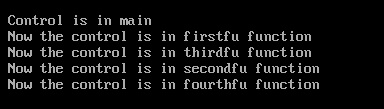
Suppose main() function calls another function msg(). When the control reach to the msg() function then the activity of main() will be suspended temporarily. After executing all the statements from the msg() function, the control will automatically goes to the original calling function (main() in our case).
Explanation
- The program starts with main() function and it will print the message inside it. After that I have called the firstfu() function from main(). Remember here main() is calling function and firstfu() is called function.
- Now the control reaches to firstfu() function and the activity of main() function is suspended temporarily. Inside firstfu() function, printf() will print a message. Now I have called thirdfu() function. Remember here firstfu() is calling function and thirdfu() is called function
- Now the control reaches to the thirdfu() function and the activity of firstfu() function is suspended temporarily. And it will execute its printf() function. Now I have called the secondfu() function.
- Same thing will happened to the secondfu() function and it will call the fourthfu() function.
- Now the printf() statement will be executed inside the fourthfu() function. As there is no further call to other function there. So the control will goes back to the calling function. Calling function of fourthfu() is secondfu().
- No more statements is left in secondfu(). So the control will reach to the calling function. thirdfu() is the calling function of secondf().
- Same execution will be done for all of them. And the control will reach to the main() function again. Now no statement is left in main() function, so the program will be terminated.
Points to Remember
1. Any C program contains at least one function and it should be main().
{
msg();
}
5. We can call one function any number of times.
void main()
{
msg();
msg();
}
6. A function can also called by itself. Such an execution is called recursion.
7. We cannot define one function inside another. We can only call one function from another.
Point of Sale System Project in VB Net
Also Read: Lab Login System Mini Project in VB.Net
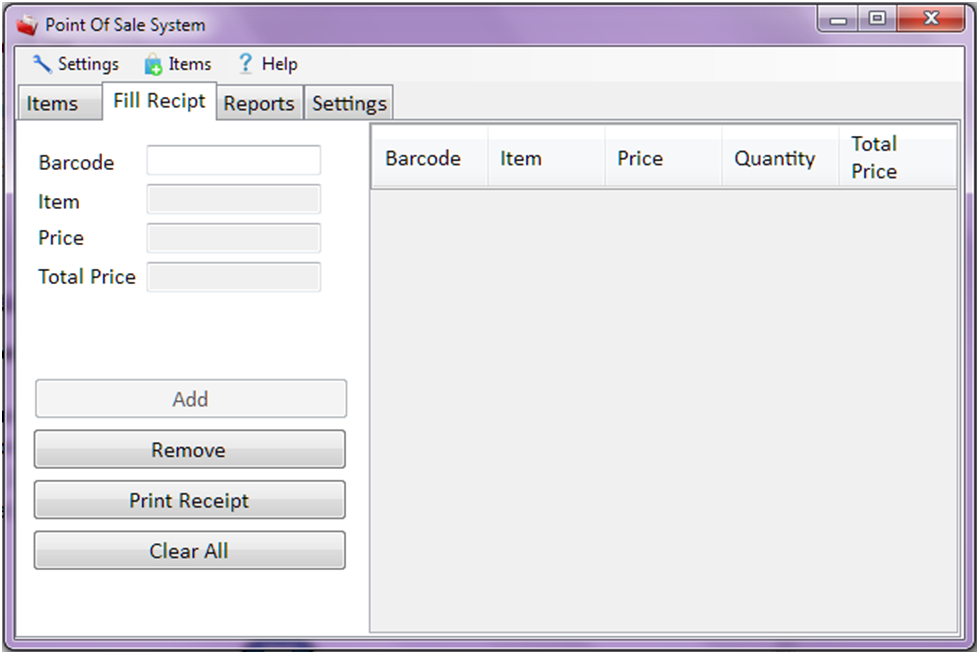
Details of Point of Sale System Project in VB.Net
Functions:
- Add an item
- Updates an item
- Removes an Item
- Add items to Receipt
- Generate Total Amount
- Print Receipts
- Generates Report
- Adjust Receipts settings (width, height)
- Adjust Printer settings
Programming Language used : VB.Net
How to Make a Tic Tac Toe Game in VB Net
Also Read: Working With Error Provider in VB.Net [Video Tutorial]
How to Make a Tic Tac Toe Game in VB.net
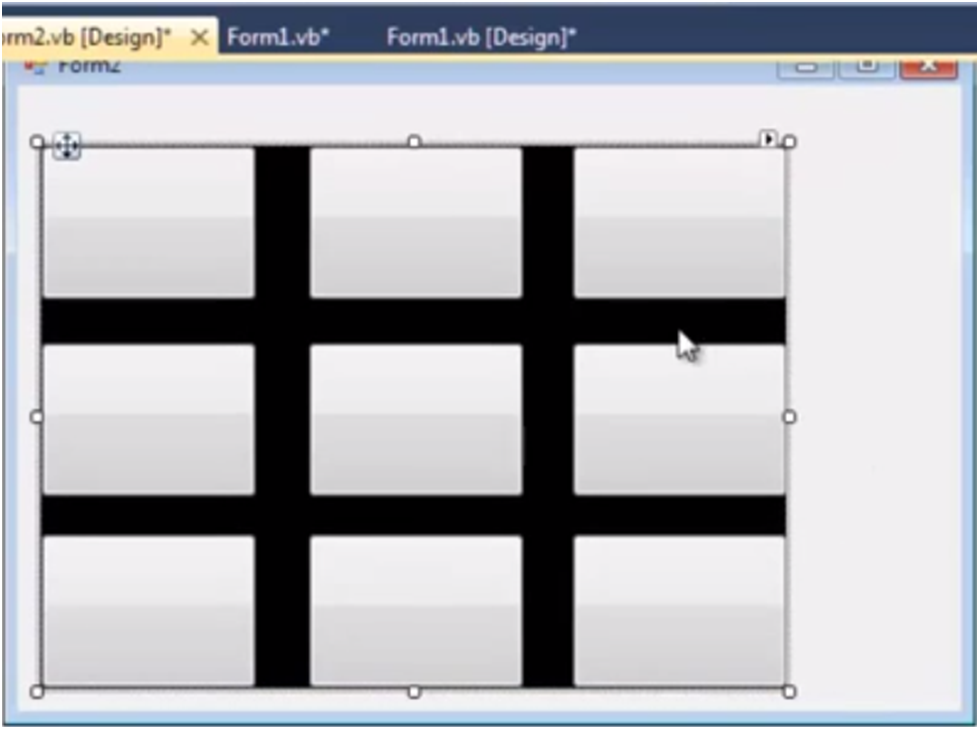
3. Add 6 buttons from toolbox on your windows form application and leave their text to blank as shown below.