Thursday, March 12, 2015
Au to do a sample application using Google Apps APIs in the cloud
One of the big focuses of this blog (and the team behind it) has been providing compelling examples of how integration with Google Apps APIs can make a product richer and more engaging. As a part of this effort, earlier today we announced Au-to-do, a sample application built using Google APIs.
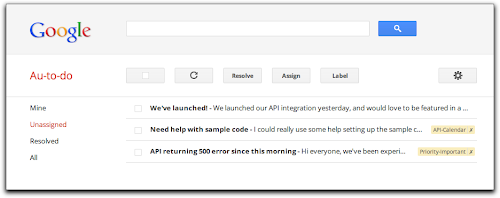
Au-to-do is a sample implementation of a ticket tracker, built using a combination of Google App Engine, Google Cloud Storage, and Google Prediction APIs.
In addition to providing a demonstration of the power of building on Google App Engine, Au-to-do also provides an example of improving the user experience by integrating with Google Apps. Users of Au-to-do can automatically have tasks created using the Google Tasks API whenever they are assigned a ticket. These tasks have a deep link back to the ticket in Au-to-do. This helps users maintain a single todo list, using a tool that’s already part of the Google Apps workflow.
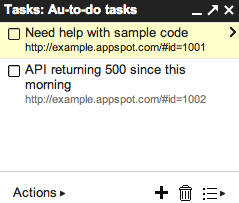
We’re going to continue work on Au-to-do, and provide additional integrations with Google Apps (and other Google APIs) in the following months.
To learn more, read the full announcement or jump right to the getting started guide.
 | Dan Holevoet profile Dan joined the Google Developer Relations team in 2007. When not playing Starcraft, he works on Google Apps, with a focus on the Calendar and Contacts APIs. Hes previously worked on iGoogle, OpenSocial, Gmail contextual gadgets, and the Google Apps Marketplace. |

Sunday, March 1, 2015
How do Students Use Technology

Via: OnlineEducation.net
Wednesday, February 18, 2015
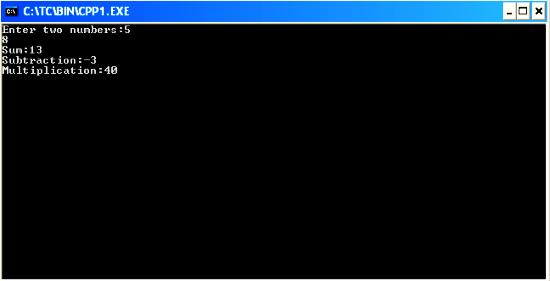
C Program to do Addition subtraction and multiplication of two numbers using function
#include<iostream.h>
#include<conio.h>
int res;
void main()
{
clrscr();
int sum(int,int);
int sub(int,int);
int mul(int,int);
int a,b,m,su,s;
cout<<"Enter two numbers:";
cin>>a>>b;
s=sum(a,b);
su=sub(a,b);
m=mul(a,b);
cout<<"Sum:"<<s<<"
Subtraction:"<<su<<"
Multiplication:"<<m;
getch();
}
sum(int a,int b)
{
res=a+b;
return(res);
}
sub(int a,int b)
{
res=a-b;
return(res);
}
mul(int a,int b)
{
res=a*b;
return(res);
}
Tuesday, February 17, 2015
do while loop in C
do while loop is just like a normal loop control instruction which executes a set of statements until the condition turns false.
do while loop in C
Till now we have learnt that loops checks the condition first before executing the set of statements inside its body. But this loop is a bit different than others. It is compulsory that the statements under the body of do while loop will get executed at least once in a program. This loop control instruction executes its statements first, after that it checks the condition for it.{
do this
and this atleast once!
}while(condition);
 |
| Flowchart of do while loop in C - Image Source |
Note: Remember writing semi colon after while keyword in do while loop. This is the most common mistake of a beginner C programmer.
Lets make one program to grasp this loop too.
#include<stdio.h>

void main()
{
	do
	{
		printf("OMG its working!");
	}while(7>10);
}
Output

Well it’s a very simple program to demonstrate the use of do while loops. As you can see the condition is wrong with while keyword. But still the printf() function will get executed once.
Usage of break and continue with do while loop
break: It will work similar to other loops. By introducing break keyword it will take control outside the loop. Remember it is not recommended to use break keyword inside loops without if statement.
continue: The functioning of continue will also work similar to other ones. However do while loop can make some good twist to the programs, if used properly with continue keyword.
This is the last loop control instruction of C programming. I recommend to try your hands on do while loops too. In the next tutorial I will tell you the best way to make Menu in C programming.